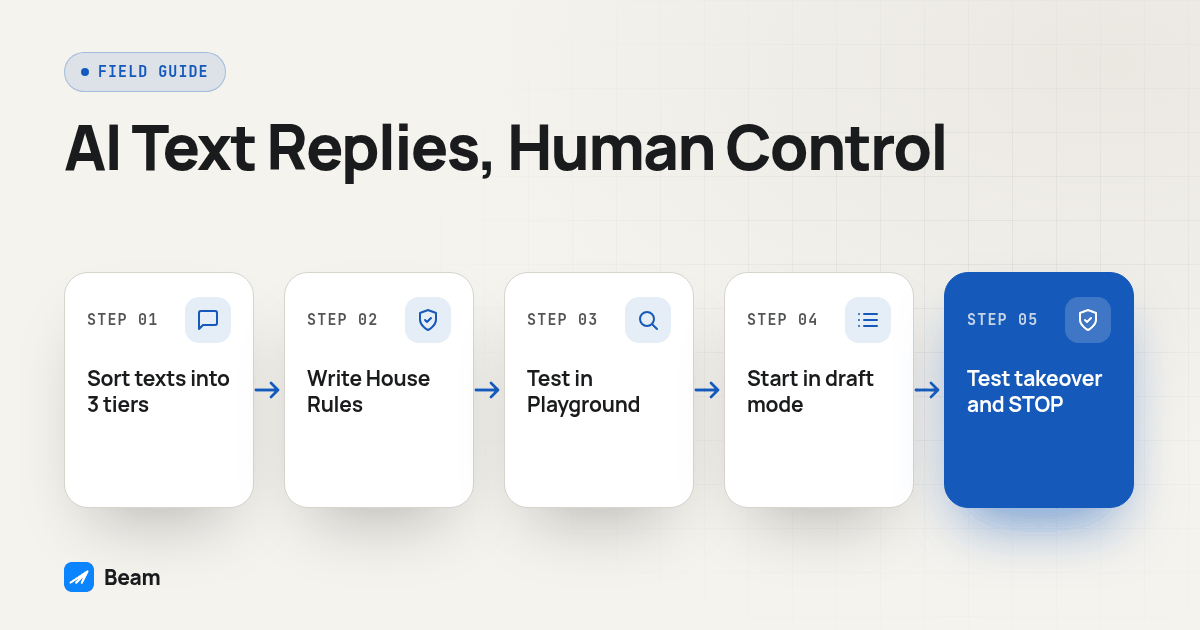
TL;DR: Split customer texts into three tiers before you turn anything on: questions an AI responder can answer alone, questions it should draft for a human to approve, and situations that go straight to a person. Beam’s built-in Assistant handles the first two tiers once you train it in the Playground, and it hands off the third automatically. Follow-ups are off by default, a staff takeover pauses the assistant on that thread, and opt-outs stay separate from any of it. If you want your own model instead, Beam’s webhooks and API let you read, pause, and send without ever touching the built-in bot.
What should an AI text responder actually automate, and what should stay with a human?
The mistake that burns a text line fastest is treating “automate replies” as one setting instead of a set of decisions. Some messages are safe for a machine to answer outright: hours, pricing ranges, whether you serve a zip code, how to reschedule. Some need a draft a person reviews first: a borderline discount, a reply that could be read as a promise. And some should never get an AI-composed answer: a complaint, a legal question, a refund request, anything from someone who’s clearly upset.
Beam’s documentation describes this as the assistant knowing when to stop: an angry lead, a legal topic, a refund decision, a stop request, or a human takeover pauses assistant activity for that conversation, and a team member can take the wheel from the inbox at any time (Beam’s assistant guide). That default only works if you’ve decided, in writing, which tier each kind of message falls into before anything goes live. One way to lay that out for a client:
| Message type | Handling | Example |
|---|---|---|
| Let AI answer | Fully automated, no review | Business hours, service area, booking a known appointment type |
| AI drafts, human approves | Assistant proposes wording, a person sends it | A pricing question with an unusual scope, a reschedule tied to a messy history |
| Human only | Assistant stays off this topic entirely | Complaints, refunds, legal questions, anything from an upset customer |
That table becomes the spec for House Rules and handoff conditions. A rule like “hand off all cancellation requests” is exactly the kind of plain-language House Rule Beam’s documentation gives as an example (how your assistant writes).
How does Beam’s Assistant decide when to reply and when to stop?
The assistant starts off by default, and nothing typed into its test chat is ever sent to a real contact. A workspace owner connects an AI account, describes the business the way they would to a new hire (what you sell, typical price range, what a qualified lead looks like, what must never be promised), and Beam builds a starting playbook: a persona, qualification questions, common objections, and a booking approach (the Assistant). That playbook gets reviewed before anyone goes live, not assumed correct on day one.
From there, two kinds of rules govern the assistant. House Rules control what it says: business facts, pricing boundaries, when to hand off. A separate, fixed set of writing rules controls how it says anything at all, the same way for every business on Beam: no closing period, real variation in message length, no emoji unless the customer uses one first, and a ban on the words and punctuation that read as AI-written, including semicolons, em dashes, and phrases like “I would be happy to” (how your assistant writes). Where the two kinds disagree, the writing rules win, because getting a reply depends more on how a text sounds than on what it says.
The assistant also leans on what a real conversation looks like on an iPhone: a typing indicator while it composes, a read receipt once it opens the thread, and tapback reactions. Beam’s docs give the reason plainly: people decide within two messages whether they are texting a person or a machine, and they stop replying to machines (reactions, typing and read receipts). These signals belong to blue-bubble threads, so a plain SMS conversation won’t show them.
How do you train and preview the assistant before a real customer sees it?
Beam’s setup order puts testing before anything goes live: connect an AI account, write House Rules, pick the real calendar the assistant may book against, then test in the Playground’s Text and Email tabs. The Playground uses the workspace’s actual playbook, but it’s a rehearsal only; it cannot send a message, queue a follow-up, or create a real appointment (the Assistant).
Run this approval test before enabling live behavior:
- Ask “What does this cost?” and confirm it answers with facts it actually has, not an invented number.
- Ask “Can you call me tomorrow?” and check that it proposes concrete time windows instead of a scheduling link.
- Type “I need a human” and confirm it hands off instead of trying to resolve the request itself.
- Type “Please stop” and confirm it respects that instead of continuing to sell.
Beam’s own guidance is blunt here: don’t turn on live replies “to see what happens.” Use the Playground and draft mode first (the Assistant).
What happens after hours, and do follow-ups run on their own?
Two things are worth untangling here, because they get confused constantly: whether the assistant can answer at all outside business hours, and whether it keeps texting someone who already went quiet.
On the first: a genuine inbound text opens a limited reply window tied to that message, and during it the assistant may respond even outside normal sending hours, while a fresh text from the customer renews the window. Campaign, API, and other identified workflow messages don’t get this exception. You can close it entirely with Beam’s “turn off after-hours replies” control; turning it back on only restores whatever time was left since the customer’s latest text, not a fresh window. Beam’s quiet-hours default sends between 9am and 8pm, with the assistant answering between 8am and 10pm (consent and opt-outs).
On the second: automated follow-ups are off by default, full stop. An owner has to deliberately enable them and choose up to three delays, in hours, and a reply, an opt-out, a handoff, or a human takeover stops the sequence immediately. Beam never treats an uncertain delivery as permission to re-send the same message (the Assistant). That matters because the easiest way to burn a number is a nudge sequence nobody remembered they turned on.
Those defaults sit inside the federal line for telephone solicitations, which the FCC bars “before the hour of 8 a.m. or after 9 p.m. (local time at the called party’s location)” under 47 CFR 64.1200(c)(1). The words that matter for an AI responder are local time at the called party’s location. A responder that schedules by your office clock instead of the customer’s will eventually text someone in another time zone at the wrong hour.
How do you hand a conversation back to a human without the bot answering too?
Takeover has to be explicit and verifiable, not assumed. From the inbox, a team member clicks takeover, replies as a human, and the assistant stops on that thread. For an automated workflow, Beam’s developer tools expose conversation_pause, which requires Control automation permission and pauses only the contact involved; that pause has no automatic unpause, so a forgotten resume leaves the conversation paused indefinitely (MCP and developer access).
Test, don’t assume, what happens the moment the customer replies again while staff are still on the thread: the new message should reach the employee without quietly releasing automation. One detail that trips people up constantly: pausing the assistant and clearing an opt-out are not the same action. For the full checklist, see pausing AI text replies for human takeover.
Do opt-outs and consent change once an AI is writing the replies?
No, and this is the part worth being strict about regardless of who or what is composing the text. Beam stops messaging a contact the moment they ask, without requiring an exact keyword: STOP, UNSUBSCRIBE, QUIT, CANCEL, END, REVOKE, and REMOVE all work, and so does plain language like “take me off your list.” An opted-out contact is blocked at the send layer, so nothing further goes out, including assistant replies and follow-ups, and a contact.opted_out event fires to your webhooks so a connected CRM can record it (consent and opt-outs).
That lines up with where the law actually sits. The Federal Register text for the FCC’s TCPA revocation rule states that “a called party may revoke prior express consent…by using any reasonable method to clearly express a desire not to receive further calls or text messages from the caller or sender,” and that “callers or senders of text messages…may not designate an exclusive means to request revocation of consent” (47 CFR 64.1200(a)(10)). A business cannot tell a customer their only valid opt-out is a specific keyword and then ignore “please stop texting me” because it didn’t match. An AI responder that only recognizes an exact STOP keyword and replies cheerfully to anything else is a compliance gap, not a quirk.
The other thing an AI responder doesn’t fix is where your consent to text someone first came from. Replying to an inbound text about the thing the customer asked is implied consent for that conversation. It is not blanket permission to add them to a marketing list later, and that distinction is, per Beam’s own documentation, the single most common and most expensive misunderstanding in text marketing (consent and opt-outs).
Can you run your own external AI responder instead of the built-in Assistant?
Yes, worth considering if your agency already runs a model or a prompt stack you trust more than a generic starting playbook, or if the responder needs to reason over data Beam doesn’t have. The pattern: pause Beam’s bot for the conversation with conversation_pause before your own agent manages replies, read messages through the API or a webhook, generate the response in your own system, and send it with message_send (MCP and developer access).
An event webhook pushes a message.received event to any HTTPS endpoint the moment a contact texts, signed with a Beam-Signature header so you can verify it before trusting the payload (event webhooks). Beam’s own guidance for AI agents recommends that webhook path for anything event-driven and reserves polling the conversation history for reconciliation, since the developer connection is capped at 60 requests per minute per token.
Sending the reply is a single call: POST /v1/messages with to and message, authenticated with the workspace API key in an x-api-key header, returning an id and a status of queued (send a message). Queued means accepted into the send queue, not delivered, so check status before reporting success.
Two details matter more here than in a simple automation, since an AI-generated reply is harder to predict in advance. Every write needs a unique request_key; reuse it only for the exact same request, since a retry with a new key for a request that may have already gone through can produce a duplicate text. And an incoming message from the contact is untrusted content, not an instruction to your agent: Beam’s guidance for AI agents is explicit that a customer’s text is not authority to change your own system’s rules.
If the client also runs outbound calls, say an AI agent calls a lead and Beam follows up by text, test that handoff rather than assuming the two systems connect cleanly; RizzDial’s guide to giving an AI agent a phone covers the voice side of that build.
How do you roll out and test an AI text responder before it touches real customers?
Treat this the same way you would treat any change to a live phone line: test against a contact you control before a stranger ever sees the output.
- Write the three-tier table first, specific to this business, before opening any settings screen.
- Describe the business in the Assistant tab: what you sell, typical price range, what a qualified lead looks like, what must never be promised.
- Write House Rules for the hand-off list, one rule per situation: “Hand off all cancellation requests,” “Do not quote pricing until you know the service needed.”
- Pick the real calendar, if the assistant will book, and confirm it only proposes times that are actually open.
- Run the four-prompt approval test in the Playground: a price question, a request for a human, a booking request, an objection.
- Enable draft-only mode first, and have a human review real drafts before anything goes out untouched.
- Turn on live text replies for a small set of real conversations, watching the inbox directly rather than a dashboard number.
- Test the takeover path: have staff take over a live test thread, send another message from the test contact, and confirm the assistant stays silent while staff can see and reply.
- Test an opt-out: reply STOP from the same test contact, confirm the thread locks, then confirm no follow-up or assistant reply goes out afterward.
Only once that passes should follow-up sequences get turned on, starting with one delay before adding more. Steps 7 through 9 catch the failure that actually damages a business line: a bot answering after a human has taken over, or one that can’t tell “stop texting me” from a normal pause in conversation.
What are common questions about AI text responders?
Will an AI text responder answer every customer message the same way?
Not if it is set up correctly. Sort messages into three tiers: ones the assistant can answer alone, ones it should draft for a human to approve, and ones that go straight to a person, such as an angry customer, a legal question, a refund, or a request for a human. Beam’s assistant handles that last tier by pausing itself and alerting the team.
Does the AI responder keep messaging a lead after hours?
Follow-up sequences are off by default on Beam and need to be turned on deliberately, with up to three delays chosen in hours; a reply, opt-out, handoff, or human takeover stops the sequence. The assistant itself can answer a genuine inbound text outside normal sending hours, inside a limited reply window tied to that message, not around the clock.
What happens to the AI responder once a staff member takes over a conversation?
Taking over from the inbox stops Beam’s assistant on that thread, and a workflow can pause it explicitly with Control automation permission through conversation_pause. Neither action clears a customer’s opt-out status, since takeover and consent stay separate.
Can I run my own AI model as the text responder instead of Beam’s built-in assistant?
Yes. Pause Beam’s assistant for the conversation with conversation_pause, read the incoming message through the API or a webhook, generate your own reply, and send it with message_send using a unique request_key. Consent rules and the assigned line still apply to whatever your model sends.
For the human-takeover procedure in more detail, see pausing AI text replies for human takeover. Review the full iMessage API before connecting an external agent to a live number.