A2P registration friction
Campaign reviews and registration questions can complicate client onboarding. Know which channel you are sending through before you launch.
Built for GoHighLevel agencies
iMessage for GoHighLevel, RCS for supported Android phones, and SMS fallback. One messaging setup for your agency’s clients.
iMessage and FaceTime Audio run outside carrier A2P 10DLC. SMS fallback remains subject to applicable carrier A2P requirements.
For agencies and resellers
Text on behalf of clients while keeping their inboxes, numbers, teams and CRM connections separate. Each Beam client workspace maps to one verified GoHighLevel location.
Build your client messaging service around dedicated business identities and a shared team inbox.
Explore client workspaces ↗The agency headache
Campaign reviews and registration questions can complicate client onboarding. Know which channel you are sending through before you launch.
Clients want conversations that feel familiar. Reach eligible iPhones with blue-bubble iMessage instead of relying only on SMS.
A sent request is not a delivered message. Keep consent, channel requirements and delivery status part of every client’s workflow.
How Beam works with GHL
Beam sends from Apple and Android devices. It selects iMessage when the recipient and line support it, RCS for supported Android phones, and SMS fallback otherwise.
Channel routing ↗Beam is an additional GHL inbox channel. Workflow sends use a Custom Webhook, not the native Send SMS action. Webhooks and MCP connect your other automations and authorized AI agents.
MCP and developer access ↗Use FaceTime Audio from iPhone numbers. Beam also works alongside Voice AI for text follow-up after calls and handing a text conversation back to a call.
Call and text routing ↗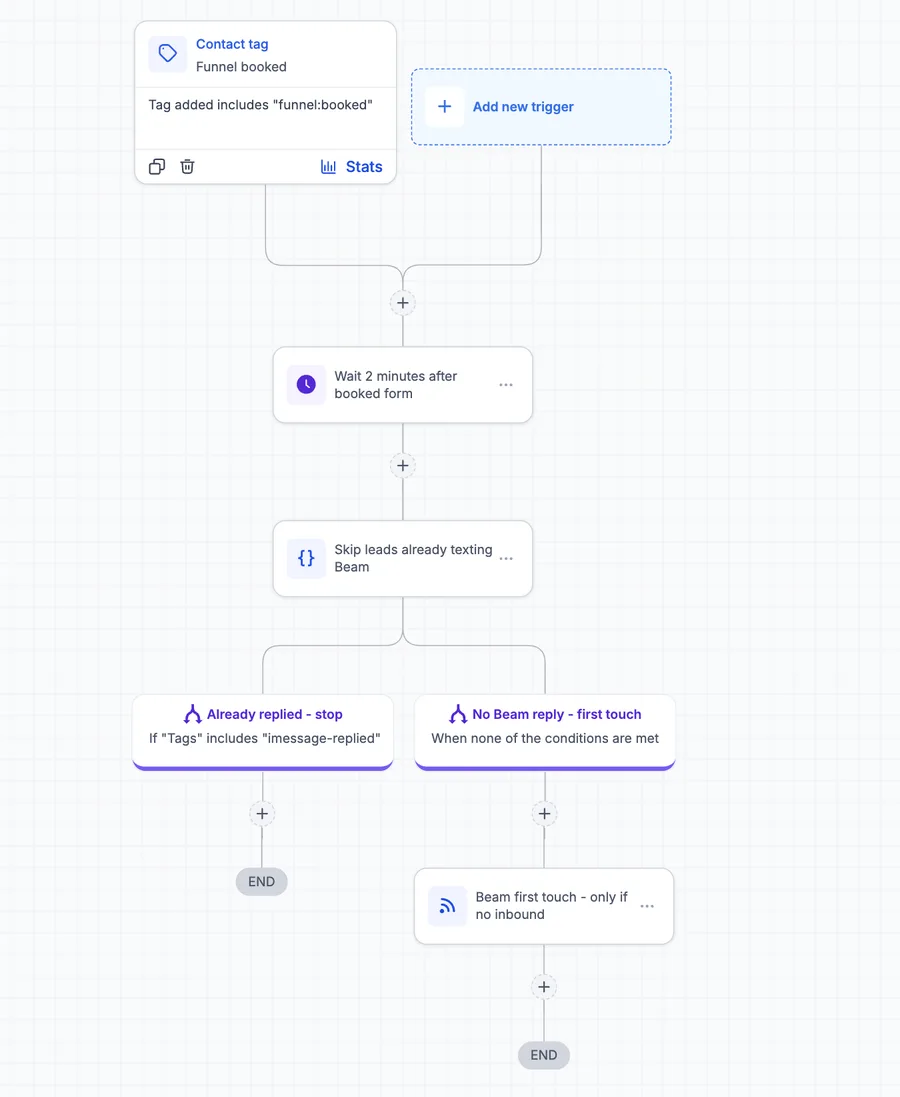 Tap to enlarge
 Get connected
Create a restricted GHL credential with the contact and calendar permissions Beam needs. Enter it in Beam Settings. Beam verifies the live account before showing Connected.
Use a Custom Webhook with POST to Beam’s workflow endpoint. Include the workspace token and documented body fields. Beam retrieves the destination from the GHL contact in the connected location.
Run your own test contact with dry_run set to true. After validation, set it to false for that contact. Check the message status: queued means accepted, not delivered.
Full Custom Webhook setup ↗Deep dive: GHL iMessage integration ↗
Connect a Beam workspace to a verified GoHighLevel location using a restricted credential in Beam Settings. Beam appears as an additional inbox channel. For workflow sends, use a Custom Webhook pointed at Beam’s workflow endpoint. GHL’s regular Send SMS action keeps using your default SMS provider. Validate with your own test contact before sending.
Read the detailed iMessage setup ↗Beam sends from real Apple and Android devices, using iMessage for eligible iPhones and RCS for supported Android phones. iMessage and FaceTime Audio run outside carrier A2P 10DLC. Registration depends on the channel and number type: SMS fallback remains subject to applicable carrier A2P requirements. Confirm requirements for your assigned lines, and keep consent and opt-out records.
Check line and channel requirements ↗Beam supports separate client and reseller workspaces, each with its own inbox, numbers, assistant, team, CRM connection and API key. One Beam client workspace maps to one verified GoHighLevel location. Keep each client’s connection separate, and review the reseller billing documentation before collecting live payments through a connected payment account.
RCS is used when the Android recipient’s phone and carrier support it. Otherwise, Beam falls back to SMS where your assigned line can reach the recipient. Your team can manage these conversations in one messaging setup. Check pending, delivered and failed states in the CRM: a queued message has been accepted, but is not yet proof of delivery.
Beam connects as an additional inbox channel, so your existing phone workflows stay separate. Keep your GHL triggers, delays and conditions, then use a Custom Webhook for the Beam send step. Do not change your default SMS provider to force the integration. A selectable Marketplace send action should not be assumed available.
Beam provides developer access through its API, MCP and documented events. An authorized agent can work with conversations and send through Beam within its permissions. If an external text agent takes over a conversation, pause Beam’s bot first. Keep the workspace connection private and check message status after a send is accepted.
Beam supports FaceTime Audio from iPhone numbers and works alongside Voice AI for follow-up texts after calls. A text conversation can also hand back to a call. FaceTime recipients must be reachable on that channel, and their call settings still apply. Coordinate the workflow and test the handoff before using it with clients.
Beam paces new outbound-first conversations to protect line health. Replies inside an active thread and conversations that contacts start are handled differently. Sending remains subject to pacing, plan capacity and carrier limits. Match your assigned capacity to your client’s audience and volume, and retain marketing consent rather than treating the integration as a bulk-blast tool.
An uncertain delivery is not automatically sent again or switched to SMS. SMS fallback after a confirmed failed iMessage is a workspace setting. Check the message’s recorded status before deciding what to do next. For workflow retries, reuse the same request key for the same intended message so a retry does not create a second text.
Start with a conversation
Tell us about your GoHighLevel setup. Explore iMessage, RCS and SMS for your client workspaces with our team.
Live sending requires a plan and an assigned dedicated line.
iMessage
Today 9:41 AM
Hi! I would love to hear how your coaching works.
Happy to chat. Would Thursday work for a discovery call?
Thursday sounds great! Looking forward to meeting you.
Blue bubbles. Read receipts. Typing.
Try a conversation with the Beam team.