Your Beam guide
Beam Docs
Your CRM.
Your AI.
Now in blue.
Dedicated iMessage lines for your business. Connect your GoHighLevel workspace, let your text assistant handle the conversation, and turn the next reply into the next appointment.
iMessage on supported lines and devices. SMS where configured. One workspace for your team.
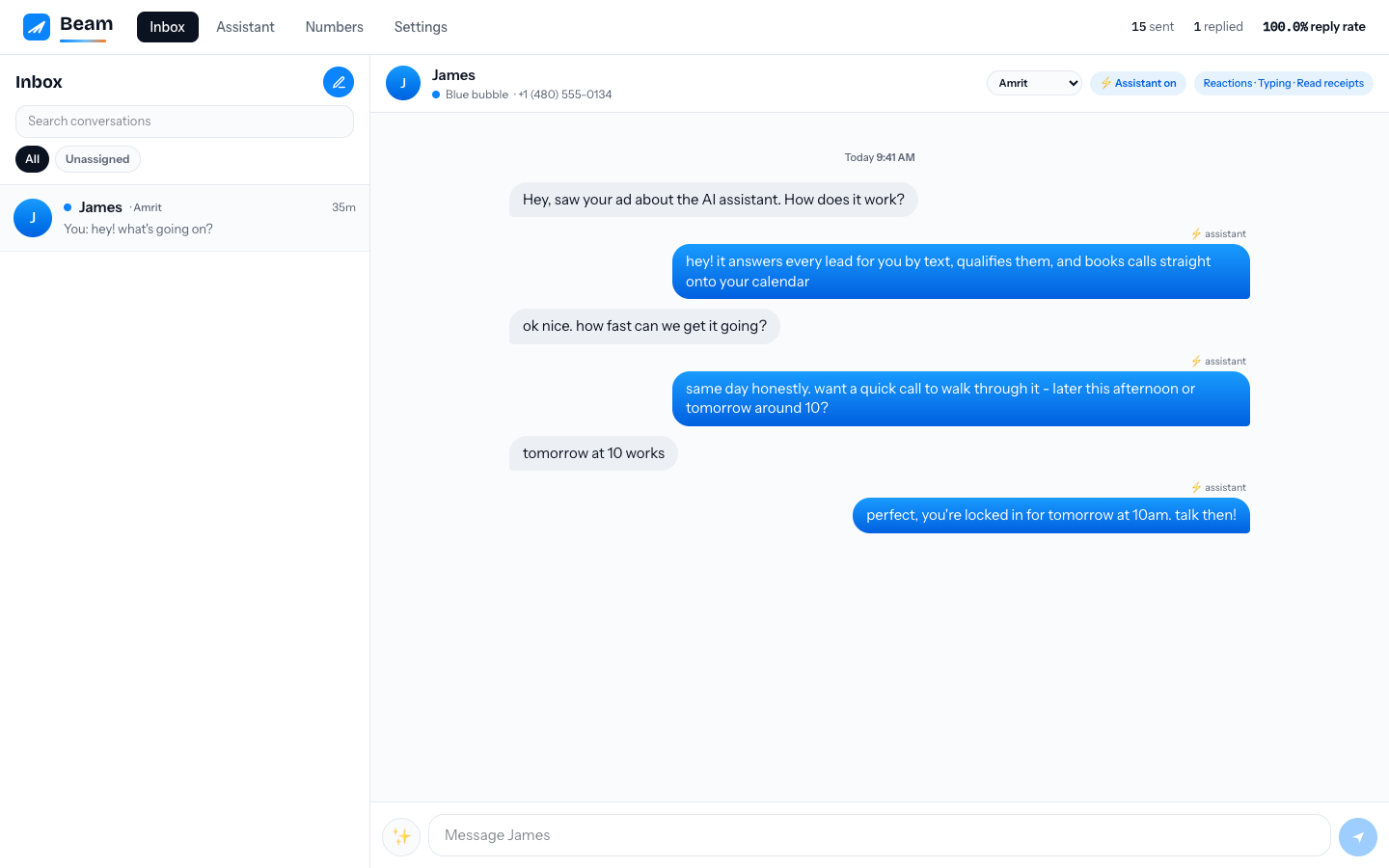
From “just looking”
to “see you Tuesday.”
Your leads already live in their messages. Meet them there with a recognizable business number, useful answers and a clear next step. Keep your team in control when the conversation needs a human.
Illustrative conversation, not a customer result. Reply and conversion rates depend on your audience, consent, offer and follow-up.
Hey, can I ask a few questions before booking?
Of course. What would you like to know?
Do you have anything Tuesday afternoon?
There’s a 2:30 opening. Would that work for you?
Perfect, let’s do it. ♥
A business line.
A more personal conversation.
Bring familiar messaging features into your sales workflow, with visibility for the people responsible for the relationship.
Dedicated iMessage lines
A consistent business number for supported iMessage conversations, separate from your team’s personal phones.
Read receipts
See available read signals and configure outgoing receipts. Receipt availability depends on channel and recipient settings.
Client reactions
See supported reactions on messages. A reaction alone does not instruct the assistant to send another reply.
Human takeover
Let your team take over a conversation, review the history and keep the relationship moving.
GoHighLevel, meet Beam.
Connect your client’s GHL location to bring messaging into its CRM workflow. Use the connected calendar for availability and booking, while Beam manages the messaging workspace.
Building on another CRM? Use Beam’s API and documented events to build your integration. Direct setup and supported capabilities vary by CRM.
Explore the API and MCP guide →Train the answers.
Keep your personality.
Configure your business knowledge, tone and qualification rules. Preview replies before publishing. Use AI-assisted text conversations across your configured messaging channels, including SMS.
Teach
Give your assistant the business context and boundaries that make an answer useful.
Rehearse
Test sample conversations in preview without messaging customers or creating bookings.
Approve
Publish approved instructions and let your team step in when needed.
Send inbound calls
to the right place.
Configure an inbound phone destination or supported AI receptionist endpoint for your line. Route callers to your GHL number or your existing agent setup, then verify the route with a live test call.
Explore line setup →One configured destination. A clear handoff.
Don’t stop at the settings screen.
Connect Claude Code, Codex or Cursor through MCP. Review conversations, improve assistant instructions, preview drafts and approve live actions. Or build your own workflow with the API.
Each connection is scoped to one workspace. Agencies create separate connections for each client. Sending, publishing and booking require explicit permissions. Supported bearer-token and desktop connections are documented; OAuth-only hosted connectors are not supported yet.
Build on Beam →Android leads count, too.
Scale the follow-up, not the busywork.
Use dedicated SMS lines to reach Android customers and other SMS recipients. Connect your CRM or API workflows to send personalized, consent-based follow-up, then manage replies with your team and AI assistant.
Green-bubble SMS
Keep SMS conversations alongside supported iMessage conversations in one workspace. Channel availability depends on your assigned lines.
Capacity for your workflow
Size your line capacity around your audience and sending volume. Sending remains subject to pacing, plan capacity and carrier limits, not unlimited instant blasting.
Registration depends on the channel and number type. Do not assume SMS traffic is exempt from A2P registration or verification. Confirm requirements for your assigned lines before launching a campaign. Marketing consent and opt-out requirements still apply.
Reach iPhone and Android customers from one managed inbox.
You choose the messaging capacity your team needs. Beam uses blue-bubble messaging when supported and standard text everywhere else, while every reply stays in the same workspace.
Send through the right available channel.
Beam handles the technical line mix for you: blue-bubble messaging when supported, standard text otherwise, with one shared conversation record.
See how messaging works →Keep every response in one place.
Your team sees the customer, conversation, delivery state, owner, assistant activity, and next step without managing separate messaging systems.
Explore the inbox →Continue one-to-one conversations on a verified domain.
Send and receive threaded email, share drafts and notes, and keep delivery health visible without giving clients provider credentials.
Set up Beam Email →From account to active line in three clear steps.
You do not have to configure everything before you see the product. Build the workspace first, then activate only when the plan and number are right.
Create your workspace
Use your work email and business name. Beam opens a private preview with safe sample data. Nothing sends.
Create preview →Explore the operating system
Try the inbox, see AI-to-human handoff, connect your CRM, and set your area-code preferences.
Take the product tour →Select your plan and activate
In Billing, select the currently published Starter, Team, or Scale plan. Payment creates a tracked request; a dedicated line is assigned before sending unlocks.
See activation rules →Not another campaign tool. The system behind the reply.
Beam keeps each relationship in one thread while your team, assistant, CRM, and calendar work from the same recorded context.
See the message routing map →Lead-to-inbox continuity
Use dedicated business numbers so the conversation stays recognizable when a lead replies.
AI that knows when to hand off
Let the assistant qualify and book, while your team can take control at any time.
Operational reporting
Read recorded delivery, reply, pacing, and appointment signals, not invented opens.
Built with guardrails
New outbound-first conversations are paced; active replies keep moving normally.
Ask Claude or Codex exactly how to build your next workflow.
Every docs page prepares a prompt grounded in Beam's full documentation and API contract. It deliberately excludes account access, client records, and credentials.
Open a workspace. See the difference before you commit.
Create a private preview, then choose the plan and capacity that matches your real sales motion.
Create your free preview →