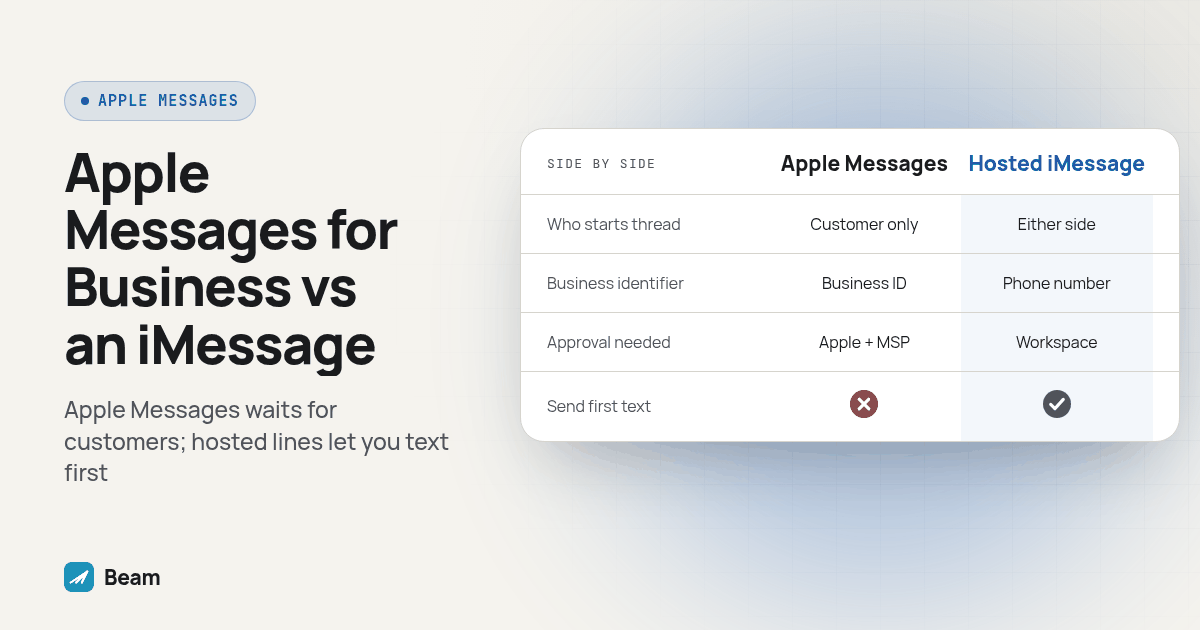
TL;DR: Apple Messages for Business (Business Chat) is Apple’s own registered program: the customer has to start the conversation through an Apple-approved entry point, and your business is identified by an Apple-issued Business ID instead of a phone number. A hosted iMessage business line, the kind Beam sets up for agencies, runs on a real phone number, shows up as a normal thread, and lets your team text first. Pick Business Chat for customer-initiated support and commerce chats from your site or app, and a hosted line for reminders, follow-up, and anything where you need to speak first.
Apple runs two very different things under the Messages umbrella for businesses, and mixing them up leads to the wrong project plan. Apple Messages for Business is a registered program where the customer always opens the thread. A hosted iMessage business line is a phone number your team controls and can text from first. The difference changes what you build, who has to approve it, and whether your next appointment reminder can even go out.
This question comes up most often from agencies setting up a hosted iMessage business line who assumed Apple’s own program was the only path, or the faster one. It isn’t automatically either. Our deeper breakdown of where each one fits your customer journey covers the registration side in more detail; this piece focuses on the specific question that comes up on a sales call: which one actually lets you send the first text.
What is Apple Messages for Business (Business Chat)?
Apple Messages for Business, often called Business Chat, is Apple’s registered program for a company to send and receive messages inside the Messages app. According to Apple’s program FAQ, a business is identified by a Business ID assigned during registration, not a phone number, and only approved, registered businesses can receive messages through the program at all. Getting approved means applying through Apple Business Register and working with an Apple-approved Messaging Service Provider; Apple does not let a company connect directly without one standing in between.
The customer side works through specific entry points, not a phone number lookup. Apple Support’s overview lists Maps, Safari, Siri and Search alongside a participating business’s own website or app as the ways a customer finds the Message option and opens a thread. Apple’s program FAQ adds more entry points on the business side: a website button, a mobile app, email marketing, a QR code, an NFC tag, a Wallet pass and Message Suggest tied to a registered phone number. Every one of those still depends on the customer choosing to tap something. The business cannot start the thread from its side, no matter which entry point it builds.
What is a hosted iMessage business line, and how is it different?
A hosted iMessage business line, the kind Beam sets up for agencies and GoHighLevel resellers, is shaped the opposite way. Beam’s iMessage for business page describes a dedicated business number that sends iMessage to eligible iPhones, RCS to supported Android phones, and SMS as a fallback for everyone else, all from a number your team actually controls. There is no Business ID to apply for and no customer-facing entry point to design, because the line behaves like any other business phone number sitting in the recipient’s contacts.
The practical difference shows up the first time you need to reach out instead of waiting for someone to reach you. Beam’s iMessage API lets a workflow send a message through a server-side request and read delivery and reply events back, which is what makes outbound reminders, confirmations and follow-up possible in the first place. Apple’s own program has no equivalent outbound-first path, because the entire design of Business Chat assumes the customer opens the door.
Which one lets your business send the first message?
Only one of these two ever lets the business speak first, and it is not Apple’s own program. Apple’s program FAQ states plainly that customers initiate a conversation by tapping a Messages button or another approved entry point; nothing in the documentation describes a business-initiated Business Chat message. That is a deliberate design choice, not a missing feature. Apple built the program around support and purchase conversations a customer chooses to start, not outbound campaigns.
A hosted iMessage business line flips that around. Because the number belongs to your account and behaves like a normal phone number, your team, or a GoHighLevel workflow, can text a contact who has never messaged you before, the same way you would send any other first-touch text. That is the entire reason a clinic can text an appointment confirmation, or a mortgage team can send a document reminder, without waiting for the client to open a thread first. If your business depends on sending the first message, a hosted line is the one of the two that actually does that job.
That one fact decides more of this choice than anything else on this page.
How do the two compare side by side?
| What matters | Apple Messages for Business | A hosted iMessage business line |
|---|---|---|
| Who can start the thread | Customer only | Either side; your team can text first |
| What identifies your business | An Apple-issued Business ID | A real phone number |
| What identifies the customer | A per-relationship Opaque ID, not their phone number | Their own phone number, as usual |
| How a customer reaches you | An Apple-approved entry point: your website, app, a Maps listing, a QR code, an NFC tag, a Wallet pass or Message Suggest | Texting your number directly, or replying to a text you sent |
| Approval needed before launch | Apple Business Register approval plus an Apple-approved Messaging Service Provider | A connected workspace and an assigned business line; no Apple program enrollment |
| Fits when | A customer wants support or to buy something inside Messages, starting from your site or app | You need to confirm, remind, follow up or reply, and may need to speak first |
Both channels can land inside the same CRM once a message exists, but only the hosted line gives you two way sync built around your CRM’s own workflow triggers for messages your team initiated. A Business Chat message still has to flow back through the Messaging Service Provider’s own integration, which is a separate project from a GoHighLevel webhook.
How does Apple keep a Business Chat conversation private?
Apple’s security documentation describes end-to-end encryption between the customer’s device and Apple’s own servers, then a TLS connection carrying the message on to the business. Apple’s security guide states that messages are never stored unencrypted while in transit through the service. Apple’s servers decrypt a message in memory only long enough to forward it over that encrypted connection to the Messaging Service Provider, and an undelivered message is cached in encrypted form for up to 30 days before it is automatically deleted.
The business never sees the customer’s real phone number, email address or Apple Account details under this design; it only receives the Opaque ID tied to that one relationship, per the same security guide. That is a meaningfully different privacy model from a hosted iMessage business line, where the recipient’s real phone number is exactly what your CRM needs to match the conversation to the right contact record. Neither design is more secure in the abstract. One builds an anonymized support channel; the other builds a CRM-linked business relationship, and each trades privacy and reach differently.
How do you set up and test a hosted iMessage business line before you rely on it?
Apple Messages for Business has its own onboarding path through an approved Messaging Service Provider, and that provider sets the pace. A hosted iMessage business line is the piece you control end to end, so test it properly before a real contact ever gets a message from it. Here is the procedure to run before turning on outbound sending for a new account:
- Activate the workspace and confirm the assigned business line is a real, dedicated number, not shared with another client or campaign.
- Connect the right GoHighLevel location, or your CRM, and give the team members who will answer replies actual access to the shared inbox.
- Send a first outbound text to a phone you control and confirm it lands as a normal iMessage, not as SMS, before testing anything else.
- Reply from that test phone and confirm the reply shows up against the correct contact record, not a generic or duplicate one.
- Trigger a real workflow send through the documented Custom Webhook action and confirm it fires correctly before pointing it at a live contact list.
- Text a number you know does not support iMessage and confirm the message falls back to SMS the way your account is configured to handle it.
- Record a test opt-out and confirm the STOP path is honored immediately and logged, using the same consent and opt-out standard you would apply to any other channel.
- Only after every one of those checks passes, open the line to your actual contact list.
Diagram: a two column checklist graphic. Left column, “Apple Messages for Business setup,” showing registration, Messaging Service Provider approval and an entry point going live. Right column, “Hosted iMessage business line setup,” showing workspace activation, a test send, a test reply and a test opt-out, with a checkmark next to each completed step.
Can a business run both at the same time?
Yes, and plenty of businesses eventually want both. Nothing about registering for Apple Messages for Business blocks a hosted iMessage business line from also being active, and nothing about a hosted line requires giving up a Business Chat entry point you have already built. The two can sit side by side once your team is clear on which job each one does.
A common pairing looks like this: keep an Apple Messages for Business entry point live on the website for customers who want to ask a question or buy something inside Messages, and use a hosted iMessage business line for every message your team needs to send first, confirmations, reminders, and follow-up after a missed call. Agencies that already connect GoHighLevel to a voice stack tend to want that same webhook-first approach on the texting side too; see how RizzDial’s own integrations are built around that pattern if you are wiring up both channels for a client at once.
What do agencies ask before picking one?
Can our business send the first message with Apple Messages for Business, or does the customer have to start every conversation?
No. Apple’s own documentation says customers initiate every Apple Messages for Business conversation by tapping a Messages button or using an approved entry point; the business cannot open the thread first. A hosted iMessage business line works the other way: your team can text first, the same way you would from any other number.
Does Apple Messages for Business use our regular business phone number?
No. Apple identifies the business with a Business ID assigned during registration, not a phone number, and identifies the customer with a per-relationship Opaque ID instead of their real phone number. A hosted iMessage business line runs on an actual phone number that shows up the way any other business line would.
How long does it take to set up Apple Messages for Business compared with a hosted iMessage business line?
Apple Messages for Business requires registration and approval through Apple Business Register plus an Apple-approved Messaging Service Provider before a single message can go out, and timing depends on that provider and your own entry points. Beam does not publish a fixed setup time here either, since it depends on your CRM, your workflow triggers and how many test contacts it takes to confirm delivery; text our team with your setup and we will scope it with you.
Can a business run Apple Messages for Business and a hosted iMessage business line at the same time?
Yes. They solve different problems and nothing about either one blocks the other. A company can keep an Apple Messages for Business entry point live on its website for customer-initiated support chats while using a hosted iMessage business line for appointment reminders, follow-up and any text where the business needs to speak first.
What happens when a customer wants to stop receiving messages on either channel?
On Apple Messages for Business, the customer deletes the conversation and chooses to leave it, which stops the business from sending further messages or alerts. On a hosted iMessage business line, a STOP reply or an opt-out request should be honored immediately and logged the same way you would log any other opt-out; test that path before you send real volume.
Pick based on who needs to speak first, not on which program sounds more official. If outbound reminders, confirmations or follow-up are the job, text our team to try it on a number you control before you point a hosted iMessage business line at a real contact list.