Can you check whether a number has iMessage before sending a business text?
Not with a permanent, public Apple lookup. The useful answer is narrower: a device or messaging integration may check a recipient’s current capability when a conversation is composed or a message is routed, but that check does not guarantee delivery later. The recipient’s device and settings can change, and the selected business line must support the route too. For a reliable workflow, check the actual message route and status, then verify receipt on a test phone you control.
That distinction matters when an agency builds a first-touch sequence. A list-cleaning step can help teams decide what to expect, but it cannot replace a controlled send test or turn a changing device state into a promise. Beam’s routing documentation describes a capability check alongside selected-line support. Its iMessage API guide documents sending and checking message records, which is the practical path for an integration that needs to act on a real send rather than a guess made days earlier.
What does an iMessage availability check actually tell you?
An availability check is a signal that a recipient may be reachable through iMessage at the time the check runs. Apple’s Messages support page explains the visible distinction between iMessage and SMS or MMS, including the familiar blue and green message bubbles. It is useful context for the person using an iPhone, but it is not a business-facing directory service or a service-level promise for a future send.
Keep four ideas separate when reviewing a check:
- Recipient capability: whether the number or address appears reachable through a channel at the moment of the check.
- Sender capability: whether the selected line or device can use that channel for this conversation.
- Message state: what happened after the integration attempted to send, such as queued, sent, delivered, or failed.
- Human response: whether the recipient read, replied, clicked, or took another action.
These are related but not interchangeable. A blue compose state is not a delivery receipt. A message marked queued is not necessarily sent. A delivered message does not prove it was read, and a reply is a separate event again. If a report collapses these states into a single green checkmark, it can make a workflow look more certain than the underlying evidence supports.
Why is there no guaranteed public lookup for every number?
Apple documents how Messages behaves for users, but does not document a general public endpoint for businesses to query whether any arbitrary number is registered for iMessage. A third-party checker therefore needs to use a method it controls and explain what the result means. The result may be based on a device interaction, an integration’s own capability response, or another signal. It is not an official Apple guarantee unless Apple publishes and supports such a product.
Security researchers have also examined the privacy implications of identifying whether a number can receive iMessage. Hexordia’s research on iMessage lookup describes lookup approaches and the information they may reveal. That context is one reason to be cautious about uploading an entire contact list to an unfamiliar checker. Before using one, review what contact data it receives, whether it stores or reuses the data, how it secures access, and whether the account owner has permission to process the list.
If a vendor says a check is “accurate,” ask what it checked, when the result was generated, and whether it evaluates the recipient alone or the sending line too. Ask whether the result can go stale and what it does when the lookup is inconclusive. These questions are more useful than a broad accuracy label because they reveal what action your workflow can safely take from the response.
How do public checker products compare with checking at send time?
The right choice depends on whether a team needs list preparation or a decision attached to a real send. Public product documentation describes different workflows. Blooio describes a contact capabilities endpoint, while Tuco AI describes a hosted checker and list-oriented workflows. Beam documents capability and line checks in message routing. The table summarizes their publicly described shapes; it does not make a claim about accuracy, uptime, or outcomes.
| Approach | Publicly described workflow | Useful question before relying on it |
|---|---|---|
| Blooio capability endpoint | Its iMessage checker guide describes a contact capabilities endpoint with channel flags and a check timestamp. | How recent is the saved result when the send occurs, and what happens if the result is missing or old? |
| Tuco AI hosted checker | Its checker page describes single and bulk lookup options and workflow connections. | Does the response include enough context to interpret an inconclusive result, and how does contact data move through the service? |
| Beam send routing | Beam’s routing documentation says it checks recipient capability and selected-line support before choosing a channel. | What channel and message status did the actual send return, and was receipt confirmed on a controlled device? |
These are different operational patterns, not a measured head-to-head performance test. A separate checker can help prepare a list, but its timestamp, exceptions, and data handling must fit the workflow. A send-time check still needs a result review. Choose the method that gives the team enough evidence without exposing unnecessary contact data.
What happens when Beam checks a recipient during routing?
Beam’s documentation says that outbound routing checks recipient capability and selected-line support, selects an appropriate assigned line, then applies its pacing rules. The channel depends on the recipient and the line: eligible iPhones can use iMessage on a capable line, supported Android phone and carrier combinations can use RCS, and SMS is used for other reachable recipients where the line can reach them. SMS remains subject to applicable carrier requirements.
This routing flow is not the same as promising that every contact has iMessage. It means the sending process considers the available route for the message being sent. If a number does not appear eligible for iMessage, the workflow should still check what channel was selected and whether the message was delivered. If no available line can reach the recipient, the integration should surface the relevant no-channel or failure state rather than prompting an operator to claim a successful conversation.
Beam’s GoHighLevel workflow guide explains that the Custom Webhook path is used to send through Beam. The ordinary Send SMS action continues through the default SMS provider, so swapping actions without checking the workflow path can result in a test that never exercises Beam’s routing. This is why the test needs to use the same configured action that the client workflow will use.
How should you read a capability result and a message status?
Treat a capability result as route information and a message status as send evidence. Beam’s message status documentation distinguishes queued, sent, delivered, failed, and other recorded states. Queued means the request was accepted into the pacing queue. Sent means the message was handed to the network. Delivered is the state that confirms delivery. Do not present queued or sent as proof that a phone received the message.
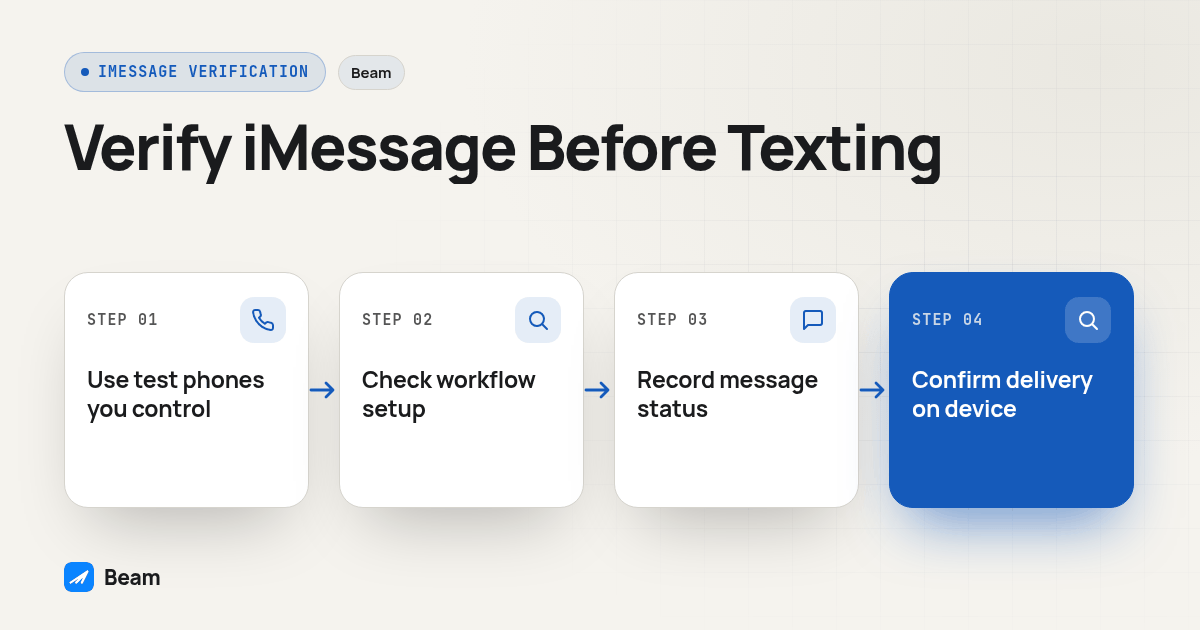
For each test, record the selected line, recipient device type, expected route, channel shown in the available record, and message status. Then confirm the content arrived on the device. This gives the team a small evidence trail it can use to diagnose a mismatch without inferring a route from bubble color, a carrier name, or a workflow success toast alone.
If an iMessage attempt has a confirmed failure, a configured fallback policy may affect what happens next. Beam describes confirmed failed-message fallback as a workspace setting. An uncertain delivery state should not be treated as a confirmed failure. Do not build a retry around the assumption that an ambiguous status automatically becomes SMS; inspect the actual record and have a person decide whether another contact attempt is appropriate.
How can you test a number before a workflow goes live?
Use a controlled acceptance test on a number your team is allowed to message. Do not upload or message a purchased contact list just to see which numbers return a blue indicator. The goal is to confirm that your configured integration behaves as expected and that replies go to the correct place.
- Choose test recipients you control. Use an eligible iPhone number and, if the workflow supports mixed channels, a separate Android test phone. Note the device and carrier details you know without treating them as a prediction for every customer.
- Confirm the sending context. Check the client workspace, active assigned line, and intended GoHighLevel location. Verify that the action is the Beam Custom Webhook path if the purpose is to test Beam routing.
- Check permission and opt-out state. Ensure the person has agreed to receive the test and has not opted out. Beam’s consent and opt-out guide covers the workspace behavior; a capability check does not create consent.
- Send one short test. Use a neutral message that identifies the business and makes it easy for the test recipient to recognize the conversation. Avoid including sensitive information in a test.
- Inspect the response. Record the channel when available and distinguish queued, sent, delivered, failed, or no-channel outcomes. Do not treat a successful webhook response alone as delivery.
- Verify on the receiving phone. Confirm the expected message appears and note how the device displays it. Check that your interpretation matches the recorded channel instead of guessing from color alone.
- Reply and verify the thread. Send a response from the test phone and confirm it appears under the intended CRM contact. Check that any reply-triggered workflow stops or branches as intended.
- Repeat after meaningful changes. Retest when the workspace, line assignment, integration action, or fallback setting changes. A prior result describes the test conditions at that time, not every future recipient.
This procedure tests the pieces an agency can control: the intended route, the line, the system response, device receipt, and the reply path. It cannot establish a universal iMessage status for an entire contact list. If a result differs from expectations, stop before enabling the workflow broadly and check the line, channel, and workflow configuration with the provider.
What should an agency do with numbers that do not show iMessage?
First, avoid treating “not iMessage” as “bad number” or “unreachable person.” It only says that the iMessage route is not established for the current check. The person may still be reachable by RCS or SMS if the device, carrier, number type, line, and configuration support that route. A customer may also change phones or settings after the check.
Second, make the alternative route explicit. Decide which channel is appropriate for the contact and message, confirm the relevant carrier requirements for SMS, and preserve an option for a human to review an inconclusive status. Do not silently send duplicates through multiple channels to compensate for uncertainty. A second attempt should have a clear reason and should respect consent, opt-outs, and any applicable frequency or quiet-hour rules.
Third, preserve a useful record. Store the time of a separate check if you use one, the send timestamp, selected line, channel when returned, and resulting status. Limit access to contact data, avoid keeping copies longer than the workflow needs, and explain to clients which status proves delivery and which one simply means a request entered the system.
If you are coordinating texting with a voice follow-up, test the handoff as a separate event. A failed text or a missing read receipt is not evidence that the person wants a call. When a workflow has a legitimate call step, RizzDial’s voice AI platform is a separate option for handling the calling side; verify the handoff and contact rules across both systems before enabling it.
What should you tell a client about an iMessage check?
Use language that names the evidence and its limits. For example: “The system checked the available messaging route when the message was sent. We can confirm the recorded channel and delivery state for that attempt, but a check does not guarantee future availability or prove that a person read the message.” This is direct enough to set expectations without making the channel sound mysterious.
When presenting results, define each status and separate sent, delivered, and replied messages. If comparing campaigns, keep audience and workflow conditions visible instead of crediting a change to the channel alone. An iMessage signal helps choose a route; it is not a measure of engagement or revenue.
The same discipline should shape implementation notes. Record what was tested, which workspace and line were used, what the integration returned, and what the recipient device showed. If a client later reports a missing message, those details make diagnosis easier than a saved screenshot of a compose button. For a deeper explanation of what happens when Android is the recipient, read our existing Android routing guide.
What else should you know about checking iMessage availability?
Can a tool guarantee that a number has iMessage before a business sends a text?
No. A capability result is a point-in-time signal, not a guarantee that a later message will reach the same device. The recipient can change devices or settings, connectivity can change, and the sending line must also support the route. Test the actual send and check its status.
Does Beam provide a separate public iMessage lookup API?
Beam documents sending a message through its API and checking the returned message record. Its documented flow checks recipient capability and selected-line support as part of routing. It does not document a separate public Apple registration lookup endpoint.
What should an agency check when a message uses SMS instead of iMessage?
Confirm the recipient route, selected line, message status, and the applicable carrier requirements for that number type. SMS fallback remains subject to carrier requirements. A queued or sent state alone does not confirm delivery.
Does checking capability confirm that the recipient received or read the message?
No. Capability describes whether a route appears available. Queued means accepted into the sending queue, sent means handed to the network, and delivered is the delivery confirmation. A delivery state does not establish that the recipient read or replied to the message.
How can an agency safely test a new iMessage workflow?
Use a phone and number the team controls, confirm the selected line and workflow, send one permitted test, then inspect the channel and message status and verify receipt on the device. Reply from that device and confirm it appears in the intended contact thread before the workflow is used with customers.