What makes a plumbing emergency different from other home service requests?
A burst pipe or overflowing water heater can keep causing damage while a dispatcher is deciding what to do. The first text should confirm that the request reached a person and establish whether water is actively flowing. It should not imply that a technician is already on the way until dispatch has confirmed that.
That separates emergency intake from estimate follow-up. A planned fixture replacement can go through ordinary scheduling. A leak needs a clear triage path, a named owner and a way to update the customer if the arrival window changes. For the shared structure across trades, see our home service messaging playbook; this article focuses on plumbing intake and dispatch details.
How should a plumbing company acknowledge an emergency text?
Start the conversation when a missed call, after-hours form or supported dispatch event arrives. Keep the first message short and ask only what changes the next action. Avoid diagnosing the problem over text or telling someone to attempt a repair. If the caller cannot stop the water or feels unsafe, ask them to call the appropriate emergency service or the company directly.
- Acknowledge the request. Use the company name and say that the message reached the team. Do not claim a technician has been dispatched before a person confirms it.
- Ask whether water is actively flowing. Record the reply in a field or dispatch note that the on-call person can see.
- Ask whether the caller knows the shutoff location. Do not instruct them to handle electrical equipment or attempt work beyond their ability. Route uncertain situations to a person.
- Confirm the service address and callback method. Match the contact to the correct property before dispatch.
- Assign a named dispatcher or on-call plumber. A shared thread still needs an accountable owner and a backup.
- Record the first-response time and disposition. Use those records to review whether the workflow did what the company intended.
Example acknowledgment:
Hi [Name], this is [Company Name]. We received your message about the water issue at [address]. Is water actively flowing right now, and do you know where the main shutoff is? A team member is reviewing this and will confirm next steps here.
The last sentence should reflect the actual operation. If the team does not monitor messages continuously overnight, state the hours and provide the correct call route instead of implying live coverage.
How can the arrival window stay accurate when a prior job runs long?
Give a window only after dispatch checks the schedule and assigns the job. A range is useful when it reflects what the crew can reasonably meet; a vague promise like “this afternoon” does not help a customer decide what to do next. If the previous job changes the estimate, update the same thread as soon as the dispatcher knows.
Example confirmation:
Hi [Name], [Tech name] is scheduled to arrive between [time] and [time]. We will update this thread if the schedule changes. Reply here if that window no longer works.
The message should not make the customer responsible for monitoring a delayed crew. Set an internal status or escalation so a person reviews the appointment when the ETA changes. If the crew cannot provide a reliable window, say that the dispatcher is checking rather than sending an invented one.
What photo should the dispatcher request before the truck leaves?
Ask for one image that answers a dispatch question. Depending on the job, that may be a close view of the leak, a fitting, a fixture label or a water heater model tag. Do not ask customers to move heavy equipment, touch hot or energized components, or enter an unsafe area to take it.
Example photo request:
If it is safe to do so, please send one clear photo of the leak or fitting from a few feet away. Please do not move equipment or touch anything hot or electrical. The dispatcher will review it before confirming what the technician should bring.
Customer-sent images can appear inline in Beam’s conversation flow; see the attachments documentation for supported handling. A file sent outward may behave differently according to its size and channel. HighLevel documents file constraints for SMS and email in its attachment guide. Test the exact file type and receiving device before making it part of a customer promise.
How should emergency intake differ from planned plumbing work?
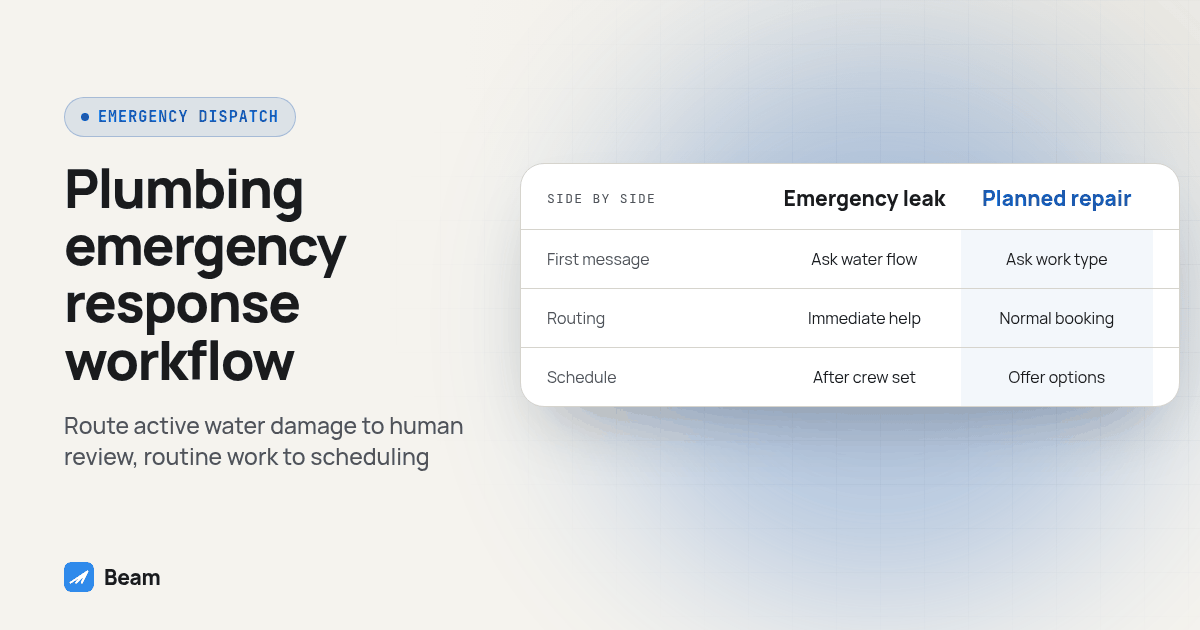
Keep the emergency and routine paths distinct so a slow drain does not receive the same urgency as active water damage. This table is a workflow design comparison, not a measured service benchmark.
| Workflow stage | Emergency leak or overflow | Planned repair or fixture work | Owner |
|---|---|---|---|
| First message | Confirm receipt and ask whether water is actively flowing | Confirm the request and ask what work is needed | Dispatcher |
| Routing | Put active water into immediate human review | Offer the normal booking process | On-call dispatcher |
| Schedule | Confirm only after the crew assignment and window are checked | Offer available appointment options | Dispatcher |
| Photo | Request a safe, relevant image if it affects parts or routing | Request model or fixture details when useful | Dispatcher or technician |
| Follow-up | Update the customer if dispatch timing changes | Confirm the appointment and any preparation | Assigned owner |
| Close-out | Confirm completion and provide the agreed next contact | Summarize the completed work and next step | Office or technician |
The point of separate paths is operational clarity. Do not let an automated workflow mark a job as dispatched simply because a text was sent or accepted by an integration.
How do you build this as a GoHighLevel workflow?
Beam connects to GoHighLevel through a Custom Webhook action. Other dispatch platforms need a compatible API or webhook event on their side, and their incoming reply handling should be checked separately. Before launch, map the fields the dispatcher needs and decide which events require a person rather than an automated response.
- Choose a trigger for each intake source. Use a missed-call, after-hours form or documented dispatch event. Verify that the trigger identifies the correct contact and property.
- Create separate emergency and routine branches. Use the active-water response to route the emergency branch for human review. Keep routine requests in ordinary scheduling.
- Map structured fields. Store the service address, active-water answer, shutoff status, assigned owner and appointment window where the dispatch team can find them.
- Add the Beam Custom Webhook action. Follow the GoHighLevel workflow integration guide, and send first to a test contact and number you control.
- Set the message route expectations. Beam supports iMessage, RCS on supported Android devices and SMS fallback. SMS requirements depend on number type: local 10DLC numbers need A2P registration, toll-free numbers need verification, and short codes need carrier approval.
- Add a schedule-change review. When the appointment status or arrival estimate changes, route it to the dispatcher and send an update only after the new window is confirmed.
- Set stop and handoff conditions. Stop routine follow-up after a reply, opt-out, completed booking or human takeover as appropriate. Make sure a customer response reaches the correct owner.
Use this acceptance test before enabling the workflow for real customers:
- Submit a test after-hours request and confirm the right contact, property and branch are selected.
- Reply that water is actively flowing and confirm a person receives the alert. Repeat with a routine request and confirm it stays in the normal queue.
- Send to an iPhone and an Android phone you control. Confirm the actual channel and that replies return to the intended conversation.
- Change the test arrival window and verify an update is sent to the same thread only after the dispatcher confirms it.
- Send a safe test image and inspect how it appears to the recipient and in the inbox.
- Test a reply, an opt-out and a completed job. Confirm each stops or routes the pending sequence as designed.
- Review the message record and dispatch record together. Note any missing field, unexpected route or late trigger, then correct it before rollout.
Record pass or fail for each step and keep the test contact separate from real customers. This is a proposed setup procedure, not a report of a customer deployment. For outbound campaigns beyond individual job conversations, review Beam’s outbound texting guide and plan the audience, route, consent records and reply coverage before sending.
How should a plumbing company review consent and opt-outs?
A customer who contacts a business about a job is asking about that job; it does not automatically authorize unrelated marketing. A purchased, forwarded or old list should not be treated as permission by itself. Check what the person agreed to, which business collected the permission and whether it covers the planned message. The FCC’s consumer guidance on unwanted calls and texts is a starting point for reviewing expectations. This operational guide is not legal advice.
Channel rules are separate from consent. iMessage lines do not require A2P 10DLC registration. SMS follows the sending number’s requirements: local 10DLC registration, toll-free verification or short-code approval, depending on the number. Twilio’s A2P 10DLC documentation describes its registration path. Keep opt-out records available to every workflow that could contact the person, and confirm that a stop request suppresses pending automation.
When should a plumbing company send a review request?
First confirm the job is complete and that the repair has had an appropriate chance to hold. Do not imply that a customer should leave a positive review or offer a reward for one. Google’s Business Profile content policy prohibits incentives and selective solicitation of positive reviews. Send the same neutral request to eligible completed jobs, and make it easy for a customer to raise a problem directly with the team.
Example close-out:
Hi [Name], checking in about the repair at [address]. Is everything working as expected? If anything needs attention, reply here and our team will follow up. If you would like to leave an honest review, you can do so here: [review link].
Keep the review request separate from an invoice reminder, and do not automate it until the dispatch system reliably marks the job complete. A customer who reports a continuing issue should be routed to a person rather than receiving another review prompt.
What do plumbing companies ask before changing texting workflows?
What does Beam cost for a plumbing company running an after-hours emergency line?
Beam does not publish pricing on this page. Line count, after-hours routing and whether you need a second number for reviews and marketing change the setup, so text our team with your current call volume and we will scope it.
How long does it take to get an emergency text workflow live before the next cold snap?
It depends on whether your dispatch software already fires a clean event on a missed call or after-hours form, whether your line is connected, and how many test contacts it takes before triage and window updates fire correctly. Build and test it in a slow week, not the week pipes start bursting.
Does this work with ServiceTitan, Housecall Pro or Jobber, or only GoHighLevel?
Beam connects to GoHighLevel through a Custom Webhook action. ServiceTitan, Housecall Pro, Jobber and other dispatch software need a compatible API or webhook on their side; confirm whether their platform can call an outbound webhook on a status change before planning a workflow around it.
Is it legal to text an after-hours or storm lead list we bought or got from a referral network?
A purchased or forwarded list is not automatically permission to text. Review what the person agreed to, who collected it, and whether that covers the message you plan to send. An emergency doesn’t remove the requirement. Have the list owner confirm the record, and treat unclear consent as a reason to call instead.
We already text through our dispatch software’s built-in SMS. What does switching to Beam involve?
Confirm number eligibility and whether a port is needed, map your triggers to the new line, carry over consent and opt-out records, and test sends and replies before cutover. Export message history first; porting a number doesn’t bring its history with it. Agree on a rollback plan before retiring the old route.
For the call-handling side of plumbing intake, RizzDial’s guide to AI dialing for plumbing companies covers a separate way to follow up when a service call is missed. Use the two workflows together only when call ownership, customer consent and the handoff between voice and text are clear.
Set up the emergency branch and test it with a dispatcher before the next busy period. Text our team to try it with your own dispatch trigger and a test contact.