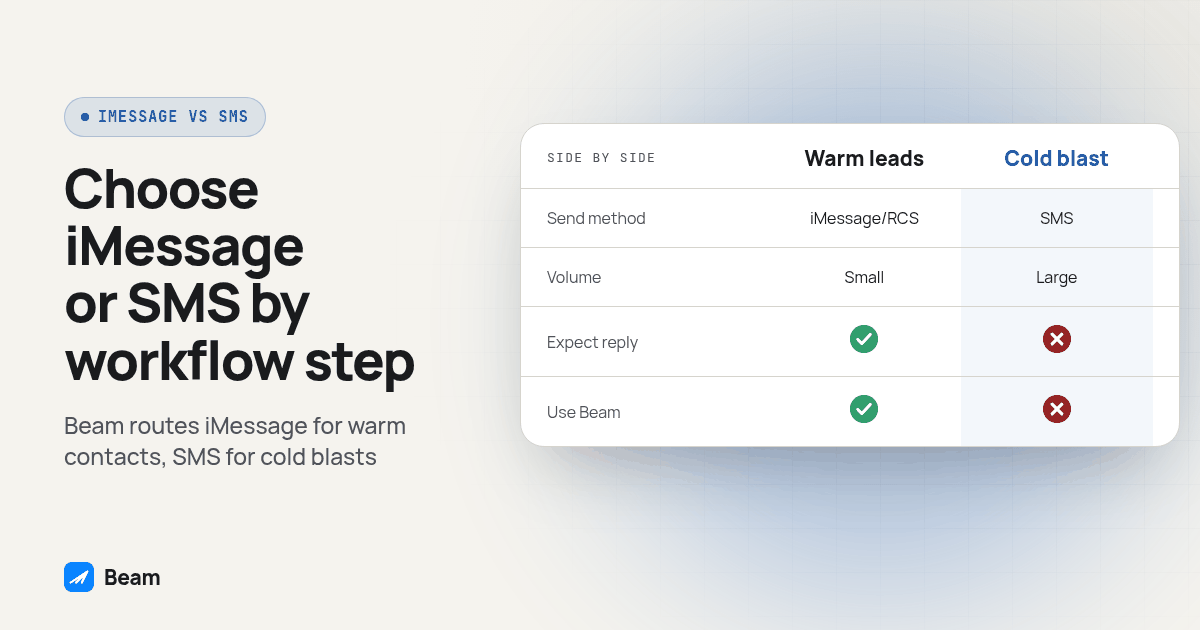
For each new-lead, reminder, nurture or win-back step, choose the send path and define how the workflow handles unsupported phones, pending delivery and replies.
Does Beam pick iMessage, RCS or SMS automatically for a GoHighLevel workflow step?
Once a step uses Beam, yes. Beam’s own documentation states it plainly: it “picks blue when the recipient is eligible and your line supports it, and text otherwise,” sending RCS “when the Android recipient’s phone and carrier support it,” with SMS as the remaining fallback (GoHighLevel iMessage guide). Nothing in a workflow step tells Beam which channel to use. The step tells Beam who to message and what to say, and Beam resolves the channel against what that specific recipient’s phone and carrier actually support.
This logic only runs if the step calls Beam. GoHighLevel’s regular Send SMS action “does not select an additional Beam conversation channel. It continues using your default SMS provider” (GoHighLevel iMessage guide). A Custom Webhook action pointed at Beam’s workflow endpoint is the documented path that actually invokes the blue-first, RCS-second, SMS-third decision. So the first fork in this whole question is not a channel choice at all. It is whether the step calls Beam or quietly bypasses it.
That distinction matters when an agency rebuilds a client’s existing GoHighLevel workflows around Beam, a pattern the agency rollout guide covers in more detail: an old Send SMS step left untouched inside a rebuilt workflow keeps firing plain texts next to the new Beam-routed steps, until a lead gets two different messages from two different numbers.
Which workflow steps should default to iMessage first?
Put the channel-aware Custom Webhook step on anything that behaves like a conversation rather than a blast. Two workflow types fit that description most often.
A new-lead first touch is the clearest case. For example, a prospect might let an inbound call go to voicemail but answer a text from the same business. A speed-to-lead step after an opted-in form submission aims to earn that reply. iMessage can provide read receipts and typing indicators where available, but neither the bubble color nor a read receipt guarantees a response. Assign someone to handle replies before enabling the step.
An appointment reminder or confirmation step is the second. These go to a contact who already has a relationship with the business, usually one who gave a phone number specifically for scheduling, so the channel-aware path can fit the task: the recipient is known, the message is short, and a missed or late confirmation has a real cost in a no-show.
Both of these share a trait that makes Beam’s channel logic worth using: the contact list is warm, the volume per send is modest, and a reply matters enough that you want it landing wherever the recipient is actually comfortable replying.
Which workflow steps are fine defaulting to SMS instead?
Steps that send to large, colder lists carry a different risk than steps that send to a handful of known contacts, and that risk shows up before the channel decision even gets made. Beam paces new outbound-first conversations to protect line health, and it treats a reply inside an active thread differently from a message that starts a brand-new conversation (GoHighLevel iMessage guide). A nurture drip or a re-engagement blast aimed at a few hundred dormant contacts is, by definition, mostly new outbound-first conversations, all at once.
That does not mean these steps should skip Beam’s channel logic. It means the agency should expect the ramp to apply, and should not schedule a large re-engagement send as if every message clears instantly the way a single reminder does. For an eligible, opted-in win-back list, it is usually simpler to let the same Custom Webhook step run, let recipient and line eligibility determine iMessage, RCS or SMS, and plan the send window around pacing rather than forcing every contact onto one channel manually.
A pure, high-volume blast with no individual reply expectation, such as a one-way service alert sent to an entire client base at once, is the one place where staying on GoHighLevel’s plain Send SMS action is a defensible choice rather than an oversight. That keeps the channel-aware inbox free for conversations an agency actually wants to work, and reserves blue bubble capacity for steps where a reply matters.
What happens when a workflow contact has no iPhone?
Nothing dramatic, and that is deliberate on Beam’s part. The documentation describes the behavior this way: “Beam checks capability on first contact and remembers the answer, so you are not guessing per send” (GoHighLevel iMessage guide). Treat remembered capability as a routing aid, not a permanent guarantee that a phone can receive iMessage. Verify the actual channel and status when testing a later send.
For an Android recipient, Beam sends RCS when the phone and carrier support it, and SMS when they do not. Either way, GoHighLevel receives a tag that tells the workflow what actually happened: imessage-sent for a blue bubble, or beam-sms-sent when “the lead’s phone does not support blue bubbles, so a text went out instead” (GoHighLevel iMessage guide). A workflow can branch on that tag the same way it branches on any other GoHighLevel condition, so a nurture sequence can, for example, shorten its message length on the beam-sms-sent branch without touching the branch that stays on iMessage.
There is a second, less obvious case worth planning for: a message accepted for iMessage delivery that never resolves to a clean delivered or failed state. Beam does not automatically resend or switch to SMS after an ambiguous provider update. A teammate reviews the original record before making any intentional follow-up. Separately, a workspace can enable SMS fallback after a confirmed failed iMessage (GoHighLevel iMessage guide). That confirmed-failure setting does not turn uncertainty into failure. Decide who reviews pending messages and which confirmed-failure policy fits the workspace before a campaign starts. Apply the distinction to reminders and win-back steps alike; a larger list does not make an unclear delivery safe to retry.
How do replies from iMessage, RCS and SMS end up in one GoHighLevel conversation?
Through the same write-back path regardless of which channel carried the message. GoHighLevel’s own marketplace documentation describes an Add an inbound message API that accepts a contact or conversation reference along with message content, which lets an integration associate an incoming message with an existing CRM record. That API contract alone does not prove your inbox installation works; verify Beam messages against the original contact in your own test.
Beam’s tag imessage-replied marks the moment a lead responds, described in its documentation as “your hottest signal” (GoHighLevel iMessage guide), and that tag fires the same way whichever channel the reply arrived on. The practical risk is not that replies split into separate threads by channel. It is contact matching: a phone number saved with a country code and a reply that arrives without one can fail to match the existing contact if the lookup compares raw strings instead of normalized ones, something the device-text sync guide covers in more detail for any provider, Beam included.
The same write-back-and-verify discipline applies if a workflow step hands a reply to an external service and sends back whatever that service returns. The SMS API reply round trip guide is built around proving that an incoming message, an external response and the outbound reply all land on the same contact and conversation, a useful check to run once per workflow before trusting it with a channel-mixed audience.
How do you test a workflow step before turning it on for every contact?
Run this sequence on contacts you control before a channel-aware step touches a real list. The workflow send guide documents dry-run validation and duplicate protection. These are proposed acceptance checks, not claimed results from a live campaign.
- Pick one test contact with a known phone type. Use a number you control that you know is iMessage-eligible, so the first test exercises the blue-bubble path rather than an immediate fallback.
- Confirm the step uses a Custom Webhook, not Send SMS. Open the workflow step and check the action type directly; a step labeled “Send with Beam” is only a label you entered; it is not proof the action is actually calling Beam’s endpoint.
- Run the step with a dry run first. Keep the dry-run flag on for this test contact and confirm the response shows a validated, not-yet-sent state before anything goes to a real phone.
- Send once and record the channel, status and tag. Turn the dry run off for the same contact, let the step fire, and note which tag landed on the contact afterward, imessage-sent or beam-sms-sent, then check Beam’s recorded channel and the receiving phone. A tag is a workflow signal, not proof of RCS versus SMS or successful delivery.
- Reply from the test phone. Send a distinct reply from the device and confirm it appears on the matched contact’s conversation in GoHighLevel, not as a new, separate contact.
- Repeat the same test with an Android-only number. This exercises the non-iMessage route: confirm the message arrives as RCS or SMS on that phone and that the correct tag landed on that contact too.
- Trigger the step twice with the same identifying key. Confirm the second attempt returns the same result as the first rather than sending a duplicate message, since a workflow that retries on a timeout should not text the same lead twice.
- Only then connect the step to the real contact list, starting with the smallest segment the workflow actually targets.
Which channel fits which workflow step?
| Workflow step | Route through Beam? | Why this step | What happens with no iPhone |
|---|---|---|---|
| New lead speed-to-lead (first touch) | Yes, Custom Webhook | Warm, one-to-one, reply expected fast | RCS or SMS fires automatically; beam-sms-sent tag lets the next step adjust |
| Appointment reminder or confirmation | Yes, Custom Webhook | Known contact, short message, missed reply is costly | Same automatic fallback; Review ambiguous deliveries; the workspace fallback setting applies only to confirmed failures |
| Nurture drip (multi-touch over days) | Yes, Custom Webhook | Ongoing relationship, lower volume per send | Fallback is routine; manual follow-up on an ambiguous send is usually acceptable at this volume |
| Re-engagement or win-back blast | Yes, Custom Webhook, with pacing expected | Still a conversation channel, but mostly new outbound-first sends at once | Same fallback, but plan the send window around the outbound-first ramp rather than an instant blast |
| One-way service alert, no reply expected | Optional, native Send SMS is defensible | No conversation to protect; frees blue-bubble capacity for the steps above | Not applicable; the step never touches Beam’s channel logic |
What should an agency check before scaling this across every client workflow?
Audit the existing workflow first. An agency migrating a client from a plain SMS tool onto Beam usually inherits several Send SMS steps already sitting inside live workflows. Each one needs a decision: leave it as a one-way alert, or swap it for a Custom Webhook step so it behaves like the rest of the conversation. Mixing bypassed and channel-aware steps in one workflow can leave a client with two numbers texting the same lead.
Match the workspace-level confirmed-failure setting to the mix of steps running in that workspace. For reminders, consider whether a confirmed failure warrants an SMS retry before the appointment. For win-back outreach, consider whether a retry would conflict with later scheduled steps. Neither choice allows an ambiguous result to be silently resent. Assign a teammate to reconcile uncertain records, and retain the original message ID so a later workflow retry does not create a duplicate.
Finally, confirm the reply side is connected before trusting the channel-mixed thread for client reporting. One coherent conversation only happens if the inbox installation and contact matching are both correct, which is exactly what the test sequence above catches before a client ever sees it.
If the same workflow also needs a voice follow-up when a text goes unanswered, for example calling a lead who never replies to the speed-to-lead text, RizzDial’s GoHighLevel integration covers connecting an AI calling step to the same contact record.
Before enrolling a dormant contact, review the consent record, current opt-out state and the purpose of the new message. A previous appointment does not establish permission for every future campaign. Keep the selected SMS number eligible for its traffic and verify that both the native SMS path and the Beam path honor suppression. Channel choice should follow that review, not replace it.
What do agencies ask about running iMessage and SMS in the same GoHighLevel workflow?
Does using iMessage mean we can skip A2P 10DLC registration for texting?
No, and this trips up agencies moving a client onto GoHighLevel. iMessage lines do not need A2P registration, but that exemption is specific to the iMessage channel itself. Carrier registration rules still apply to SMS by number type: local 10DLC numbers need A2P 10DLC registration, toll free numbers need toll free verification, and short codes need carrier approval. The moment a workflow step falls back to SMS, the number sending it is back under whichever rule applies to that number type.
Can I force a workflow step to always send iMessage and never fall back to SMS?
The documented workflow path lets Beam choose the eligible channel for each message: iMessage on a capable line, RCS for supported Android recipients, and SMS for other reachable recipients. Separately, the workspace controls SMS retry after a confirmed failed iMessage. That setting does not force every recipient onto iMessage and does not allow automatic retries after ambiguous updates.
Which GoHighLevel action actually sends through Beam's channel logic?
A Custom Webhook action pointed at Beam's workflow endpoint. GoHighLevel's regular Send SMS action does not select an additional Beam conversation channel and keeps using your default SMS provider, so it never reaches Beam's iMessage, RCS or SMS fallback logic at all.
Do replies that come back as SMS still show up next to the iMessage history?
Yes, in the same connected conversation thread, as long as the inbox installation and contact matching are set up correctly. Beam writes inbound and outbound messages back to the matched GoHighLevel contact regardless of which channel carried that particular message, so a lead who starts on iMessage and later falls back to SMS still reads as one conversation, not two.
How long does it take to see which channel a workflow step actually used?
Inspect the test contact after the send, then compare the CRM tag with Beam's recorded channel, delivery status and the receiving phone. The imessage-sent tag marks a blue bubble send; beam-sms-sent marks a non-blue text send. Tags alone do not distinguish RCS from SMS, prove delivery or guarantee a fixed update time.