TL;DR: Send from Node.js with an authenticated
POSTto Beam’s/v1/messagesendpoint. Check the returned message ID separately for delivery status, or receive signed webhook events instead of polling. Verify each event against its raw body before your application trusts it.
A backend engineer asked to add texting to a Node app can either automate Messages.app on a Mac that stays signed in or call a hosted API over HTTPS. This guide covers the API route end to end, including the part a quick send example leaves out: verifying that a webhook came from Beam by checking its Beam-Signature header with Node’s crypto module before trusting any field in the event.
What do you need before writing any Node.js code?
Start with an active Beam workspace and an assigned business line. The Beam iMessage API page explains the product and API access, and the complete endpoint list is in Beam’s API documentation. You also need a workspace API key from Settings and a Node version with global fetch available. Send the key in an x-api-key header on each request. It is not a Bearer token.
Treat the key like a database password. Keep it in a server-side environment variable or secret manager. Do not place it in browser code, a mobile build, a public repository, a prompt, or a log. If a key is exposed, rotate it.
export BEAM_API_KEY="your_workspace_key"
export TEST_PHONE="YOUR_TEST_PHONE_E164"
Use a test phone you control and have permission to message. Keep the first run separate from a client workflow. The purpose is to learn what your application receives at each stage, not to infer delivery from a successful request.
How do you send your first iMessage from Node.js?
The documented send endpoint is POST /v1/messages. Its required fields are to and message; first_name is optional and saves to the contact record the first time you message them. No extra package is needed for this request with Node’s global fetch.
const res = await fetch("https://beam.aisync.link/v1/messages", {
  method: "POST",
  headers: {
    "x-api-key": process.env.BEAM_API_KEY,
    "Content-Type": "application/json",
  },
  body: JSON.stringify({
    to: process.env.TEST_PHONE,
    message: "This is a test message from our Node.js integration.",
    first_name: "Test",
  }),
});

if (!res.ok) {
  throw new Error(`Beam send failed: ${res.status} ${await res.text()}`);
}

const sent = await res.json();
console.log(sent.id, sent.status);
The res.ok check is part of your application code. Without it, an HTTP error can be mistaken for a successful send. Save the returned message ID and status in a protected log that does not include the workspace key or unnecessary message content.
The endpoint also documents optional attachments and effects. Attachments are public HTTPS file links; the documented maximum differs by channel. Effects apply to blue-bubble messages and are ignored on texts. Check Beam’s send endpoint reference before adding optional fields so your code follows the current contract.
How do you confirm that a message reached the phone?
A successful response means the request was accepted into Beam’s send flow. It does not prove that the phone received it. Use the id returned by the POST request with the separate status endpoint:
const statusRes = await fetch(
  `https://beam.aisync.link/v1/messages/${sent.id}`,
  { headers: { "x-api-key": process.env.BEAM_API_KEY } },
);

if (!statusRes.ok) {
  throw new Error(`Beam status check failed: ${statusRes.status}`);
}

const status = await statusRes.json();
console.log(status.status, status.channel);| Status | What it tells your application |
|---|---|
queued | Beam accepted the message into its pacing queue. |
sent | The message was handed to the network; channel identifies the route. |
delivered | Delivery was confirmed against carrier records. |
failed | The send did not go through. |
cancelled | The message was cancelled before it went out. |
no_channel | No active number could reach this contact. |
These meanings follow Beam’s Get a Message reference. A delivered status is useful evidence of delivery, but it does not show that a person read or replied. Keep status and response behavior as separate application signals.
How do you check channel eligibility before sending?
Beam documents a read-only availability endpoint for checking blue-bubble support. For one recipient, call GET /v1/availability/:phone with the same workspace key. This lookup does not send a message or notify the recipient.
const availabilityRes = await fetch(
  `https://beam.aisync.link/v1/availability/${encodeURIComponent(process.env.TEST_PHONE)}`,
  { headers: { "x-api-key": process.env.BEAM_API_KEY } },
);

if (!availabilityRes.ok) {
  throw new Error(`Beam availability check failed: ${availabilityRes.status}`);
}

const availability = await availabilityRes.json();
console.log(availability);
Treat the response as an eligibility check, not a delivery guarantee. An unknown result means the check could not be completed, which is different from a confirmed ineligible result. For a group of numbers, Beam’s screening endpoint guide documents how to check a list without sending messages. Recheck an unknown result later rather than converting uncertainty into an assumption about the recipient.
How do you receive replies without polling?
Use an event webhook when your application needs to react to replies without repeatedly asking for updates. In Beam, open Settings, then Event webhooks, and add an HTTPS endpoint. Beam provides a signing secret for the endpoint. Each event is a POST with a JSON body and a Beam-Signature header, as described in Beam’s event webhook guide.
{
  "id": "evt_8c1f2a9d64b34e0f9a12",
  "type": "message.received",
  "timestamp": "<unix_seconds>",
  "data": {
    "from": "YOUR_TEST_PHONE_E164",
    "to": "YOUR_ASSIGNED_LINE_E164",
    "body": "Sounds good, see you then",
    "channel": "imessage"
  }
}
The message.received event represents an inbound reply. message.sent reports an outbound send, while contact.opted_out signals that a contact texted STOP. On receiving an opt-out event, update your suppression state and stop queuing messages to that contact. Keep the event ID and the workspace/contact relationship in your processing record so duplicate or out-of-order application work can be reviewed safely.
How do you verify that a webhook came from Beam?
Verify the signature before parsing the JSON or acting on the event. Beam signs the timestamp and exact raw request bytes with HMAC-SHA256. The signature reference also documents rejecting timestamps more than five minutes from the current time and using a constant-time comparison. See Beam’s webhook signing documentation.
import { createHmac, timingSafeEqual } from "node:crypto";

const REPLAY_WINDOW_SECONDS = 300;

export function verifyBeamSignature(rawBody, header, secret) {
  const match = /^t=(\d+),v1=([0-9a-f]{64})$/.exec(header ?? "");
  if (!match) return false;

  const [, timestamp, signatureHex] = match;
  if (Math.abs(Date.now() / 1000 - Number(timestamp)) > REPLAY_WINDOW_SECONDS) {
    return false;
  }

  const expected = createHmac("sha256", secret)
    .update(`${timestamp}.`)
    .update(rawBody)
    .digest();
  const supplied = Buffer.from(signatureHex, "hex");

  return supplied.length === expected.length && timingSafeEqual(expected, supplied);
}
Pass the exact bytes Beam sent as rawBody. If your framework parses JSON first and then serializes it again, whitespace and key order can change, so the computed signature will not match the original. Node’s crypto documentation describes timingSafeEqual, which avoids an ordinary string comparison for the final check.
How do you connect signature verification to Express?
Use Express’s raw body parser for this route, verify the signature, then parse and enqueue the event. Respond promptly and process any slower business logic asynchronously.
import express from "express";

const app = express();

app.post(
  "/beam/events",
  express.raw({ type: "application/json" }),
  (req, res) => {
    const signature = req.get("Beam-Signature");
    const secret = process.env.BEAM_SIGNING_SECRET;

    if (!verifyBeamSignature(req.body, signature, secret)) {
      return res.sendStatus(401);
    }

    const event = JSON.parse(req.body.toString("utf8"));
    enqueueForProcessing(event);
    return res.sendStatus(200);
  },
);
The express.raw() parser supplies a buffer before JSON middleware changes the body. Verification runs before parsing, and parsing runs before application processing. If the signature is missing, malformed, stale, or incorrect, reject the request without processing the event.
Should you script Messages.app or call a hosted API from Node?
Some teams automate Apple’s Messages app on a dedicated Mac. Apple does not document a general backend send endpoint through its Messages framework documentation, which describes app extensions such as stickers and interactive bubbles. A local script may suit a personal integration, but a Node service that needs to run independently of a logged-in desktop has different operational needs.
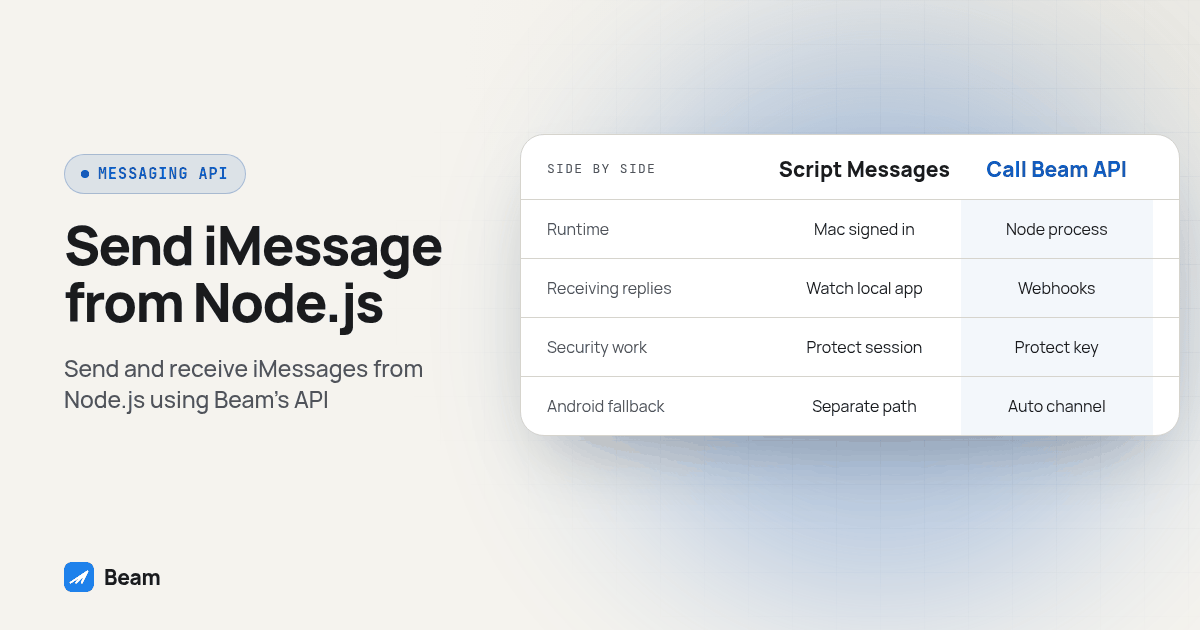
| Consideration | Script Messages.app yourself | Call Beam’s API from Node.js |
|---|---|---|
| Runtime dependency | A Mac with Messages.app signed in and available | A Node process with outbound HTTPS access |
| Maintenance surface | Your team maintains the local automation | Your team maintains its API integration; Beam operates the messaging service |
| Receiving replies | Your code must watch local app or message state | Signed webhook events can reach your HTTPS endpoint |
| Android and carrier fallback | Requires a separate path if needed | Beam selects an available channel for the recipient and line |
| Security work | Protect the Mac session and local data | Protect the API key, webhook secret and event receiver |
The hosted route moves the infrastructure boundary, but it does not remove application work. Your team still needs to protect credentials, verify webhook signatures, respect opt-outs, test message states and decide what to do when a request fails. Review Apple’s iCloud Terms before designing any automation around a personal account.
Can this API connect to an AI agent or CRM workflow?
The examples above assume your server decides the message content. A Node application can also connect a workflow to an agent that reads a reply and chooses a next action. Beam documents MCP and OpenAPI developer access in its developer access guide. Keep sending permissions limited to the integration that needs them, and require an explicit test path before an agent can message a real contact.
For a CRM-managed flow, Beam’s GoHighLevel connection uses a Custom Webhook action rather than the direct REST request shown here. Use one route for a given workflow action and confirm where replies and opt-outs appear before enabling automation. If your journey also requires a voice follow-up, test that handoff independently; RizzDial’s voice AI platform handles a separate part of the interaction.
What should you test before a real contact sees any of this?
Run this procedure with a phone you control and a workspace set up for the intended flow. Record the actual request ID, status, channel and webhook outcome rather than relying on what you expect the service to do.
- Check your setup. Confirm the workspace, assigned line, server-side API key and permission to message your test phone.
- Send one test message. Make the POST request and save its returned
idand initial status without logging the secret. - Check the message record. Call the status endpoint with the returned ID. Compare
queued,sent,delivered,failedorno_channelwith what you observe on the phone. - Configure the receiver. Point the Beam event webhook at your HTTPS endpoint and store its signing secret in the server’s secret manager.
- Reply from the test phone. Confirm a
message.receivedevent reaches the endpoint and passes signature verification before your app processes it. - Send a deliberately altered request to a separate local test handler. Confirm a bad signature is rejected and no event processing occurs.
- Test a stale timestamp. Use a fixture outside the documented freshness window and confirm verification returns false.
- Test an opt-out in the controlled environment. Send STOP from the test contact, confirm the opt-out event or state, and verify your own sending workflow suppresses later messages.
- Review the logs and then enable the intended endpoint. Confirm the production receiver handles only verified events and records enough context to troubleshoot without exposing secrets.
The invalid signature and stale timestamp checks distinguish a receiver that only accepts a happy-path event from one that rejects malformed input. The opt-out check makes sure webhook processing is connected to the part of your application that decides whether another send is allowed.
What should your application watch for after launch?
Use Beam’s documented errors to decide what your app should do. A 403 means the contact opted out and Beam will not message them. A 409 can mean that an action no longer applies, such as cancelling a message that already delivered. A 502 means the network rejected the action; the error reference says it is safe to retry once after a short wait.
Avoid tight retry loops. If your application cannot tell whether an action completed, inspect the message record or conversation history before sending again. A missing webhook also should not cause an automatic duplicate send. Beam’s guide to recovering a missed iMessage API webhook describes reconciling stored event history without resending to a contact.
Before using an integration with a client workflow, confirm who owns the event endpoint, who reviews failures and where an opt-out is recorded. Text our team to try it with a test phone and a concrete use case so the path can be checked before it becomes part of a live customer process.
What else should you know about sending iMessage from Node.js?
Can Node.js send through Beam without controlling a Mac?
Yes. Your Node.js server can call Beam’s HTTPS API with a workspace key. It does not need to control Messages.app on a Mac. Keep the key on the server and use a test number you control before sending to a real contact.
Does a successful POST mean the recipient received the message?
No. A successful POST can return a queued status, which means Beam accepted the request into its pacing queue. Use the returned message ID with the status endpoint, then distinguish sent, delivered, failed and no_channel. A delivered status is not evidence that the recipient read or answered.
Can my Node.js app receive replies from Beam?
Yes. Configure an HTTPS event webhook in Beam settings. The receiver gets events such as message.received and contact.opted_out. Verify the Beam-Signature header against the exact raw request body before parsing or acting on the event.
Can I use a GoHighLevel workflow instead of calling the REST API?
Yes. Beam’s GoHighLevel workflows use a Custom Webhook action, while the REST API is for a server you control calling Beam directly. Choose the path that fits the workflow and avoid triggering both paths for the same contact action.
What should I do when a webhook signature does not verify?
Reject the request without processing its event. Check that the receiver captured the exact raw request bytes, used the correct signing secret, and rejected a timestamp outside the documented freshness window. Do not parse and re-serialize the body before verification.