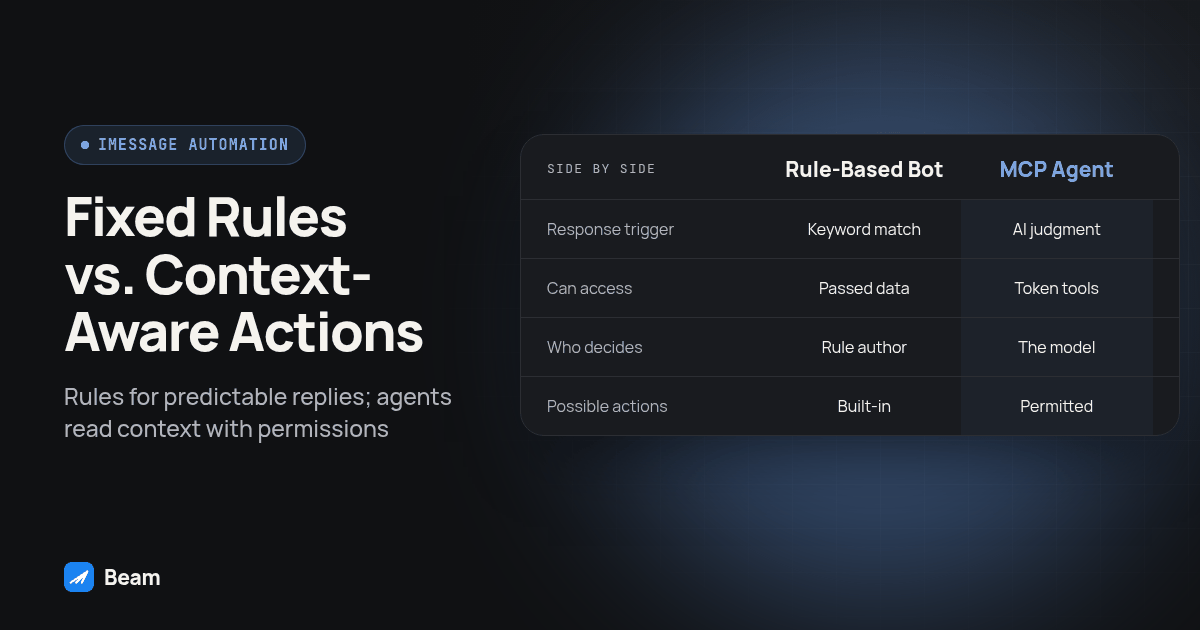
An iMessage bot can mean a fixed rule that sends a preset reply, while an MCP connected agent can read workspace context and use specifically permitted tools. The useful comparison is what each system can read and do, and who approves its actions. Beam’s iMessage API and MCP connection provide distinct ways to connect messaging workflows, with permissions that can limit what an agent may access.
A business owner searching for an “iMessage bot” might mean a rule that answers “hours” with a preset schedule, or an AI agent that reads a thread and drafts a contextual reply. Both labels are used loosely. A vendor’s wording alone does not tell you whether its system reads earlier messages, checks other records or can send without review.
That distinction matters when you choose what to automate. Fixed rules can be easier to inspect, while an agent can handle requests that need context if it has the right information and permissions. An agent can also make mistakes in ways that sound plausible. Evaluate its access and approval controls before deciding whether it should act on customer conversations.
What Do People Mean When They Say “iMessage Bot”?
An “iMessage bot” is not one specific architecture. It can describe a simple rule, a workflow connected to a messaging service, or an AI agent with messaging tools. Apple’s Messages framework describes app extensions such as stickers and interactive messages. It is not a general business API for automating ordinary two way customer texting. Messaging providers therefore use their own supported connections and infrastructure.
The important question is what reads the inbound message and decides what follows. A fixed rule might look for a keyword and return a prewritten response. A workflow may combine several conditions and actions. An MCP connected agent can discover and call tools exposed by a service, within the permissions assigned to its connection. Ask a vendor to show the actual flow rather than relying on the word “bot.”
There are also operational differences between approaches. A system built around a device or an unofficial method can have different maintenance and account risks from a hosted messaging service. One engineering team’s account of rebuilding an iMessage integration describes its experience with account enforcement. Treat that as one team’s report, not a universal outcome or a statement about every provider.
How Is an MCP Connected Agent Different From a Keyword Bot?
The Model Context Protocol lets compatible AI clients discover and use tools made available by a server. A keyword rule follows conditions that someone wrote in advance. An MCP agent can select from the tools its connection exposes, based on the request and the context it can access. Its actual capabilities depend on the connected service and the permissions chosen for its token. See the Model Context Protocol overview and Beam developer access.
| Fixed rule or canned reply | MCP connected agent | |
|---|---|---|
| What triggers a response | A configured phrase, condition or workflow event | A request interpreted using the context and tools available to the model |
| What it can see | Whatever data the rule or workflow receives | Data exposed by the connected service and allowed by its permissions |
| Who decides the response | A person writes the rule and response in advance | The model proposes or selects an action within the configured tools and instructions |
| Can it take an action, such as booking | Only if the workflow has a suitable action and conditions | Only if an appropriate tool exists and the connection has permission to use it |
| What can go wrong | A condition misses an unexpected phrasing or case | The model can misunderstand context, or a needed tool or permission may be unavailable |
| What to review | Conditions, response text, opt out and handoff behavior | Token scope, instructions, tool behavior, approval path and handoff behavior |
Neither category is automatically safer or more capable in every situation. A small set of stable questions may suit explicit rules. Requests that require interpreting a thread may benefit from an agent, provided a team checks what context it uses and controls what it can change.
What Can a Canned Reply Handle, and Where Can It Break?
A fixed reply can be useful when the answer is stable and the trigger is clear. For example, an operator might configure a workflow to respond to a recognized scheduling request with a link to the booking process. A separate opt out workflow can also recognize a STOP request and suppress additional marketing messages, subject to the system’s implementation and applicable rules.
The edge cases need attention. A customer may use an unexpected phrase, combine two requests, or refer to something said earlier. A simple keyword match cannot infer context it was never given. More elaborate rules can cover additional conditions, but the team must define and maintain those branches. That is not necessarily a defect: predictable workflows are useful when their boundaries are explicit.
Before using a rule with customers, list phrases that should trigger it and phrases that should not. Include ambiguous wording, an opt out, a request for a person and an unrelated question. Check whether the workflow stops, hands off or responds in each case. Keep the answer limited to information the business has approved.
What Can an MCP Connected Agent Do That a Script Cannot?
An MCP connection can let a compatible agent discover and call tools exposed by a service. Beam’s developer access guide describes separate permissions for reading workspace information, training and previewing the assistant, publishing, pausing automation, sending messages and booking. A token begins with read and train selected by default; publishing, automation, sending and booking require their own permission. The service determines which tools are available to that connection.
That access can let an agent work with more than the text of one inbound message. For example, if the connected tools and permissions allow it, it may read conversation context, draft a response for review or make a permitted booking. Those capabilities are bounded by the actual tools and permission settings. Do not assume an agent can read a calendar or contact record unless the provider documents that tool and the connection has access to it.
The key difference is not simply that one response was generated by a language model. It is the combination of context, available tools, permissions and review. An agent with read access may be able to inspect information but not send. A team should understand those boundaries before adding write access. Our guide to iMessage MCP explains Beam’s connection model in more detail.
How Can You Move From Fixed Rules to an Agent Carefully?
Use a staged process so you can see what changes before granting a connection broader access:
- Write down the existing rule’s job. Record its trigger, expected response, exclusions, opt out behavior and human handoff. Keep the current rule available while you evaluate a replacement.
- Collect examples it handles poorly. Use reviewed conversations or synthetic examples approved by your team. Remove unnecessary personal details before using them to evaluate a system.
- Choose a workspace and owner. Confirm which business workspace the connection should access. Beam’s developer guide says an owner creates the connection under Settings, Developer access, MCP and API.
- Create a least privilege token. Select only the permissions needed for the initial evaluation. Beam’s default read and train permissions allow workspace reading and assistant draft or preview tools; sending and booking need separate permissions.
- Connect a compatible client securely. Follow the provider’s current setup instructions, keep the token private and do not paste credentials into a prompt or public configuration.
- Review drafts before enabling actions. Give the agent test cases that include an ambiguous request, a request for a human and an opt out. Compare its result with the approved workflow. Do not enable send or booking merely because a draft sounds plausible.
- Test a narrow workflow with an owned test contact. If the team later grants an action permission, confirm the result in the destination system and verify message status. Expand only after the team has reviewed the actual behavior and its handoff path.
This procedure separates access from action. A connection can be useful for reading or preparing a draft before it is allowed to publish changes, send messages or book appointments. Keep an owner responsible for reviewing permissions and revoking a token when it is no longer needed.
What Should You Check Before Picking Either One?
Ask a vendor to demonstrate whether the system can read earlier messages in the conversation or only the latest inbound text. Ask what records, if any, it can access, and whether those records are visible to a human reviewer. Then ask what actions it can take, how permissions are granted, and whether sending can be disabled while reading and drafting remain available.
Check the approval path as well. Does a person see a draft before it goes out? Can the team pause automation or transfer a conversation to a person? What happens when a tool fails, the system lacks context, or the customer asks to opt out? Ask how the provider records status so the team can distinguish an accepted request from a delivered message.
If the system only responds to configured triggers, evaluate it as a rule or workflow. If it can use tools and interpret context, inspect its access and approval controls as an agent. Either can be appropriate for a defined job; the label itself is not enough to choose.
Which One Does a Business Actually Need?
Many businesses can use rules for routine, stable cases and reserve an agent for work that benefits from reading context. For example, a rule may route a known request into a documented process, while an agent with limited access may help a team summarize a thread or draft a response for a person to approve. The exact division depends on the business process and the supported tools.
Problems arise when expectations do not match the implementation. A team may expect a keyword rule to understand a multi part request, or assume an agent has permission to perform a task that its token does not allow. Start with a specific workflow, document what a good outcome looks like, and test the failure and handoff cases before using it with customers.
For agencies, repeat that review in each client workspace. Use workspace specific access, confirm the client owner and permissions, and avoid treating one successful setup as proof that another client’s configuration is identical. The iMessage bot setup guide covers Beam’s available setup paths.
What Should You Test Before Trusting Either Setup?
Run a controlled test with a number and contact your team owns. Keep the test separate from live customer campaigns and confirm what the connected service reports at each stage.
- Send an inbound test message and verify it appears in the intended workspace and conversation.
- Trigger the expected response, then verify whether it is a draft, queued send or completed delivery. Check the receiving phone rather than treating an accepted request as proof of delivery.
- Send a variation the rule may not recognize, or a question that depends on an earlier message. Confirm the system follows the expected fallback or asks for a person.
- Test STOP and confirm the workflow honors the opt out state before any further marketing message is attempted.
- If booking is in scope, verify the appointment in the connected calendar. Do not rely on the agent’s statement that a booking succeeded.
- Review the conversation record and permissions after the test. Confirm which actor or automation sent the reply and remove any temporary permission the workflow no longer needs.
An accepted send request does not prove a message reached a device. Check a documented delivery status and the actual recipient during testing. Beam’s API page describes the integration route for teams building against its messaging service.
What Else Do Buyers Ask About iMessage Bots and MCP Agents?
Does a canned-reply bot cost less to run than an MCP-connected agent?
It depends on the product and the work involved. A fixed rule can require less setup than connecting and reviewing an agent, but do not assume the messaging plan or total operating cost is the same across providers. Text our team with the workflow you have in mind and we can discuss what fits your workspace.
How long does it take to set up each kind on Beam?
Setup time depends on the workspace, the rule or agent configuration, and the review your team needs. A Beam MCP connection requires a workspace owner to create a connection token under Settings, Developer access, MCP and API, choose permissions, and configure a compatible client. See the developer access guide for the supported connection steps.
If we start with a canned bot, is switching to an MCP-connected agent later expensive?
That depends on how the original bot and the agent were built. Beam's MCP connection is created for a particular workspace, but the available documentation does not promise that every third-party bot shares the same number, history or records. Confirm data ownership and migration requirements with the current provider before changing systems.
Does an MCP-connected agent create new compliance work beyond what a canned bot already needs?
MCP is a way for a compatible AI client to access permitted Beam workspace tools; it does not remove the rules that apply to a message or channel. iMessage lines do not need A2P 10DLC registration. SMS requirements still depend on number type. Beam supports HIPAA compliant texting through compliant carrier infrastructure, while practices remain responsible for their own safeguards.
Can the same business phone number run a canned bot now and a real agent later without losing history?
Do not assume that without checking the systems involved. A Beam MCP connection is scoped to a workspace, but whether another bot shares that number, conversation history and contact records depends on that product's implementation. Confirm the workspace, data access and handoff behavior before switching.
Where Should You Start?
If you want an integration that your own software controls, start with the iMessage API. If you are comparing a preset workflow with an agent, first identify the context and actions the workflow really needs. Then check the provider’s permissions, handoff and test process against those requirements.
For a team considering voice follow up alongside messaging, RizzDial’s comparison page provides a separate look at the voice channel. Either way, use a business workspace and a test contact before enabling customer facing actions. Text our team to try it and describe the workflow you want to evaluate.