A move from GoHighLevel to HubSpot needs a separate messaging integration plan. A HubSpot Community question about integrating iMessage, posted October 13, 2025, shows the buyer question directly: how do the two connect? This guide separates outbound sending, reply logging and workflow triggers so an agency can test each promise before offering it to a client.
Does Beam have a native HubSpot connector?
Beam does not document a native HubSpot connector in the integration references used here. Plan around the API until a specific supported connector is demonstrated. Beam’s own “why Beam” documentation puts it plainly: other CRMs connect through the API and documented events, and not every CRM has a native connection (Beam docs: why Beam). GoHighLevel has a documented CRM inbox connection and dedicated Custom Webhook contract. That workflow contract does not establish a native HubSpot connection; HubSpot needs its own mapping.
That distinction matters when comparing connectors. Tuco AI’s HubSpot integration page advertises a HubSpot connection. Evaluate the actual contact record and reply workflow in a demo, rather than assuming every provider exposes the same controls. Ask whether the rep can compose a message inside HubSpot, which activity receives the reply, and who maintains the connection.
What are the three real ways to connect Beam and HubSpot?
Compare these three implementation patterns. Each still needs field mapping, authentication and a test of both message directions.
| Path | What you actually build | What the configured path can do | Who it fits |
|---|---|---|---|
| Direct webhook and API | A HubSpot workflow “Send a webhook” action calling Beam’s send endpoint, plus a small receiver that turns Beam’s event webhooks into HubSpot API calls | Outbound sends from eligible contact-based workflows after configuration | A team with a developer who wants control and does not want to wait on a public app review |
| Zapier or Make | Beam’s generic REST endpoint wired into Webhooks by Zapier (or Make’s HTTP module), paired with HubSpot’s own native Zapier or Make app on the other side | Sends and note writes after mapping; signed inbound events may still need a verification receiver | Agencies using automation tools, with technical help for signed inbound events |
| Custom HubSpot app | A HubSpot app, account authorization, event definitions and the required approval | App events after approval and implementation; not a built-in Beam sync | A platform planning to serve many HubSpot accounts, not one agency’s client list |
The third row is a custom development project, not a Beam connector you can enable. HubSpot now directs new event implementations to its current developer platform and requires approval to define app events. Existing legacy timeline integrations have separate requirements, so do not start a new build by copying an old public-app tutorial.
How do we trigger a Beam text from a HubSpot workflow?
Start with outbound sending so you can isolate API authentication and field mapping. HubSpot’s workflow tool can fire an outbound POST to any HTTPS URL from eligible contact-based workflow triggers (HubSpot: using webhooks with workflows). That action requires Data Hub Professional or Enterprise on HubSpot’s side, according to that reference. Check the action in your account before choosing this path.
- Open Beam Settings and create a workspace API key. This is the credential the webhook action authenticates with; keep it server side, the same rule Beam gives for any other API integration (Beam API introduction).
- Build a draft HubSpot workflow and choose your trigger. Start with a contact-based workflow and a trigger your account supports, such as an eligible form submission. Restrict enrollment to your own test contact and confirm permission to text before enabling customer sends.
- Add the webhook action and set the method to POST, with the URL set to
https://beam.aisync.link/v1/messages. - Choose API key authentication, name the key
x-api-key, select Request header as its location, and store your Beam workspace key securely. Beam expects a JSON request body. - Customize the request body, mapping the contact phone property to
to, a static test message tomessage, and the first-name property tofirst_name. Compose personalized text in a supported workflow step or middleware before sending it. - Test with your own contact only. HubSpot notes that API keys are not included in test requests, so validate authenticated sending through a controlled enrollment if the editor test fails authentication. Confirm the response includes a message ID and
"status": "queued", then confirm the text actually lands on a phone you control, not just that HubSpot logged a successful call. - Turn the workflow on for customer enrollment criteria only after that live test passes.
This illustrates the field mapping, not literal HubSpot template syntax. Replace placeholders through the editor; never send unresolved tokens to Beam:
{
  "to": "RECIPIENT_PHONE_PROPERTY",
  "message": "Thanks for your demo request. What time works today?",
  "first_name": "FIRST_NAME_PROPERTY"
}
One real limit worth knowing before you scale this past a pilot: Beam’s general send endpoint does not document an idempotency or request key the way its separate GoHighLevel workflow contract does (Beam: send a message). A HubSpot workflow that re-enrolls a contact, or a webhook action that retries on a timeout, can send the same text twice. Build your enrollment criteria to fire once per real event, and do not point two workflows at the same trigger as a backup.
How do we get a reply logged back onto the HubSpot contact record?
Reply logging answers whether a rep can read the conversation without leaving HubSpot. Beam pushes signed event webhooks the moment something happens: message.received, message.sent, message.failed, contact.opted_out, assistant.booked, and assistant.handoff, each one a POST with a Beam-Signature header you verify against your own signing secret (Beam: event webhooks; Beam: webhook signing). Verify the exact raw body with HMAC-SHA256 and a constant-time comparison, and reject signatures older than five minutes. Store verified events durably, then acknowledge quickly and process asynchronously. The documented delivery has a five-second timeout and no automatic retries, so schedule history reconciliation for missed events.
Nothing in that event, by itself, touches HubSpot. You need a small receiver, a single endpoint on your own server, that does three things when a message.received or message.sent event lands: look up the matching HubSpot contact by phone, create a Note engagement, and associate it to that contact. HubSpot’s Notes API takes a POST to /crm/v3/objects/notes with an hs_note_body property and an associations block; the default association type ID for a note-to-contact link is 202 (HubSpot: Notes engagements; HubSpot: associations). Once associated correctly, that note shows up on the contact’s timeline next to calls and emails, which is the actual outcome most agencies mean when they ask for “HubSpot sync.”
Here is an illustrative Notes API request body, not a complete receiver. Supply your HubSpot authorization separately and replace the contact ID and event time:
{
  "properties": {
    "hs_timestamp": "2026-10-20T15:04:00Z",
    "hs_note_body": "Beam message received: \"Tuesday works for me.\""
  },
  "associations": [
    {
      "to": { "id": "HUBSPOT_CONTACT_ID" },
      "types": [{ "associationCategory": "HUBSPOT_DEFINED", "associationTypeId": 202 }]
    }
  ]
}
That note is a plain activity entry, not an embedded messaging inbox. The HubSpot Timeline Events reference limits legacy v1/v3 events to partners with existing event definitions and requires OAuth for event creation. New implementations must use the current developer platform and request app-event approval. A Notes API integration avoids making a custom event card a prerequisite for reading replies.
For reply-triggered automation, have the receiver also update a contact property your HubSpot workflow watches, such as a last-reply timestamp. Define the property and enrollment rule yourself; writing a note does not automatically create that behavior. Normalize phone numbers and check both phone fields before association. If multiple contacts match, route the event for review instead of attaching a private conversation to an arbitrary record.
What does not sync automatically?
Write these down before a client assumes the integration is more complete than it is.
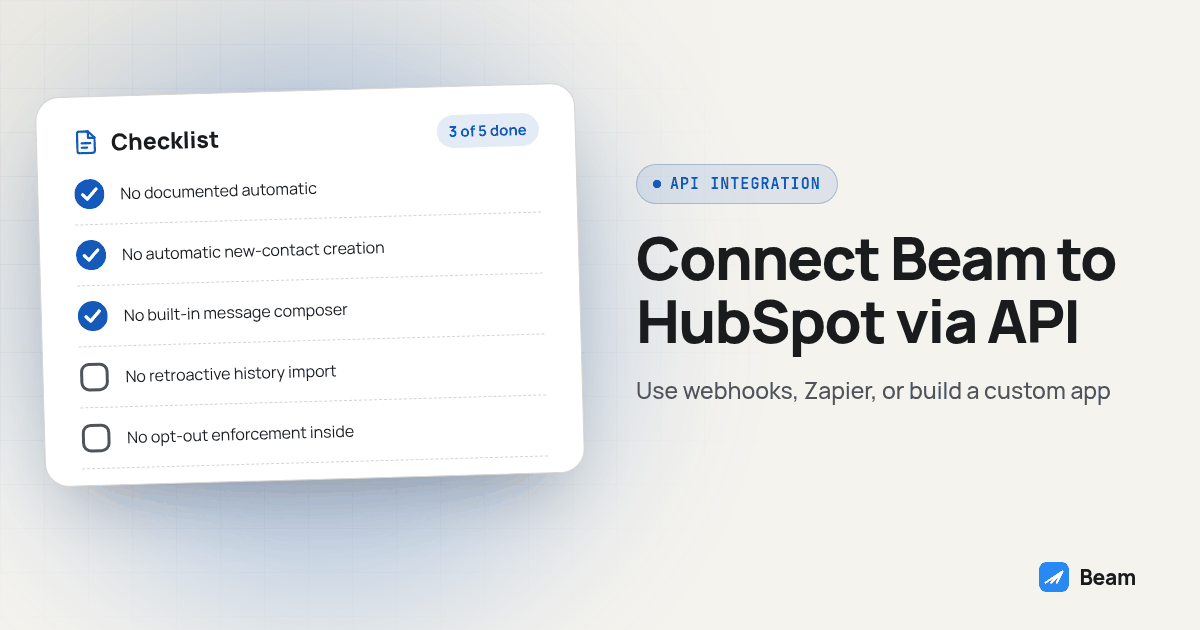
- No documented automatic deduplication on the generic send endpoint. The
/v1/messagesreference does not document the request-key contract used by GoHighLevel workflows. A HubSpot workflow re-enrollment can send the same text twice unless you build the guard yourself. - No automatic new-contact creation from an unknown inbound number. Your receiver needs an explicit policy for unmatched numbers: create a record through the HubSpot Contacts API, or hold it for review. Contact creation does not require a public app. Do not guess an email address to force a match.
- No built-in message composer or branded event card. Notes let reps read activity. Sending a manual reply inside HubSpot needs a separately configured interface or workflow. Custom app events require their own implementation and approval.
- No retroactive history import. Beam’s
/v1/conversations/:phoneendpoint can return up to 500 prior messages for a contact on request (Beam: history and listing), but nothing pushes that history into HubSpot by itself. If a client wants six months of prior texts backfilled onto HubSpot records, that is a one-time script someone runs, not a setting someone toggles. - No opt-out enforcement inside HubSpot. A
contact.opted_outevent tells your receiver that a contact texted STOP; mapping that onto a HubSpot property, and making sure your own workflows respect it, is work your team does, not a checkbox Beam exposes inside HubSpot.
How do we test this before turning it on for a client?
Run this checklist against your own contact before any real lead touches it.
- Run a controlled authenticated enrollment for your own contact record and confirm Beam returns a message ID with status
queued. - Confirm the text actually arrives on a phone you control, using iMessage on an eligible iPhone and RCS on supported Android phones, with SMS fallback where applicable. Verify the recorded channel and sender capability instead of assuming a route from the handset alone.
- Reply from that test phone and confirm your receiver logs a Note on the correct HubSpot contact, not a duplicate or an orphaned record.
- Trigger the same workflow enrollment a second time on purpose and confirm whether it sends a second text; if it does, fix the enrollment criteria before going further.
- Text STOP from the test phone and confirm the
contact.opted_outevent reaches your receiver and updates the suppression property used by every sending workflow. Verify that a later workflow attempt is blocked, not just that a note mentions STOP. - Pull
/v1/conversations/:phonefor that test contact and compare it against what actually landed in HubSpot’s timeline, so you know the two records agree before a client’s real conversation history depends on it.
Which path should your agency actually pick?
If one developer owns this and wants full control over what gets logged where, build the direct webhook and receiver. If your team already uses Zapier or Make, map outbound calls and HubSpot note writes there. Confirm how raw-body signature verification will work before using a generic catch-webhook step for inbound events. The custom app path makes sense if you are building a product meant for many HubSpot accounts rather than wiring up your own client base, since the OAuth and review process is real engineering overhead for a single-agency use case.
None of those three paths touch the actual sales process sitting on top of the synced data, whether a rep follows up fast enough, whether the right person owns the lead, whether a reply turns into a booked call. If that is the part actually costing your team deals, that is a sales-operations problem, not a messaging-sync problem, and it is the layer MetaTechAi’s managed services team builds on top of whatever CRM you are already running.
Get the webhook and receiver tested against your own contact first. Everything downstream, workflow logic, a rep’s trust in the timeline, a client’s confidence that nothing fell through, depends on that plumbing actually doing what you think it does.
What do agencies ask before connecting Beam to HubSpot?
Does Beam have a native HubSpot app we can install from the marketplace?
Beam does not document a native HubSpot app in the integration references used here. Its documented path for other CRMs is the REST API and event webhooks. Ask to see a supported connector and a same-contact send-and-reply test before treating any integration as a one-click installation.
How long does it actually take to wire Beam into HubSpot?
Estimate the work after checking your HubSpot workflow access, phone-field quality and inbound signature verification. Outbound sending is only one part. Reply logging, duplicate protection, opt-out mapping, missed-event recovery and a rep-facing reply interface each need configuration and testing. This guide does not promise a fixed build time.
Will the texts show up as a branded iMessage icon on the HubSpot timeline, or just a generic note?
The Notes API approach creates a generic note on the contact timeline. A custom app event is a separate project. HubSpot reserves legacy timeline APIs for existing partner event definitions; new app-event implementations use its current developer platform and require approval. A note is enough to display the message body, but it is not a reply composer.
What does this cost, and does Beam charge per HubSpot contact synced?
Text our team for a Beam quote based on your contact volume and messaging requirements. HubSpot's Send a webhook workflow action requires Data Hub Professional or Enterprise according to its documentation. That subscription requirement is separate from Beam; confirm it in your account before planning a direct workflow integration.
We're on GoHighLevel today and considering a HubSpot move. Does our Beam setup carry over?
Treat the HubSpot connection as a new integration. Confirm workspace and number continuity with Beam before changing CRM connections. GoHighLevel's documented workflow endpoint retrieves its own contact IDs and supports a request key. A HubSpot build needs its own contact mapping, duplicate protection and reply logging around the generic API and event webhooks.
Want help scoping the connection before it touches a client’s real HubSpot contacts? Text our team to try it and bring your workflow, reply-logging and number-continuity requirements.
For the underlying send and status contract this whole setup depends on, see the full iMessage API reference. If GoHighLevel is still part of your stack alongside HubSpot, Beam’s CRM integration guide covers the native side of that comparison, and the provider-switch checklist is worth reading before you move a number or a client’s history between the two. For how a competitor’s HubSpot claims actually hold up next to what Beam ships today, Beam vs Tuco AI checks the rest of that comparison.