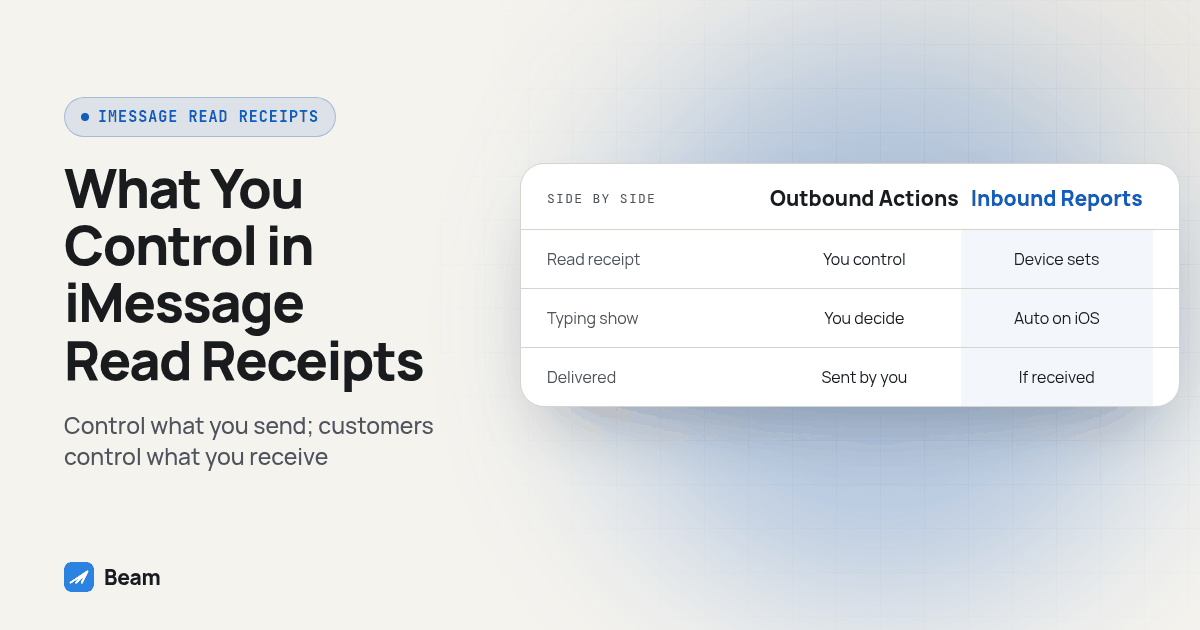
A business iMessage line can show a customer a read receipt and a typing indicator, but whether the customer ever sees a read confirmation that your message was read depends on a setting on the customer’s own phone, not on the texting platform. An agency can control whether it sends a read receipt back to the customer, but it cannot force the customer’s phone to report back one for your outbound text. SMS and RCS do not carry either signal the way iMessage does.
We get asked this constantly once a team moves a client off plain SMS: “so now we’ll know when they actually read it, right?” The honest answer is partial. Blue bubble conversations carry two live signals, a typing indicator and a read receipt, that a green bubble SMS thread simply does not have. But both signals run through a setting that lives on the customer’s device, and no texting platform, ours included, can flip that setting for someone else’s phone. Below is what each signal actually shows, what a team can and cannot control, and a short test you can run before you tell a sales rep to trust what the thread is telling them.
Do Read Receipts and Typing Indicators Actually Appear on a Business iMessage Line?
Yes, on an iMessage (blue bubble) thread, both signals exist. A typing indicator is the three animated dots that show while the other side is composing a reply, and a read receipt is the small “Read” label that appears under a sent message once the recipient has opened it. Apple documents both as part of the Messages experience on iMessage specifically, separate from the plain Delivered status every text gets (Apple: iPhone read receipts).
Neither signal exists on SMS or MMS. SMS and MMS do not provide Read receipts or typing indicators. RCS may support them when the recipient device and carrier support the feature, so do not treat every green bubble conversation as SMS (Apple: iMessage, RCS and SMS/MMS). A vendor comparison of blue versus green bubble messaging makes the same point from the business side: the extra signals are one of the practical reasons agencies want a blue bubble line for client conversations in the first place, not just a cosmetic difference (Sendblue, blue bubble vs green bubble).
Why Does Whether the Customer Sees a Read Receipt Depend on Their Own Phone?
Because read receipts are a setting Apple puts in the hands of the person holding the phone, not the person or platform sending the message. Apple’s own guide describes Send Read Receipts as something each user turns on or off for themselves, and on current iOS it can even be set per conversation rather than as one global switch (Apple: iPhone read receipts). A business account has no lever that reaches into a customer’s phone and changes that setting. If the customer has it off, every business they text, regardless of platform, gets the same nothing: no Read label, ever, on that thread.
This is the same point we made in our own troubleshooting piece on a stuck blue bubble: a missing read receipt on a thread is not proof the customer ignored the message, and it is not something an agency should promise a client it can guarantee (Beam: iMessage blue with no Delivered status). The platform can show you what the customer’s phone reports back. It cannot make the customer’s phone report back something the customer has chosen not to share.
What Can an Agency Actually Control, and What Is Out of Its Hands?
Split this into two directions, because they behave differently and sales teams routinely mix them up.
Outbound: showing the customer that your team read their message. This direction is API-driven on Beam, which means it is deliberate rather than automatic. Sending a read receipt back to a customer, and starting or stopping a typing indicator while a reply is being written, are separate actions your team or your AI assistant triggers, not something that fires just because someone on staff happened to open the thread. That is a meaningful difference from a personal iPhone, where the OS-level toggle applies to every thread at once (or per-conversation on newer iOS) with no way to send one and withhold another on a case-by-case basis for a specific message.
Inbound: confirming the customer read your outbound message. This direction depends entirely on the customer’s own device setting, for the reasons above. A chiirp overview of blue bubble features for business texting notes the same split: typing and read signals make a conversation feel more human and responsive, but they describe what a business-side platform can show a customer, not a way to extract a confirmation the customer’s phone was never going to send (Chiirp, the blue bubble advantage). We built our own iMessage API around that same honesty: it will not report a read confirmation for an outbound text that the recipient’s phone never sent back, because claiming otherwise would just be a different kind of guess dressed up as data.
Can an Agency Turn Read Receipts and Typing Indicators Off?
Only on the side it actually controls, which is the outbound direction. Because sending a read receipt or starting a typing indicator is a deliberate action rather than an automatic one, the practical “off” switch is simple: don’t trigger it. A team that wants every customer to see confirmation their message was read can call that action every time a message is opened. A team that wants to stay quiet, for example during a sensitive conversation where showing “Read” immediately might pressure someone to reply faster than they’re ready to, can just not send it.
What an agency cannot do is turn off, or turn on, whether the customer’s phone reports back a read confirmation for the business’s own outbound messages. That switch sits in the customer’s Messages settings, and it is not exposed to any business account, platform, or API on either side of the conversation. The same is true for the customer’s side of the typing indicator: if their phone shows typing while they’re composing a reply, that is standard iMessage behavior on their device, not something your platform injects or suppresses.
iMessage vs SMS vs RCS: What Actually Shows Up on Each Channel?
| Signal | iMessage (blue bubble) | RCS (where device and carrier support it) | SMS/MMS (green bubble) |
|---|---|---|---|
| Delivered status | Yes, reported by Apple’s servers | Carrier and device dependent, not uniform | Limited; carriers do not provide a consistent Delivered signal the way iMessage does |
| Typing indicator | Yes, standard iMessage behavior | Supported on some RCS implementations, inconsistent across carriers and devices | No, not part of the SMS/MMS standard |
| Read receipt | Only if the recipient has it turned on for that conversation | Supported on some RCS implementations, same inconsistency as typing | No, not part of the SMS/MMS standard |
| Who controls the read receipt | The recipient’s own device setting | The recipient’s own device and carrier support | Not applicable, the signal does not exist |
Treat the RCS column as “maybe, verify before you rely on it” rather than a firm yes. RCS feature support varies by phone model and carrier, which is a different and separate inconsistency from the SMS fallback case; our own piece on texting an Android phone from an iMessage business line covers how to check which channel a given number will actually land on before assuming a signal will be there.
How Do You Test Whether a Lead Actually Saw Your Follow-Up?
Run this before you let a rep treat a read receipt, or the absence of one, as a fact about the lead.
- Send the message from a line you know is blue bubble. Confirm the thread shows as iMessage on your side, not a green bubble fallback, before drawing any conclusion about read behavior.
- Note the Delivered status separately from Read. Delivered tells you the message reached the device. It does not tell you anyone looked at it.
- Wait a reasonable window before treating a missing Read as meaningful. People leave texts unopened for hours without ignoring the sender; a few minutes of silence proves nothing either way.
- Check whether a read receipt appeared at all, not just whether it says Read yet. If the thread has never shown a read receipt, record that the signal has not appeared. The reason may depend on the recipient settings or channel, so do not assume the customer ignored the message.
- Send a short, low-pressure follow-up instead of repeating the original message. A second nudge that adds new information (a time option, a direct answer to a likely question) tests engagement better than re-sending the same ask.
- Log the reply, not the read receipt, as your real signal. A reply, a booked action, or a forwarded document is confirmation. A missing Read label is not evidence of anything.
- Compare notes across a few leads before changing your process. One quiet thread is normal. A pattern across many leads on the same line is a channel or timing problem worth investigating, not an individual lead ignoring you.
Diagram: a two-column flow showing “What the thread shows you” (Delivered, Read if present, typing dots) on the left, feeding into “What you can actually conclude” (message arrived; maybe read; nothing proven either way) on the right, with a dotted line labeled “customer’s own setting” controlling whether the middle column (Read) ever appears at all.
What Should a Sales Team Rely On Instead of a Read Receipt?
Use this checklist with reps before they escalate or deprioritize a lead based on what the thread looks like:
- Did the lead reply, even briefly? Treat any reply as the strongest signal, stronger than any receipt.
- Did the lead take an action tied to the message (clicked a link, booked a time, sent a document)? That beats a read receipt every time.
- Has it been less than a few hours since the send? Don’t read anything into silence yet.
- Has this specific thread ever shown a Read label on any prior message? If never, assume the setting is off and plan your follow-up cadence without expecting one.
- Is the channel actually iMessage, or did it fall back to SMS? A green bubble thread was never going to show Read or typing, so don’t flag it as a bad sign.
Keep that list next to whatever script your sales floor already uses for GoHighLevel conversations, and have new reps run through it on their first week of client texting instead of learning the hard way that a quiet thread is not the same as a dead lead.
Why Does Any of This Matter Beyond the Thread Itself?
A rep who assumes “no Read means they didn’t see it” will often follow up too aggressively, or give up on a lead who was simply using a feature their phone offers by default. A rep who assumes “Read means they’ll reply soon” can sit on a lead that already needs a different kind of nudge. Both mistakes come from treating a device setting as if it were a commitment from the customer. The signal belongs in how your sales system actually scores engagement and timing, not just in what a rep happens to notice on one screen; our partner company’s guidance on building that kind of system wiring covers how to route real engagement signals (replies, bookings, link clicks) into the CRM stage changes that drive follow-up, instead of leaving it to whatever a thread happens to display.
What Do Agencies Ask About Business Texting Read Receipts?
Will a customer always see a read receipt the moment our team opens their text?
No. A business iMessage line can send a read receipt through the API, but it is a separate action, not an automatic side effect of someone on the team opening the thread. If nobody triggers it, the customer’s message just sits there without a Read label, the same way it would in a personal Messages thread with receipts turned off.
Can our team see in GoHighLevel when a lead has actually read our outbound text?
Not reliably. Whether a customer’s phone reports back a read confirmation depends on a setting on their device, not on the sending line or the CRM. Treat a missing read signal as unconfirmed, the same way you would treat a delivered iMessage with no further status, and build follow-up timing around a reply or a booked action instead of a read receipt.
Does turning on typing indicators and read receipts need separate setup, or is it included with the iMessage line?
It is part of the same blue bubble connection, not a separate add-on to configure. Once a line sends and receives iMessage, the typing and read actions are available through the same connection; there is no extra signup step beyond having that iMessage-capable line in place.
If we move a client from plain SMS to a blue bubble iMessage line, do old conversations suddenly show read receipts?
No. Read receipts and typing indicators only exist on iMessage threads going forward from the switch. SMS and MMS history has no read or typing concept to retroactively fill in, and the carrier never recorded one, so there is nothing to backfill once the number starts sending blue bubble messages.
What Should You Check Before You Promise a Client Read Confirmation on Every Text?
Set expectations before the rollout, not after a client asks why a lead “definitely read it but didn’t reply.” Explain the split clearly: your team can choose to show a customer that their message was read, and can show a typing indicator while composing a reply, but nobody, on any platform, can turn on a read confirmation for the customer’s own outbound behavior. That setting belongs to the person holding the phone. Build your sales process around what a reply or a booked action tells you, keep an eye on whether a thread has ever shown a Read label at all, and text our team to try it if you want to see how the typing and read signals actually behave on a live blue bubble line before you roll it out to a client’s sales floor.