What counts as “minimum necessary” for a patient text, and how do you test it?
For routine scheduling, ask whether each detail helps the patient act on the message. The HHS minimum necessary guidance has an important exception: the standard does not apply to disclosures to the individual who is the subject of the information. It also excludes disclosures to or requests by healthcare providers for treatment. Keeping clinical detail out of these templates is a practical privacy safeguard, not a claim that HIPAA categorically prohibits sending it to a patient.
A text can appear on a shared phone or lock screen. Confirm the patient’s communication preferences before sending and use the practice’s approved channel for sensitive conversations. The examples here are operational starting points, not legal advice or proof that a messaging program meets every requirement.
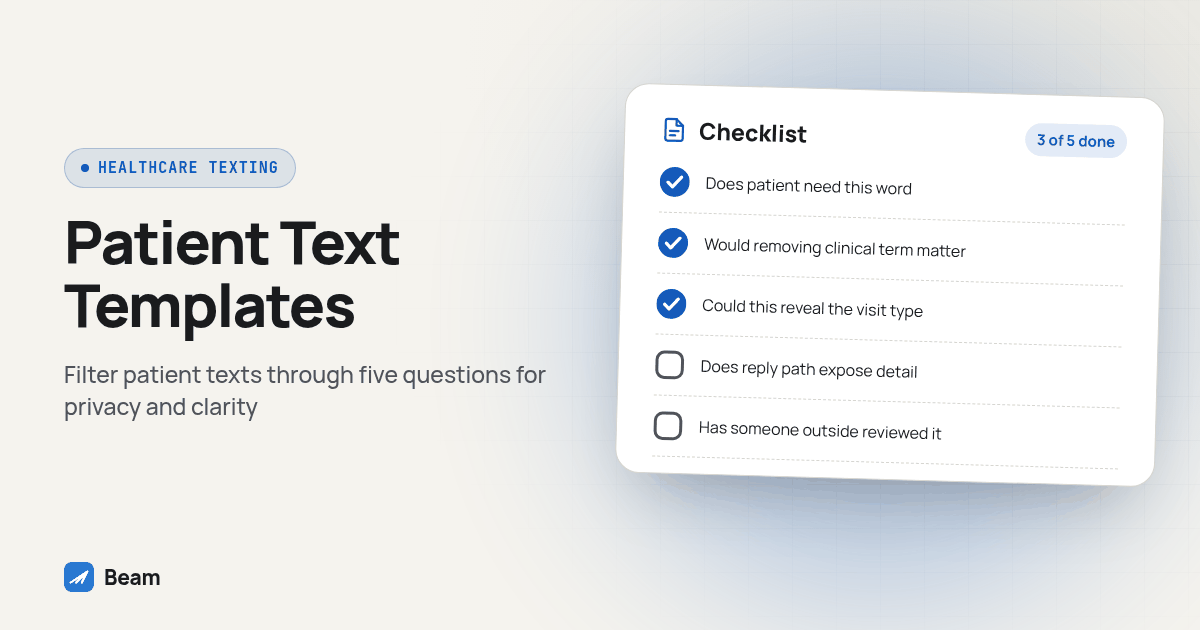
Run every template through this five question filter before it goes to a live patient list, not just once at launch:
- Does the patient need this word to know when and where to show up? If the answer is no, the word does not belong in a confirmation or reminder.
- Would removing the clinical term change whether the patient can act on the message? If removing “follow up visit” or a procedure name still leaves a clear date, time and location, remove it.
- Could this wording identify the visit type to someone who sees the patient’s phone? A text that reads “your appointment” protects more than one that reads “your biopsy results appointment.”
- Does the reply path expose anything the original text left out? A patient asking “is this about my test results” in a reply should route to a staff member, not get answered by an automated workflow repeating clinical detail back.
- Has someone outside the scheduling team read the template? A second reviewer, even briefly, catches the clinical shorthand that scheduling staff stop noticing because they write it every day.
Keep the filter attached to the template file itself, not just the launch checklist, so later wording changes receive the same review as the first version.
What should an appointment confirmation text say?
A confirmation text has one job: let the patient verify the booking is correct and give them a way to flag a problem. Keep the practice name in the first line so the patient recognizes who is texting before reading further.
Hi {{first_name}}, this is {{practice_name}}. You're confirmed for {{appointment_date}} at {{appointment_time}} {{timezone}} at {{location_name}}, {{location_address}}.
Reply YES to confirm or call {{practice_phone}} to reschedule. Reply STOP to opt out.
Notice what is missing: no provider specialty in the first line unless the practice name already implies it, no visit reason, no insurance detail. If the location has more than one department at the same address, use the building or suite number instead of a department name that reveals the type of care.
What should a reminder text say, and how is it different from the confirmation?
The confirmation goes out once, right after booking. The reminder goes out closer to the visit, usually the day before, and its job shifts from verifying the booking to prompting action: show up, bring something, or reschedule now while there is still time to fill the slot.
Reminder: your visit with {{practice_name}} is tomorrow, {{appointment_date}} at {{appointment_time}} {{timezone}}.
Location: {{location_name}}, {{location_address}}. Call {{practice_phone}} or reply RESCHEDULE if you need a new time, or STOP to opt out of texts.
The healthcare exemption in 47 CFR 64.1200(a)(9)(iv) has narrow conditions: patient-provided numbers, provider identity and contact information, eligible healthcare purposes, no marketing or financial content, and messages free to the recipient. It limits provider-initiated calls and texts combined to one daily and three weekly, generally limits texts to 160 characters, requires STOP instructions and immediate opt out handling, and requires HIPAA compliance. These are exemption conditions, not a universal cap on all patient messaging.
The illustrative templates in this guide may exceed that length after fields expand. Use them within a reviewed consent-based program; do not assume they qualify for the exemption. A privacy or legal reviewer should determine the applicable basis before launch.
What should a pre-visit prep text say without naming the reason for the visit?
Prep instructions need a separate review because they can reveal the visit type. Keep administrative details such as what to bring and arrival time separate from patient-specific clinical preparation.
{{practice_name}}: before your visit on {{appointment_date}}: please arrive {{arrival_buffer}} minutes early, bring a photo ID and your insurance card, and {{approved_prep_instruction}}.
Questions? Call {{practice_phone}}. Reply STOP to opt out.
The {{approved_prep_instruction}} field should hold only what staff has approved for that channel, administrative notes such as “bring your completed intake form.” Clinical preparation must come from the care team for that specific patient, not from a generic template or an AI-generated suggestion. Leave out the test name, the procedure name and anything a reader could use to guess the visit type. If the instruction itself would reveal the reason for the visit no matter how it is worded, have a staff member call instead of texting it.
What should post-visit follow-up and recall texts say?
A follow-up checks in shortly after the visit; a recall brings the patient back for something due later, like a routine cleaning or an annual exam. Both can stay as generic as the confirmation.
Follow-up: {{practice_name}} here. If you need help after your visit on {{appointment_date}}, call {{practice_phone}}. Please do not text medical details. Reply STOP to opt out.Recall: {{practice_name}} here. It's time to schedule your next routine visit. Reply BOOK or call {{practice_phone}} to pick a time. Reply STOP to opt out.Neither template names what was done at the visit or what the recall is for beyond “routine visit.” A patient who wants detail can call, and that call is where a staff member, not an automated text, decides how much to say.
How do you capture consent and handle opt out for a patient list specifically?
A general texting signup on a website is not the same consent record as a patient agreeing to appointment texts at intake. Capture the patient version separately, during intake or at the first visit, with language that names the sender, the message types and the opt out method:
I agree that {{practice_name}} may text me about appointment confirmations, reminders and visit prep at the mobile number I provide. Reply STOP at any time to opt out, or reply HELP for help.Use the sample intake line within the practice’s full approved disclosure, including its privacy information, expected frequency and help contact. Give the patient a clear choice and save their response with the wording they saw. A checkbox with no record of its accompanying text leaves the reviewer guessing what the patient agreed to. For a patient list, add one more habit: honor opt out requests that arrive as plain language, not just the keyword. The FCC rule on reasonable revocation methods addresses clear requests made without a particular keyword. “Please stop texting me about this” should suppress the contact exactly like a STOP reply does, and the suppression needs to reach every workflow pulling from that list, not just the one that sent the original message.
Which staff role can send and reply, and how does that get logged?
Limit sending and reply access to the front desk and clinical staff who already handle scheduling calls for that patient. Expanding access to anyone with a login defeats the minimum necessary filter before a single message goes out, since more eyes on the thread means more people who can see what little detail remains.
Keep a short log with three columns: who can send from the practice’s number, who reviews a reply that does not match an expected keyword, and who signs off when a template changes. Review that log whenever a staff member’s role changes, not on a fixed schedule that might miss a departure. A current log helps a privacy lead reconstruct who had access and who handled a reply without relying on staff memory.
Which message type carries which risk, side by side?
| Message type | When it sends | What to include | What to leave out |
|---|---|---|---|
| Confirmation | Right after booking | Practice name, date, time, location, a reply option | Visit reason, provider specialty if revealing, insurance detail |
| Reminder | The day before | Same core details, plus reschedule option | Marketing content, more than the exemption’s frequency limit |
| Prep | Before the visit | Arrival time, ID and insurance card, approved generic prep note | Procedure name, test name, anything identifying the visit type |
| Follow-up | Shortly after the visit | A general wellness check, a call back number | What was done at the visit, results, next steps in clinical terms |
| Recall | When the next visit is due | “Routine visit” language, a booking link or reply option | The specific reason the next visit is needed |
Treat this table as the starting filter for a new template, then run it through the five question test above before it reaches a live list.
Texting is not the only channel clinics lean on to fill a missed appointment. Some practices pair this wording with outbound calls for patients who do not respond to text at all; RizzDial’s guide on AI voice agents and dental no shows covers that calling side of the same problem. Beam handles the texting thread; the two channels line up well when they point at the same appointment record instead of running as separate projects.
For the registration, consent and HIPAA mechanics behind all of this wording, start with Beam’s texting compliance hub, which covers A2P 10DLC, TCPA and HIPAA together. Beam supports HIPAA compliant texting through compliant carrier infrastructure, and the practice still owns what goes into each message and who can read it. If you are weighing text against a phone call for the confirmation step itself, our guide on confirming appointments by text instead of calling walks through that setup and testing process. And if a practice also runs marketing texts to the same list, TCPA texting rules for business covers the consent and quiet hours questions that need a separate review when promotional messaging is involved.
How should an agency test the wording before the clinic uses it?
Use fictional patient records and phones controlled by the team. Keep real patient details out of screenshots and shared agency tickets. This original acceptance test checks the message, reply and staff handoff together:
- Preview every expanded field. Use a long practice name, a missing first name and an appointment with no suite number. Save the actual output, including its character count. Block messages with unresolved placeholders or ambiguous locations.
- Change the appointment. Move a test visit to a different date and verify that the old reminder is cancelled. Compare the new text with the calendar instead of trusting the workflow label.
- Send an unexpected reply. Reply with a question about preparation. Confirm that a named staff member receives it and that automation does not invent clinical advice. Record who covers replies when the usual scheduler is away.
- Test suppression across templates. Opt out on the test phone, then attempt a confirmation, reminder and recall. Each should remain suppressed under the practice’s policy. Repeat with a plain language stop request and check the staff review path.
- Review the evidence with the clinic. Save the approved wording, test date, reviewer, sending basis and access list. Ask the practice to approve each message category separately. A successful confirmation test does not approve recall or promotional campaigns.
For GoHighLevel agencies, make the clinic responsible for the clinical wording and contact policy while the agency documents field mapping and observed delivery. Check the recipient’s actual screen and the staff inbox. A workflow execution record alone does not show that the patient received the intended wording or that anyone saw the reply.
None of this replaces a practice’s own privacy review. What it gives a front desk is wording to start from, with unnecessary clinical detail removed, so the review is confirming a program that already keeps clinical detail out of the thread instead of finding that problem for the first time.
What do front desks still ask about patient text wording?
Can a confirmation or reminder text name the diagnosis or procedure?
For routine scheduling templates, leave diagnoses and procedure names out and include only useful appointment details. This is a privacy safeguard, not an absolute HIPAA prohibition. HHS says the minimum necessary standard does not apply to disclosures to the patient. Sensitive content still needs the practice’s approved communication process.
What's the daily and weekly text limit for patient messages sent without separate marketing consent?
Under the narrow federal healthcare exemption, a provider may initiate one message per day and three per week, counting calls and texts together. The other exemption conditions also apply. This is not a universal limit for every consent-based patient messaging program; have the practice review its specific sending basis.
How does a practice capture consent and opt out specifically for a patient list, not just a general texting signup?
Collect it at intake with its own line, separate from a marketing checkbox: who is texting, what kinds of messages the patient should expect, the number it comes from, and how to stop it. Log the date and the exact wording the patient saw. Opt out has to work the same way: STOP and its common variants, plus a plain language request typed into a reply, both need to land in one suppression record the whole front desk checks before sending anything else.
Which front desk role should be allowed to send and reply to patient texts, and how should that get logged?
Give sending and reply access to the staff members who already handle scheduling and patient calls, not the whole office. Keep a short log of who can send, who can reply, and who reviews an unclear reply before anything beyond the approved templates goes out. Keep access records and message activity available for the privacy lead to review if a patient reports an unexpected message.