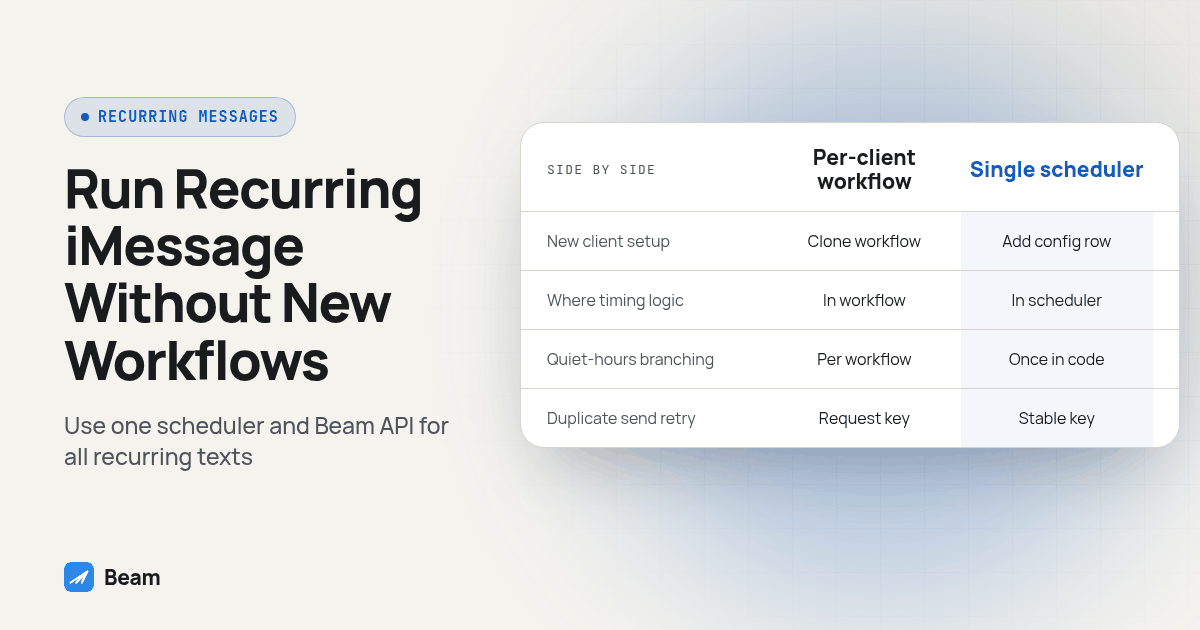
Quick answer: Beam’s API has no recurring-send field or scheduling endpoint, so the recurring logic must live in a scheduler you control. One cron job or serverless function can read a config table, then call Beam’s send endpoint when each client’s row is due. Use a stable key for each occurrence so a retry does not send the same reminder twice. Adding a client becomes a new row, not a new workflow.
Agencies often ask whether they can schedule a recurring send through the API after building the third or fourth GoHighLevel workflow for the same reminder. The honest answer has two parts: Beam does not provide a built-in recurring scheduler, but the timing logic does not have to live in GoHighLevel’s workflow builder.
This guide covers driving a recurring, multi-client cadence from your own scheduler against Beam’s API. It assumes you have read our guide to scheduling one message for a client business line, which explains where a single pending send can live, and our guide to GoHighLevel quiet-hours scheduling, which covers the timing branch inside one workflow. This guide addresses the same cadence across many clients without rebuilding the timing logic by hand each time.
Can Beam’s API actually schedule a recurring iMessage send?
Not by itself. Beam’s messaging endpoint, POST /v1/messages, takes a recipient, a message, and optional attachment and effect fields. It does not include a scheduled_at field, a recurring setting, or a cadence option (Beam’s send-a-message reference). Calling it queues a message immediately, subject to normal pacing and sending hours.
That differs from the approaches in Blooio’s scheduling guide, which describes a single scheduled send through Apple’s Send Later, the Shortcuts app, or an API connected to Zapier, Make, or n8n. Those options address one message, one time, and one contact. An agency still needs a way to run the same cadence across a client roster without configuring each client separately.
The recurrence has to live somewhere: in a GoHighLevel workflow’s Wait step, covered by our quiet-hours guide, or in a scheduler you control that calls Beam’s send endpoint on a timer. The latter centralizes the timing logic for multiple clients.
Why do agencies end up building a new GoHighLevel workflow for every batch?
The builder is already in front of them, and it works for one client at a time. An agency can set up a monthly reminder workflow for client A with a trigger, a Wait step, and a Custom Webhook pointed at Beam’s workflow endpoint. When client B signs up for the same reminder, cloning the workflow into the client’s sub-account may seem fastest. Client C leads to another clone.
GoHighLevel’s Wait action documentation describes holding a workflow contact until a time or condition. The maintenance work appears later: a wording change must be made in each clone, and each client workflow has its own webhook details to check. A shared scheduler instead reads per-client details from configuration while keeping the recurring logic in one place.
What changes when your own scheduler calls Beam instead of a GoHighLevel workflow?
Beam documents the GoHighLevel workflow endpoint, https://beam.aisync.link/api/crm/workflows/send, as an HTTPS endpoint. Its workflow documentation describes the request body and does not require that the POST originate from a workflow node. A script, cron job, or serverless function can call it with a valid location_id and contact_id, plus the workspace token in the authorization header.
Instead of creating a Wait step and webhook node for each new client, add a row to a table the scheduler reads. Fields might include client name, workspace token, GoHighLevel location ID, cadence, message template, and contact source. The scheduler checks which rows are due, then sends using the appropriate endpoint. A change to shared wording can happen once in the template source.
If a client’s contacts are not in GoHighLevel, skip the workflow endpoint and call POST /v1/messages by phone number (Beam’s API introduction) for a contact list managed in a spreadsheet or database.
Which endpoint fits a recurring batch: the workflow endpoint or v1/messages?
| Question | GoHighLevel workflow built per client | One scheduler calling Beam directly |
|---|---|---|
| Setup for a new client | Clone and edit a workflow in that client’s sub-account | Add one row to a config table |
| Where timing logic lives | Inside each workflow’s Wait step | In your scheduler’s cron or job trigger |
| Legal quiet-hours branching | Handled per workflow; see our state quiet-hours guide | Your scheduler’s job, with shared branching logic |
| Preventing a duplicate send on retry | Workflow re-enrollment rules plus a stable request_key | A stable key built from client, cadence, and period |
| Wording change across clients | Edit each cloned workflow | Edit one template field |
| Fits well when | One client has unique timing rules | The same cadence runs for many clients |
Both paths end at a POST to a Beam endpoint. Channel choice, pacing, and opt-outs are handled as part of the send. The difference is how many places the recurring logic must be maintained.
How do you stop a retried batch run from sending the same reminder twice?
Any system calling a send API on a timer needs to answer what happens if a run fires twice. Beam’s workflow endpoint uses a request_key, a string identifying one intended message. Beam’s GoHighLevel workflow guide explains that a recurring reminder needs a stable key built from the appointment or business-event ID plus the reminder step. Re-enrolling the same event should reuse that exact key. Reusing a key returns the original result instead of sending again; changing the text under the same key returns a request_key_conflict rather than choosing a version.
For a batch across clients, build the key from client ID, cadence name, and the period it covers, such as acme-maintenance-reminder-2026-12. Compute it before sending so a crashed run retried later produces the identical key and Beam can deduplicate it. The plain POST /v1/messages endpoint does not document this field, so route GoHighLevel contacts through the workflow endpoint when appropriate. For other contacts, maintain your own sent log of client, cadence, and period.
How do you build a recurring batch sender across many clients?
Build it once, test it with one client, then widen it. These steps assume contacts live in GoHighLevel. If they do not, skip the location and contact fields and call /v1/messages directly.
- Build the config table first, not the script. Add one row per client with its name, Beam workspace token, GoHighLevel location ID, cadence, message template, and recipient source.
- Confirm consent covers recurring sends. Agreement to one appointment reminder does not automatically establish consent to a standing monthly text. Beam’s consent guide notes that a disclosure for recurring messaging should include frequency.
- Write one scheduler outside GoHighLevel. Set it to run on your chosen interval, such as a daily cron or serverless schedule, and have it check whether each row is due.
- Compute the occurrence key before sending. Combine client ID, cadence name, and period so rerunning the same period reuses the identical key.
- Check opt-out state before looping the list. Use
GET /v1/contacts/:phoneor handle a403as a stop for that one send; treat a skipped opted-out contact as expected. - Choose the endpoint. Use
/api/crm/workflows/sendwith the computed key for GoHighLevel contacts, or/v1/messagesfor a list you manage directly. Personalize each recipient’s message instead of sending identical text to the batch. - Log the response. Store the message ID and status with the client, cadence, and period used to build the send key.
- Repeat on the next due cycle. A new client is a new config row; the scheduler itself does not need to change.
How do you test a recurring batch sender before it touches a real client list?
Run this against one workflow-connected test contact before adding another row to the config table.
- Build the config row for one test client and calculate its occurrence key by hand so you know what to expect.
- Call the endpoint with
dry_run: true. Beam’s workflow guide documents avalidatedresponse with no send. - Set
dry_runtofalsefor that test row. Confirm a message ID andqueuedstatus, then verify the text arrives at the test phone. - Repeat the same invocation for the same period without changing the key. Confirm Beam returns the same message ID with
duplicate: true. - Advance to the next period and confirm the key changes and a distinct message is sent.
- Add a second config row only after the first test is complete and recorded.
What consent, pacing, and personalization rules still apply to a recurring batch?
Moving the trigger out of GoHighLevel does not change consent or carrier requirements. An opted-out contact is blocked at the send layer regardless of what called the endpoint (Beam’s consent guide). A2P 10DLC registration, toll-free verification, and short-code approval depend on number type, not on whether a person clicked a workflow or a cron job fired.
Pacing also matters. Beam’s capacity guide describes how pacing protects new outbound-first contacts. A contact with an existing conversation history on the line is different from a new contact on a later reminder cycle. Size the first run of a new list against that guide’s per-line ceiling. Keep watching reply rates and personalization after the initial send.
Avoid sending identical text to a large batch at once. Build variation into the template, such as rotating a few approved phrasings per cadence, rather than relying on first-name merge fields alone. The scheduler should retain the source message and the version used for each send so a later review can explain what went out.
Where does this fit with the rest of an agency’s texting stack?
Our outbound texting page covers Beam’s sending across iMessage, RCS, and SMS, including mass outbound when a client’s budget allows it. That is the layer each recurring batch eventually hands its message to. Confirm capacity and reply handling with our team before pointing a scheduler at a live client roster. For channel mechanics, our iMessage API guide explains how Beam selects iMessage, RCS, or SMS fallback per recipient, so the scheduler does not need to choose the channel itself.
Agencies running calls on the same client relationship can review RizzDial’s integrations page before stacking another cadence against the same contact. Coordinate the text and call sequences so they do not work against each other on the same lead.
Text our team to try it if you want a second set of eyes on a recurring send before building the config table for real.
What are the frequently asked questions about scheduling a recurring iMessage send?
Do we need GoHighLevel at all to run a recurring iMessage cadence this way?
No. GoHighLevel is one valid contact source, through Beam’s workflow endpoint, but it is not required. If your contact list lives in your own spreadsheet or database, call Beam’s direct messaging endpoint by phone number instead and skip the CRM step entirely.
What does Beam charge for running a scheduler like this against the API?
Pricing is not posted on this page. Text our team with the number of clients, the cadence and the contact volume per client, and the team will scope it against your actual setup instead of a generic rate.
We already run these reminders through Zapier or Make, one scenario per client. How much work is it to move to a single scheduler?
Less than it sounds like, because the hard part, the contact list and the message wording, stays the same. The work is moving the per-client timing and routing logic out of N separate scenarios and into one config table your scheduler reads, then pointing every row at the same Beam endpoint instead of a separate Zap per client.
Does calling Beam’s API on our own schedule get around A2P 10DLC registration or opt-out rules?
No. Carrier registration requirements depend on the number type you send from, not on what triggers the send, and Beam blocks an opted-out contact at the send layer regardless of whether the call came from a GoHighLevel workflow, a cron job or a manual test. Build the dedupe and consent checks into your scheduler; they do not go away because the trigger moved.
How is this different from just adding a Wait step to a GoHighLevel workflow?
A Wait step holds one contact inside one workflow until a set time. That works well for a single client’s reminder sequence. It does not help once you are running the same cadence for twenty clients, because GoHighLevel has no built in way to run one workflow across twenty separate accounts; you would still be opening the builder twenty times. A scheduler calling the API directly reads twenty rows from one table instead.