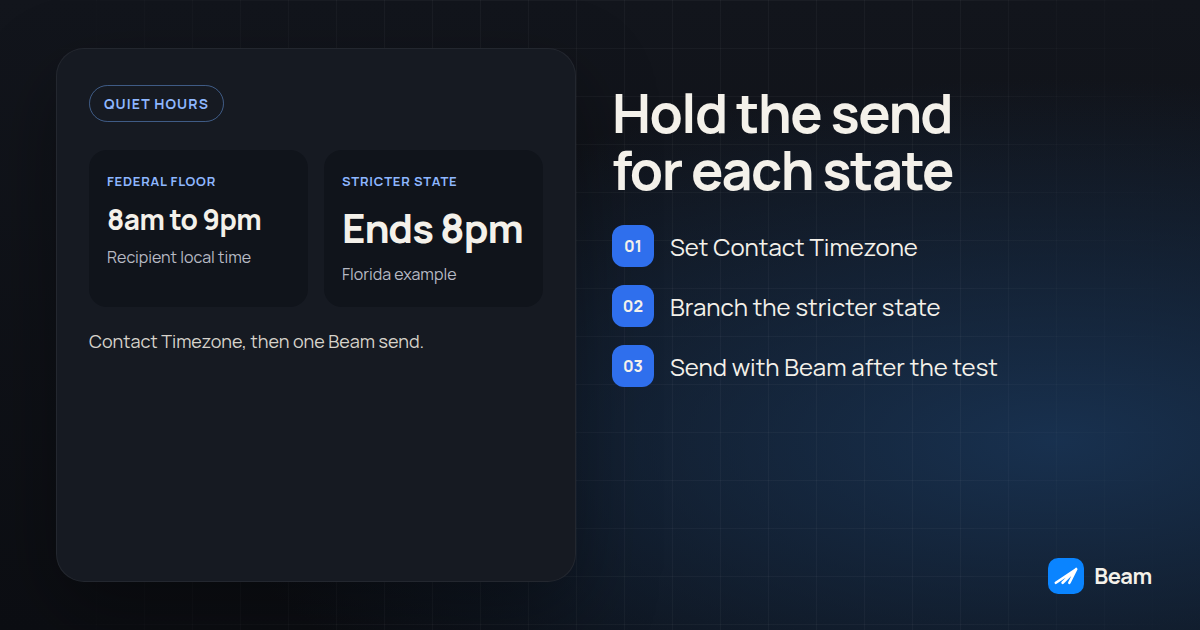
TL;DR: Yes. GoHighLevel’s workflow Wait action can hold a contact until a set time, and a Time Window setting can restrict the send to a chosen hour range in the contact’s own time zone, which is how you keep an automated iMessage inside the federal 8 a.m. to 9 p.m. floor (47 CFR 64.1200(c)(1)). One workflow only gets one Time Window, though, so a list that includes a stricter state like Florida needs a branch that routes those contacts to an earlier cutoff before the Custom Webhook step hands the send to Beam.
We get this question from agencies building their first multi-state texting workflow for a client, usually right after the client asks whether the automation “knows” it shouldn’t text a lead in Florida at 8:30 in the evening. It doesn’t, not by default. GoHighLevel’s scheduling tools and the legal quiet-hours window are two separate systems, and this guide wires them together inside one workflow instead of leaving a human to remember the state rule.
This is operational guidance from the rules and product docs cited below, not legal advice. Have counsel confirm which messages count as telephone solicitations and which state rules apply before a client list goes live.
Can a GoHighLevel workflow actually schedule an iMessage for later?
Yes, through the Custom Webhook action pointed at a Beam workflow endpoint. GoHighLevel’s native Send SMS action doesn’t pick up an additional Beam channel; it keeps using your default SMS provider. The documented path is a Custom Webhook step that posts to Beam’s workflow endpoint with a dry_run flag you flip from true to false once a test contact confirms the setup, and a request_key that stops the same reminder from firing twice if the workflow re-enrolls the contact (Beam’s GHL workflow documentation walks through both fields). That webhook step is the “send,” and it fires the instant the workflow reaches it. Timing the send, and keeping that timing legal, is a separate job that happens earlier in the same workflow.
Our existing guide to scheduling a text for a client business line covers the three places a pending message can live: Apple’s own Send Later, a GoHighLevel workflow wait, or a messaging platform’s own scheduler. This article stays on the second one and adds the piece that guide doesn’t cover: making that wait respect each recipient’s state, automatically, inside the workflow itself. For the contact-timezone fallback on reminder workflows, use the contact timezone test alongside the steps below.
Why does the legal quiet-hours window depend on the recipient’s state, not the workflow’s clock?
Because the TCPA’s quiet-hours rule is written around where the phone is, not where your office or your GoHighLevel sub-account sits. The federal floor runs 8 a.m. to 9 p.m. in the recipient’s local time for a telephone solicitation sent by text (47 CFR 64.1200(c)(1)), and our TCPA quiet hours by state guide covers that federal floor plus Florida’s stricter, earlier cutoff for covered commercial telephone solicitation calls under Fla. Stat. 501.616(6)(a) in more depth, including why we treat 8 p.m. as a conservative Florida texting cutoff while coverage of text messages specifically is confirmed by counsel.
A workflow built around a single office-hours assumption can look fine on the screen where it was built and still miss on the device it reaches. A send timed for 8:30 p.m. Eastern lands at 5:30 p.m. in Arizona, comfortably inside the window, and at 8:30 p.m. for an Eastern-time Florida contact, already past that state’s earlier cutoff. The workflow didn’t do anything wrong by GoHighLevel’s clock. It did the wrong thing by the recipient’s.
Which two GoHighLevel settings actually decide whether a wait step respects quiet hours?
Two settings, and missing either one is the usual way a quiet-hours workflow fails quietly. First, the workflow-level timezone dropdown: choosing Contact Timezone makes every time-dependent step in that workflow, including Wait and Time Window, run against the individual contact’s own timezone instead of the sub-account’s, which GoHighLevel’s own workflow settings documentation describes as the setting built for exactly this kind of national or multi-state send. Second, the Time Window setting itself, which restricts communication actions like SMS and email to a chosen start time, end time and set of weekdays, and holds the contact until the next window opens if the workflow reaches that step outside it (GoHighLevel’s workflow action: Wait and workflow settings overview).
Leave the workflow on Account Timezone and the Time Window still runs, just against your sub-account’s clock rather than each contact’s, which quietly reintroduces the exact mismatch this setup is supposed to prevent. GoHighLevel’s documentation also describes a fallback for the opposite gap: if a contact record has no timezone populated and the workflow is set to Contact Timezone, the workflow doesn’t fail, it falls back to the account timezone for that one contact. That fallback is a reason to flag timezone-less contacts for manual review, not a reason to trust the send time by default.
How do you build a delay step that targets each state’s quiet hours automatically?
Build this once in a draft workflow and test it before enrolling real leads. The steps assume the workflow already captures state on the contact record. HighLevel documents the workflow Time Window as one start time, one end time and one set of weekdays for the whole workflow, and says you cannot store a different Time Window for different days in that same workflow. A branch still needs its own earlier cutoff. You get that cutoff from a Wait step’s advance window on that branch, or from a second workflow that has its own Time Window.
- Set the workflow timezone to Contact Timezone. Open the workflow’s settings and change the timezone dropdown from Account Timezone to Contact Timezone, so every Wait and Time Window step downstream runs against each contact’s own clock.
- Confirm every contact entering the workflow has a populated timezone or state field. Add a filter or a Specific Conditions wait that routes contacts missing both fields to a manual-review branch instead of letting them fall back to the account timezone by default.
- Add a branch for stricter states before the main window. Use an IF/ELSE or Specific Conditions step keyed off the state field (GoHighLevel’s If/Else action). Route Florida contacts (and any other state your counsel flags as stricter) down one path, and everyone else down the federal-floor path.
- On the federal-floor path, hold sends for 8 a.m. to 9 p.m. in the contact’s timezone. Add a Wait on that branch and set its advance window to resume between those hours (Wait action). If you want this group to use the workflow-level Time Window itself, put these contacts in their own workflow and set that workflow’s Time Window to 8 a.m. to 9 p.m. One workflow-level Time Window cannot also store an 8 p.m. end for Florida.
- On the stricter-state path, end the window no later than 8 p.m. Use that branch’s own Wait advance window, or a separate workflow whose Time Window ends at 8 p.m. Keep both paths on the same Contact Timezone setting. Only the end time differs. That separate, earlier window is the Time Window the stricter state is routed to.
- Rejoin both branches into the same Custom Webhook step. Point it at Beam’s workflow endpoint with
dry_run: truefirst, a stablerequest_keytied to the reminder or appointment event, andconsent: trueonly once you’ve confirmed the record (Beam’s GHL workflow guide documents the exact payload fields). - Flip
dry_runto false on one real test contact per branch, not a bulk enrollment. Withdry_runstill true, expectstatus: validatedand nothing sent. After you flip it, confirm a message ID andstatus: queuedcome back, then confirm the text actually lands on the test phone and shows correctly in the GoHighLevel conversation timeline. - Re-run the whole workflow for a second test contact after changing the contact’s state field. This confirms the branch logic actually reroutes a contact rather than carrying over the first branch’s window from an earlier test.
Treat a result as unresolved until you’ve watched the message arrive, not just watched the webhook return a success response. A queued status is acceptance, not delivery.
What happens when a contact’s state cuts the window shorter than the federal floor?
The stricter rule controls for that contact, and your workflow has to know which contacts that applies to before it reaches the window step, not after. That’s the entire reason step 3 above exists as a branch rather than a single shared setting: GoHighLevel’s Time Window takes one start time, one end time and one set of weekdays for the workflow it sits in, so a list spanning Florida and, say, Texas and Arizona needs at least two windows if you want Florida held to an earlier cutoff while the rest of the list keeps the fuller federal window.
This is also where a tool built only for scheduling, without a quiet-hours layer, runs into trouble if a team assumes it. Blooio’s own scheduling guide walks through three ways to schedule an iMessage, iOS Send Later, the Shortcuts app, and a REST API wired into Zapier, Make or n8n, and none of the three touch quiet hours, time zones or state rules at all. That’s fine for a single scheduled send a person builds by hand. It’s a gap for an agency running the same workflow across a multi-state client list, because nothing in that stack stops a scheduled 8:15 p.m. Eastern send from reaching a Florida contact outside their state’s window.
How do the federal floor, a stricter state and a GoHighLevel-native Time Window line up?
| Question | Federal TCPA floor | Stricter state (Florida example) | GoHighLevel Time Window setting |
|---|---|---|---|
| Earliest legal send | 8 a.m. recipient local time | 8 a.m. recipient local time | Start time you configure |
| Latest legal send | 9 p.m. recipient local time | 8 p.m., per Fla. Stat. 501.616(6)(a) | End time you configure |
| Applies to | Telephone solicitations (marketing calls and texts) | Covered commercial telephone solicitation calls; confirm text coverage with counsel | Whatever communication actions sit inside the window |
| Who sets the clock | The recipient’s time zone | The recipient’s time zone | Contact Timezone setting, or it defaults to the sub-account |
| What GoHighLevel does if it’s missed | Not applicable; this is the legal rule | Not applicable; this is the legal rule | Holds the contact and resumes at the next open window |
Read that bottom row carefully: GoHighLevel’s Time Window is a scheduling mechanism, not a compliance engine. It will faithfully hold a contact until 9 p.m. opens back up if you configure it that way, even for a Florida contact who needed the window to close an hour earlier. The tool does exactly what you tell it. Telling it correctly is the agency’s job. A Wait advance window on the Florida branch, or a second workflow with an 8 p.m. Time Window, is how you tell it the earlier cutoff.
What breaks a quiet-hours workflow that worked fine in testing?
Three things, in our experience building these for clients, and all three pass a one-contact test before failing on a real list. First, a contact missing a state or timezone value falls back to the account timezone silently, so one untagged contact in a stricter state can get the fuller federal window instead of the tighter one. Second, a re-enrollment that skips the branch logic because the contact already carries a tag from a previous run, which is why step 8 above specifically tests a changed state field rather than a fresh contact every time. Third, a reply or opt-out arriving while the message still sits in the Wait step: Beam checks consent and opt-out status again at the send layer, right before dispatch, not only at workflow entry, and blocks the send if the contact opted out in the meantime. That send-time check matters because the FCC’s consumer guidance on the TCPA is explicit that a revocation request has to be honored in a timely manner, and a message scheduled four hours ago on good information is still your send, not a historical artifact. Our guide to TCPA texting rules covers revocation and opt-out handling next to this timing rule. Texting compliance is the broader checklist for the same program.
Build the test for all three. Use a test contact with no state field at all and confirm your review branch catches it instead of letting the send proceed on a default. Re-enroll a test contact after changing their state and confirm the Time Window that actually applies changes with it. And text STOP from a test phone while a message is sitting in the Wait step, then confirm nothing arrives once the window opens.
What should you paste into your workflow notes before launch?
Keep a short rule next to the workflow itself, the same way you’d keep one next to any automation a client is paying you to run correctly.
QUIET HOURS WORKFLOW RULE for [workflow name]
Workflow timezone setting: Contact Timezone (confirmed, not Account Timezone)
Federal-floor branch window: 8 a.m. to 9 p.m. recipient local time
Stricter-state branch(es): [state] ends at [time], confirmed against the current statute
States routed to the stricter branch: [list]
Fallback for missing state/timezone: routed to manual review, not sent on account timezone default
Send step: Custom Webhook to Beam, dry_run tested on [date], request_key pattern: [pattern]
Last verified against GoHighLevel settings and the cited statutes on: [date]
Who owns re-checking this when a new state is added: [name]
If nobody can point to when that last line was filled in, that’s the signal to run the eight-step setup again before adding the next state to the list.
Where does this fit with the rest of an agency’s texting and calling stack?
Our outbound texting page covers Beam’s sending across iMessage, RCS and SMS, including mass outbound when a client’s budget allows it, which is the layer this workflow eventually hands the message to. Confirm sending capacity and reply handling with our team before you point a multi-state workflow at a live client list; the webhook step alone doesn’t establish those operating limits. Agencies running both calls and texts into the same lead list shouldn’t treat the two channels as one compliance problem solved twice. The calling side has its own version of the same recipient-local-time rule, and RizzDial covers the calling-specific wrinkles, abandoned-call exposure and consent requirements, in its guide to TCPA calling hours and consent.
One campaign that needs this branch is an HVAC maintenance-plan renewal. The arrival text and the renewal ask are different messages, and the renewal is the one that belongs inside the quiet-hours window. The HVAC technician ETA and renewal guide keeps those two sends apart.
Text our team to try it if you want a second set of eyes on a multi-state workflow before you turn it on for a client.
What are the frequently asked questions about scheduling iMessage inside quiet hours?
Does GoHighLevel have a built-in way to hold a text until a set time?
Yes. The Wait action inside a GoHighLevel workflow can pause a contact for a fixed duration, until a specific date and time, or until a recurring schedule, and a separate Time Window setting can restrict communication actions like SMS and email to a chosen hour range and set of weekdays (GoHighLevel's own workflow action and workflow settings documentation describe both).
Can one GoHighLevel workflow use a different quiet-hours window for different states?
Not with a single Time Window setting. GoHighLevel's Time Window applies one start time, one end time and one set of weekdays to the whole workflow, so a list that spans Florida and other states needs a branch, typically an IF/ELSE or Specific Conditions wait keyed off a state field, with the stricter state routed to its own, earlier Time Window.
What happens if the contact replies or opts out while the message is still waiting to send?
Beam blocks an opted-out contact at the send layer, so nothing further goes out, including a message a workflow is still holding, and it fires a contact.opted_out event to your webhooks so the CRM record updates. The FCC's own consumer guidance on the TCPA requires callers and texters to honor a revocation request in a timely manner, which is exactly why a held message needs its consent and opt-out status checked again right before it fires, not only when it entered the workflow.
Does this cost extra on top of our GoHighLevel and Beam plans?
Beam doesn't post prices on this page. Text our team to try it and get a quote for your sub-account count and sending volume.