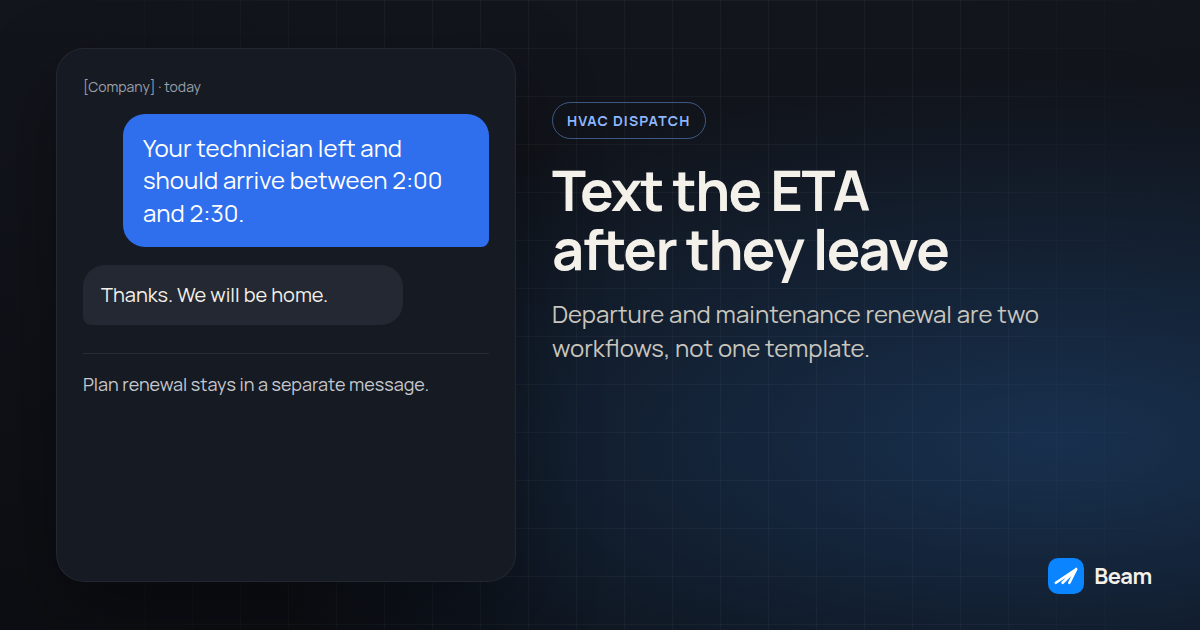
An HVAC customer who is waiting at home needs two different texts, and they fail in different ways. The first says a technician is on the way. It is wrong the moment it goes out before the truck has left. The second asks the customer to renew a maintenance plan. It is a sales message, so it does not belong in the arrival text, and it does not belong outside the hours your counsel already uses for marketing texts.
Estimate follow-up, job photos and storm-lead intake already have a home in the iMessage playbook for roofing, HVAC, plumbing and solar. Emergency intake for a leak is covered in the plumbing dispatch guide. This article stays on the departure text and the plan-renewal text.
This is operational guidance from the sources below, not legal advice.
What is an on-the-way text allowed to claim?
It can say that a named technician, or a technician from the company if the name is not assigned yet, has left for a visit the customer already booked, and that the office expects arrival between two times. It cannot say the technician is on the way because the job was dispatched, the route was printed, or the previous job “should” be done.
ENERGY STAR tells homeowners that dirt and neglect are the top causes of heating and cooling system failure and inefficiency, and that a professional checkup belongs in the spring for cooling and in the fall for heating, because contractors get busy once summer and winter arrive (ENERGY STAR, clean heating and cooling; maintenance checklist). That seasonal pile-up is why the morning board and the truck diverge. The text has to follow the truck.
The same checklist says airflow problems can reduce a system’s efficiency by up to 15 percent. That sentence is about airflow, not about a text campaign and not about a particular maintenance plan. Do not paste “15 percent” into a customer text as a savings promise. Use it as a reason the visit has a real job: filters, coils, airflow, condensate, electrical connections, and the heating-side safety checks ENERGY STAR lists. If the customer’s plan covers only some of those tasks, the text should name the tasks the plan actually includes.
A day-before reminder is a different message. Confirming appointments by text covers that earlier send. An on-the-way text goes out after departure, and a second text goes out if the window moves. Leaving the first “on the way” in the thread after the truck is stuck is how a correct message becomes a false one.
Example, after dispatch confirms departure:
Hi [Name], this is [Company]. [Technician first name] left for your [heating or cooling] visit at [address] and expects to arrive between [start] and [end]. Reply here if that window no longer works.
If the technician is not named yet, drop the first name. Do not invent one.
Example, when the window slips:
Hi [Name], this is [Company]. [Technician first name] is still headed to [address], and the arrival window is now [new start] to [new end]. Reply here if you need a different time.
How should a maintenance-plan renewal stay out of that thread?
A renewal ask encourages the customer to buy or continue a plan. Federal rules define a telephone solicitation as a call or message for the purpose of encouraging the purchase or rental of, or investment in, property, goods, or services, with stated exclusions, and they prohibit telephone solicitations to a residential subscriber before 8 a.m. or after 9 p.m. local time at the called party’s location (47 CFR 64.1200, including the solicitation definition and paragraph (c)(1)). Paragraph (e) applies the quiet-hours rules to wireless calls and text messages to the extent described in the Commission’s order cited there. Our TCPA quiet hours guide treats the 8 a.m. to 9 p.m. floor as the scheduling rule for covered marketing texts, uses 8 p.m. as a conservative Florida cutoff while counsel confirms text coverage, and recommends the same window for ordinary informational texts as an operational precaution.
An arrival update about a visit already on the books does not, by itself, ask the customer to buy something. A sentence that adds “renew today” changes that text into the marketing category. Keep the renewal in its own workflow so a template edit cannot attach it to the departure message. Schedule that workflow with the state quiet-hours setup, including Contact Timezone and a stricter-state branch. TCPA texting rules and the texting compliance page cover the consent and opt-out side of the same send.
Example renewal, sent on its own, inside the window you already use for marketing:
Hi [Name], this is [Company]. Your maintenance plan for the seasonal checkup at [address] is set to end on [date]. Reply YES if you want the office to review renewal options with you. Reply STOP to opt out.
Do not add a price, a savings figure, or a claim that the plan prevents every breakdown. ENERGY STAR’s checklist is a description of a full pre-season visit, not a script that overstates a filter-only agreement.
| Question | On-the-way text | Maintenance-plan renewal |
|---|---|---|
| What starts it | A status your team trusts that the technician has left | A plan end date, or a renewal task a person created |
| What it may say | Company, technician if known, address, arrival window | That the plan end date is coming, and how to talk about renewal or stop |
| What it must not say | That the truck has left before it has | A price, a savings promise, or a line inside the arrival text |
| Clock | Send when departure is true; still avoid the middle of the night | Recipient local quiet hours, including a stricter state cutoff |
| Consent posture | About a visit the customer already has | The marketing consent record you already require; counsel confirms it |
| If plans change | Send a new window; do not leave the old one as the last word | Stop the send if the customer already renewed or opted out |
How do you build the two workflows in GoHighLevel?
Use two workflows. The departure workflow has no renewal sentence. The renewal workflow has no “on the way” sentence. Beam’s send, in both cases, is a Custom Webhook to the workflow endpoint, not GoHighLevel’s Send SMS action. The GoHighLevel iMessage setup and Beam’s workflow payload document dry_run, request_key and consent.
HighLevel’s Contact Tag trigger fires when a selected tag is added or removed, after the tag update is applied, and it does not fire for tags that were already on the contact before the workflow was active (Contact Tag trigger). HighLevel’s trigger list also includes Custom Date Reminder, which fires before, on, or after a selected date field (workflow triggers). Those are the two triggers to test. A dispatch product such as a field-service platform can start the same workflows only if that product can update the GoHighLevel contact, add the tag, or call a webhook you have confirmed. Beam does not add that connection for you.
- Create the departure tag and the plan date before any send exists. Use a tag your dispatchers will apply only when the technician has left, and a contact date field for the plan end date. Fill both on a test contact you control.
- Build the departure workflow on Contact Tag, filtered to Tag Added. The first action should be a check that the appointment is still today and that the contact is not opted out. If either check fails, stop. Do not add a renewal line to this template.
- Send through Beam with a stable
request_key. Include the contact and the appointment in the key, for example a pattern like{{contact.id}}.hvac-en-route.{{appointment.id}}. Keepdry_run: trueuntil a test returnsstatus: validatedand nothing arrives.consent: trueonly after you have confirmed the record supports this message. - Flip one test to live. Expect a message ID and
status: queued, then watch the test phone and the GoHighLevel timeline. Queued is acceptance, not delivery. Repeat the same request and confirm you do not get a second text. - Remove the departure tag when the visit is done. Run a second visit on the same test contact. The Contact Tag trigger is documented for a tag being added. If the second visit does not fire because the tag is already present, the close-out step has to remove it. Write down what the test actually did.
- Build the renewal workflow on Custom Date Reminder. Point it at the plan end date, choose the offset in the builder, and set the workflow timezone to Contact Timezone. Put the quiet-hours branch from the state quiet-hours guide in front of the webhook. Use a different
request_key, tied to the contact and the plan end date, so a renewal retry cannot collide with the departure key. - Stop the renewal if the customer already renewed or opted out. A date reminder will still come due if nobody updates the date field. Test a contact whose plan date was moved forward, and a contact who texted STOP while the reminder was waiting. Beam blocks an opted-out contact at the send layer and fires
contact.opted_outto your webhooks (workflow documentation). - Test iPhone and Android before a homeowner is enrolled. Confirm iMessage on an iPhone you control. Confirm what a supported Android phone receives, and what arrives when the route is SMS. Outbound texting is the channel overview. Do not treat one successful iPhone test as proof for the whole list.
Record pass, fail, or unresolved for trigger, window, channel, reply owner and opt-out. An unresolved row blocks that workflow.
Who owns the reply when the customer writes back?
The departure text invites a reply if the window no longer works. That reply needs a person who can change the route, not a second automated “on the way.” Name the dispatcher, and a backup, in the workflow notes.
If the customer would rather talk, the same business line can take a FaceTime Audio call. That call is a separate step. The text does not place it. A voice agent that answers after hours should not tell the caller a technician is already on the way unless the dispatch status says so. The text and the call have to read the same status. An assistant connected over MCP can read the thread and the stored status; it should not invent a departure. Sending still waits for the tag or the date trigger, and for the request_key on that event. The iMessage API page is where that access is described.
A webhook into GoHighLevel from the dispatch tool is optional. If you do not have one, the dispatcher applies the tag by hand and the workflow does not pretend a board status changed. If you do have one, test it with a single job and confirm the tag lands on the right contact before you trust it for a morning of calls.
What should you test on a day you still control?
Run this on a line and contacts your team owns. It is a procedure to execute, not a report of a customer rollout.
- Assignment without departure. Put a job on the board and do not add the departure tag. No on-the-way text.
- Departure. Add the tag. One text, with the window you wrote down before the test.
- Slip. Change the window and send the update. The thread shows the new window last.
- Renewal isolation. Confirm the departure workflow cannot send the renewal sentence, and the renewal workflow cannot send “on the way.”
- Quiet hours. Put a Florida test contact and a non-Florida test contact through the renewal workflow and confirm the earlier cutoff hits only the stricter state. Details are in the quiet-hours workflow.
- STOP during the wait. Text STOP from the test phone while the renewal is held. Nothing goes out when the window opens, and the CRM receives the opt-out event.
- Second visit. Close the first job, then create another visit on the same contact. The departure text fires only if your tag handling matches what step 5 of the build showed.
- Channels. iPhone, supported Android, and an SMS fallback case. Save what each phone actually showed.
Text our team to try it on one test job and one plan date before a real route depends on either workflow.
What are the frequently asked questions about HVAC ETA texts and plan renewals?
Can the on-the-way text go out as soon as the job is on the board?
No. Send it only after the status your team trusts says the technician has left. A job assignment, a morning route, or a hope that the previous call will end soon is not a departure.
Should the maintenance-plan renewal ride along in the on-the-way text?
No. Keep the arrival update and the plan renewal in separate messages and separate workflows. A renewal ask encourages a purchase. The arrival update is about a visit already on the schedule.
What if the homeowner replies STOP while a renewal text is still waiting?
Beam blocks an opted-out contact at the send layer, so nothing further goes out, including a message a workflow is still holding, and it fires a contact.opted_out event to your webhooks so the CRM record updates. Check that status again before the quiet-hours window opens.
Will an Android homeowner get the same on-the-way text?
Beam can deliver to an iPhone by iMessage, to a supported Android phone by RCS, and by SMS when those routes are not available. Test each route you plan to use on a phone you control. A queued response means the send was accepted, not that the phone showed it.
Does this cost extra on top of our GoHighLevel and Beam plans?
Beam doesn't post prices on this page. Text our team to try it and get a quote for your sub-account count and sending volume.