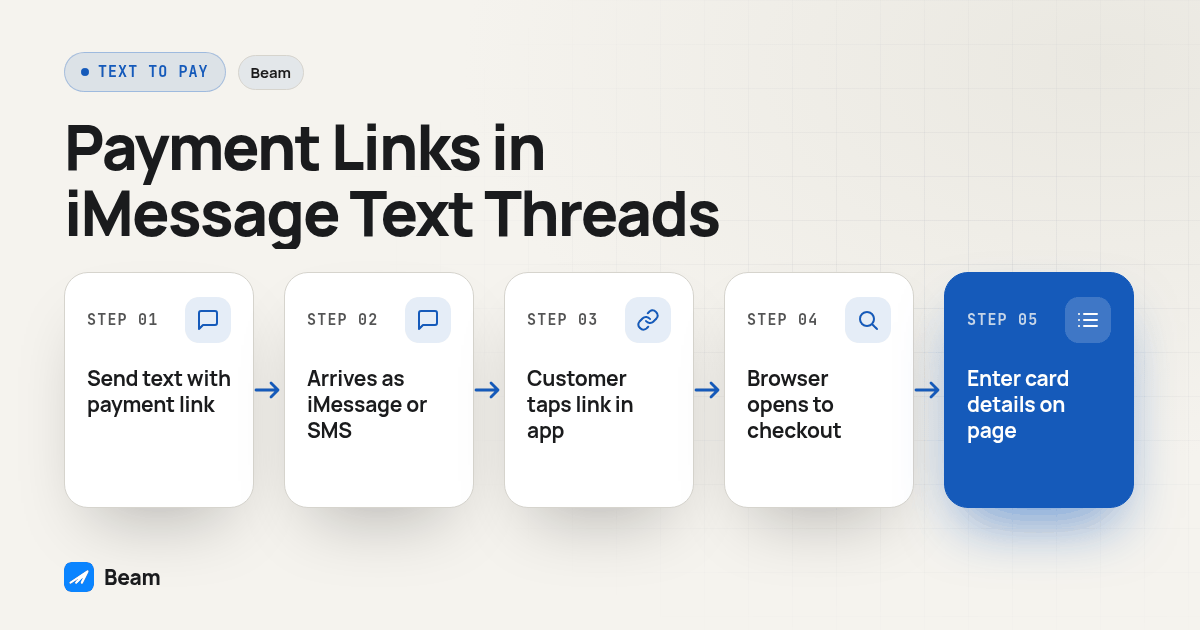
TL;DR: A customer cannot pay a business inside an iMessage thread the way Apple Cash works between two friends; Apple Cash is peer-to-peer only and Apple’s own support page says businesses will not request payment through it. Apple’s own in-thread checkout, Apple Pay inside Business Chat, exists, but only for brands Apple has individually approved into its own program, not for any business connecting through a third-party API. What a business can do today, including through Beam, is send a payment link, a Stripe or Square checkout URL, as a normal piece of text; the customer taps it, a browser opens, and the processor’s own page takes the payment.
A GoHighLevel agency building a deposit-collection workflow usually starts from the wrong mental picture: a friend splitting a dinner bill with Apple Cash inside a green or blue bubble, no browser, no separate app. A business cannot do that. What a business can do is put a payment link in the message body, the same way it puts an appointment link or a review request there, and let the customer finish the transaction on the processor’s own checkout page. This piece separates the three things buyers mix together and gives the setup steps for the one that actually works.
Why can’t a business just use Apple Cash like a person would?
Apple Cash’s send-and-receive flow lives inside Messages and Wallet, and it looks, at a glance, like exactly what a “text to pay” buyer wants: type an amount, hit send, done. But who is allowed on the other end is the catch, and Apple’s own support documentation is direct about it: “Businesses and government agencies won’t request payment via Apple Cash” (Apple Support, Avoid Apple Cash scams). That line sits inside Apple’s scam-prevention guidance, which tells users that a real business asking for payment through Apple Cash is itself a warning sign, not a normal checkout path.
That is not a technical limitation Apple might lift with an update. It is the design of the product. Apple Cash is a consumer-to-consumer rail built for splitting a bill or paying back a friend, settled between two personal Apple IDs. A business line, including a Beam business number sending iMessage, is not a personal Apple ID, and there is no toggle that turns a business messaging line into an Apple Cash participant. A developer asked Apple directly, back when Business Chat first launched, whether a business-side version was coming: “will it be possible for business to pay customers using Apple Pay?” (Apple Developer Forums, thread 79421). The one reply on record: Apple had not announced anything of the sort. Years later, a peer-to-peer rail from a business account is still not a published capability, because it runs against the product’s own design, not a missing feature flag.
So what is Apple’s own Business Chat Apple Pay, and why can’t a business just turn it on?
This is the second thing buyers conflate, and it is a real Apple feature, just not an open one. Apple’s Messages for Business platform, the same program that used to be called Business Chat, can present an in-thread Apple Pay checkout: the customer sees a payment sheet, authenticates with Face ID or Touch ID, and completes the purchase without ever leaving the conversation. That is the genuine in-thread payment experience buyers are picturing when they search “text to pay.”
The gate is approval, not price or demand. Apple’s own documentation for the program states the requirement plainly: “In order to implement and use Apple Messages for Business, a company requires the services of an Apple-approved Messaging Service Provider (MSP)” (Apple Business Register, Messages for Business FAQ). The same documentation goes further on automation specifically: “Automation and virtual agents must connect to Apple Messages for Business through an Apple-approved MSP, not through a direct technical connection.” Apple Pay sits inside the same interactive-feature set the MSP delivers, alongside list pickers and time pickers, which means a business cannot wire this up through a third-party API or a general-purpose iMessage platform. It has to be a brand Apple individually invited, routed through an MSP Apple has also approved. Reported users include large consumer names like Delta and Dish, not the independent service businesses and agencies reading this.
That gate is why “text to pay inside iMessage” and “Apple Pay inside Business Chat” are not the same offer a service business can go buy today. One is a published Apple program with a short, curated guest list. The other, the payment-link method below, is open to anyone with a Stripe or Square account and a texting line.
What does Beam actually support for collecting a payment through a text thread?
Beam sends the message. It does not process the payment. A payment link, the checkout URL a processor like Stripe or Square generates for a specific invoice or a specific deposit amount, is just a URL, and a URL is ordinary text content. Nothing about Beam’s sending path treats a link to a checkout page any differently than a link to a calendar or a review page: it goes out over iMessage, RCS or SMS depending on the recipient and the assigned line, exactly like Beam’s outbound texting handles any other link in a one-to-one or workflow message.
That distinction changes what “text to pay” actually buys an agency. A customer here does not get a payment sheet inside the Messages app the way an Apple-approved brand’s customer does; instead they get a text with a link, tap it, and a browser opens to the processor’s own hosted checkout page, entering card details directly into Stripe’s or Square’s own page, never into the text thread or anything Beam renders. Beam’s role ends at delivering the link and, if the workflow is built for it, picking up the reply once the customer is done.
This is the same shape Beam already uses for booking an appointment inside an iMessage thread: that flow is designed so the lead never leaves the thread to pick a time, because the assistant proposes real calendar slots in plain words instead of a link. Payment collection runs the opposite direction on purpose. A calendar slot can be plain words inside a conversation; a card number cannot, without putting raw payment data somewhere it should never sit. This link-and-browser handoff is not a workaround Beam is waiting to remove; it is the boundary every payment-link vendor uses, including the generic text-to-pay services built for exactly this: “sending a payment link to a customer’s mobile phone via SMS…the customer then clicks on the link, which takes them to a page” to complete the purchase (Mobile Text Alerts, what is text to pay).
How does the customer’s side actually look, step by step?
Walk through this yourself before a client ever sees it.
- The business (or a workflow) sends a text containing a payment link. The link comes from Stripe, Square, or whatever processor the business already uses to invoice; Beam does not generate or store the link, it only carries the message.
- The message arrives as iMessage, RCS or SMS, depending on whether the recipient’s phone is an eligible iPhone, a supported Android device, or neither. The link text is identical across all three channels; only the bubble color and delivery mechanics change.
- The customer taps the link inside the Messages app the same way they would tap any other URL in a text, and their phone’s default browser opens.
- The processor’s hosted checkout page loads, showing the invoice or deposit amount, a description, and card entry fields the processor controls end to end.
- The customer enters card details and submits on that page. At no point does the card number pass through the text thread, through Beam, or back into the conversation as a message.
- The processor confirms the charge and, separately, fires its own webhook or email receipt, which is a Stripe or Square event, not a Beam event; the two systems are not the same webhook.
- A workflow, built on the CRM side, can then trigger a confirmation text once the processor marks the invoice paid, closing the loop back inside the same thread the link was sent from.
Nothing in that sequence happens inside the bubble past step 3. That is the honest answer to “does the customer pay inside the thread”: they finish one tap away from it, and any vendor claiming otherwise without Apple’s own approved program is describing this same flow with different marketing language.
How do the three payment paths actually compare?
| Apple Cash (peer-to-peer) | Apple Pay inside Business Chat | Payment link by text (Beam + Stripe/Square) | |
|---|---|---|---|
| Who can use it | Two personal Apple IDs only | Apple-approved brands only, through an Apple-approved MSP | Any business with a texting line and a processor account |
| Checkout happens inside the bubble? | Yes, between the two people | Yes, an in-thread Apple Pay sheet | No; a tap opens the processor’s hosted page in a browser |
| Works for a business reaching out to a customer | No, per Apple’s own guidance | Yes, for approved brands only | Yes |
| Approval required | N/A, consumer feature | Apple’s own brand approval and MSP program | None beyond a processor account in good standing |
| Who holds the card data | N/A | Apple’s payment sheet and the merchant’s processor | The processor (Stripe, Square, etc.), never Beam |
| Works the same on Android | N/A, iMessage/Apple ecosystem only | No, Business Chat is Apple Messages only | Yes, the link opens in any mobile browser |
| Available to a GoHighLevel agency today | No | No, unless the agency’s client is one of the small number of Apple-approved brands | Yes |
Really, that table answers one question three ways: which of these can an ordinary service business or agency use without Apple hand-picking it first? Only the last column.
How should a GoHighLevel agency wire a payment link into a Beam workflow?
This is the checklist worth running before enrolling a single real client, built on the same Custom Webhook pattern Beam already documents for sending GoHighLevel workflow messages.
- Generate the payment link in Stripe or Square first, scoped to the invoice or a fixed deposit amount, and confirm it opens a real checkout page before touching GoHighLevel at all.
- Store the link, or a merge field pointing to it, on the GHL contact or opportunity record, the way an appointment link already lives on a contact field in most agency builds.
- Confirm the correct GHL location is connected in Beam Settings under CRM inbox messaging, with an active Beam line assigned to that location.
- Create a workspace token in Beam Settings under Developer access with send permission, and keep it only in the workflow’s authorization header, never in a contact field or screenshot.
- Open a draft test workflow in GHL Automation, add a Custom Webhook step, pointed at Beam’s workflow endpoint with that token in the header.
- Build the message body as plain text with the link merge field, for example “Hi {{contact.first_name}}, here is your invoice link: {{custom_values.payment_link}}”.
- Run the step with Beam’s dry-run flag on first, against a test contact only, and confirm a validated response with nothing actually sent.
- Flip dry-run off and send one real test to your own phone, then tap the link and confirm the checkout page loads the right amount before enrolling a client.
- Set up a separate confirmation step keyed to the processor’s own payment-succeeded event, not a Beam event, since Beam cannot see whether the customer finished paying; that confirmation has to come from Stripe’s or Square’s own webhook into GHL.
- Only then enroll real contacts, keeping the draft workflow as the place to test any future change to the link or the copy.
Step 9 is the one agencies skip and regret. A workflow that assumes “the link went out, so the invoice is handled” has no way of knowing whether the customer actually paid, since that confirmation lives entirely on the processor’s side. If a voice agent agrees to a deposit amount on a call before the text link goes out, the same discipline applies: the agreed amount needs to land in a CRM record the workflow can read, which is the job RizzDial’s post-call webhook into a CRM is built for, so the number in the text link matches what was actually promised on the call.
What do buyers ask most about text to pay?
Does Beam process the payment itself?
No. Beam delivers the message, including a message that contains a payment link. The processor named on that link, a service such as Stripe or Square, is the one holding the checkout page, the card fields and the money. Beam never touches card data and never shows a Beam price, because Beam is the texting layer, not the payment processor.
What happens if the customer is on an Android phone instead of an iPhone?
The link still works the same way, because the payment page is a normal web page, not an iMessage-only feature. Beam sends over iMessage when the recipient is eligible, RCS when the Android phone and carrier support it, and SMS otherwise. The customer taps the link, a browser opens, and the checkout page loads the same regardless of channel.
Is sending a payment link by text PCI compliant?
The compliance question belongs to the payment processor, not the texting layer, because the card number is entered on the processor’s own hosted checkout page, never inside the text message itself. A business still has to pick a processor that states its own PCI compliance and never ask a customer to text a card number directly into the conversation, since that would put raw card data inside the messaging platform instead of the processor’s hosted page.
How long does it take a GoHighLevel agency to wire a payment link into a text workflow?
Generating the link in Stripe or Square takes minutes once an account exists. The GoHighLevel side, the Custom Webhook step, the test contact, the dry run and the live verification, is the part worth budgeting real time for, usually one working session if the agency has already connected its GHL location in Beam.
Can this replace calling a customer to read a card number over the phone?
For most routine deposits and invoices, yes, and it is the safer swap. Reading a card number out loud over a recorded or unrecorded call puts the card data in the call itself. A payment link moves that step to the processor’s own secure page, so the business and the rep never see or key in the card number at all.