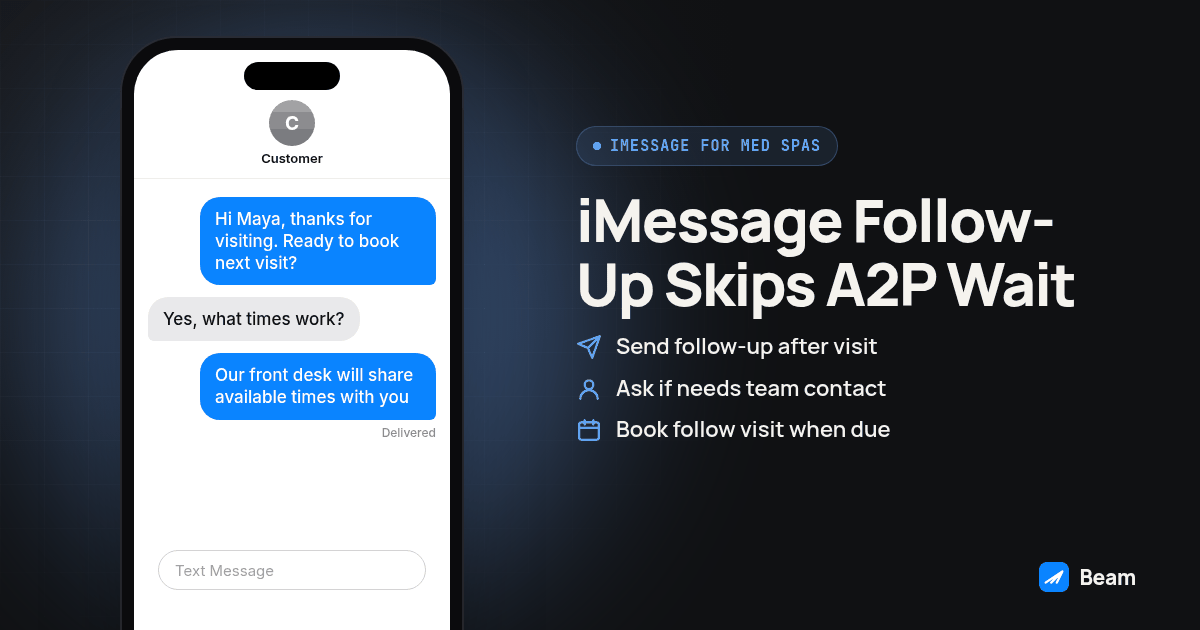
TL;DR: Send consult follow-up, no-show recovery and rebooking texts from a connected iMessage line first; it needs no A2P 10DLC registration, but confirm provisioning and workflow testing before setting a launch date. RCS covers supported Android phones and SMS is a fallback for eligible recipients, both still following the carrier rules tied to the number type behind them. Build the sequence as a GoHighLevel workflow with Beam as the connected channel, keep diagnosis-level and payment detail out of the message body, and text our team for setup help.
How does iMessage skip the A2P 10DLC wait for a med spa’s texting line?
A2P 10DLC registration exists for application-to-person SMS and MMS sent to US recipients over local ten-digit numbers; it has a brand and a campaign describing the use case, with registration and campaign vetting requirements (see Twilio’s A2P 10DLC documentation). Allow for that process when planning an SMS launch; approval timing is not a Beam onboarding promise.
iMessage does not route through that registration path at all. Sending iMessage to an eligible iPhone is a different delivery mechanism than carrier SMS, so a med spa’s consult follow-up and no-show texts to iPhone clients can go out while a parallel SMS campaign for the rest of the list is still sitting in review. The rest of the client list still needs a compliant channel, which is where RCS and SMS fallback come in further down this page, but the front desk is not stuck waiting on every client before sending anyone anything.
This is a sequencing advantage, not a workaround. The carrier rules behind SMS by number type still apply once SMS is the channel in use; see Beam’s texting compliance hub for how number types map to setup steps.
What should a med spa text right after a consult, before the client leaves the parking lot?
After a consult, make the next booking action clear without repeating clinical details on a lock screen. A useful follow-up identifies the practice, offers a scheduling step and tells the client who will handle a reply. Treat the examples here as drafts for your practice to review, not proven conversion templates.
Keep the message to what the client needs to act:
- The practice name and a familiar front desk contact.
- A neutral reference to the visit, rather than a treatment or diagnosis.
- A direct way to book the next visit, through an approved scheduling link or a reply.
- A route to the clinical team for questions about preparation, medication or aftercare.
Sample text:
Hi Maya, this is [Practice Name]. Thanks for visiting today. Would you like help scheduling your next visit? Reply YES and our front desk will share available times. For questions about your care plan, please use the contact route your clinician provided.
That template leaves clinical instructions with the treating team. Do not automate medication changes, promise no downtime or set a treatment interval from a marketing template. Replying “YES” gives the front desk a clear scheduling task without assuming the client has agreed to future promotions.
How do you word a no-show recovery text without sounding like a collections notice?
Tone changes everything in a no-show text sent an hour after a missed appointment. “You missed your appointment” sounds like a reprimand. Assuming something came up and offering the next available slot gets a reply instead of silence.
Sample text:
Hi Jordan, we missed you at your appointment today. Would you like help finding another time? Reply with a day that works and our front desk will check availability.
Test a same-day recovery message during the client’s permitted contact hours after staff confirm the visit was actually missed. Check for a late arrival, a cancellation or a booking update before sending. Record the reply and eventual attendance separately; a friendly message is a proposed workflow, not evidence that the client will rebook.
For recurring-series clients, confirm which trigger actually fires before assuming the no-show message went out. HighLevel’s recurring appointment guide now supports notifications for both calendar-configured recurrence and custom recurring appointments, and its Customer Booked Appointment trigger documentation excludes recurring appointments and manual staff bookings from that trigger. Membership clients on a recurring facial series are exactly the booking type it doesn’t cover; the full breakdown of why recurring visits miss text reminders provides a trigger-testing checklist; use the current HighLevel documentation to verify behavior in your account.
What does a rebooking and membership-renewal sequence look like?
A single no-show recovery text is a save. What keeps running after treatment is the part that actually protects recurring revenue, because most med spa services (Botox, filler, laser packages, memberships) have a natural interval before the next visit matters.
- After the visit: send a neutral scheduling follow-up at a time approved by the practice. Direct clinical questions to the care team instead of pasting aftercare into an automated text.
- At the clinician-approved check-in interval: ask whether the client needs the team to contact them. Keep results, photos and symptom details in the practice’s approved care channel.
- When the next visit is due: use the interval recorded by the treating clinician, not a generic filler or laser schedule. Offer help finding a time without naming the procedure.
- Before membership renewal or expiration: send a neutral account reminder if the client has agreed to that communication. Route billing questions to the practice’s approved account channel.
- After an unanswered rebooking invitation: review whether further contact is appropriate. Stop on a decline or opt-out, and do not keep adding messages simply because a timer expired.
Each stage is a different workflow trigger pointed at the same connected line, not five separate systems. The GoHighLevel setup procedure below covers wiring these stages so a reply at any step routes back to a staff member instead of continuing down an automated sequence that no longer fits what the client just said.
Where do RCS and SMS fit if a client isn’t on iPhone?
Not every client carries an iPhone, and a med spa’s client list is not something you get to pre-sort by device before texting them. Beam checks the recipient and routes automatically: iMessage to an eligible iPhone, RCS to a supported Android phone and carrier combination, SMS when an eligible fallback route is available. Apple’s own RCS support documentation notes that RCS availability varies by region and carrier, and its message-type explanation separates RCS from iMessage and SMS/MMS as distinct delivery types; an Android label alone does not guarantee RCS reaches that specific phone, which is why the fallback to SMS still matters.
| iMessage | RCS | SMS | |
|---|---|---|---|
| Who receives it | Eligible iPhones | Supported Android phone + carrier combination | SMS-capable phones on an eligible route |
| A2P 10DLC registration needed | No | Separate channel requirements; verify the configured route | Yes, for a local 10DLC number |
| What a no-show recovery text looks like to the client | Blue outgoing bubbles; read receipts depend on recipient settings | Read receipts and typing indicators where supported; no branding assumed | Plain text message, no read receipt |
| Where it fits in this sequence | Same-day consult follow-up and no-show recovery, where speed and a visible reply matter most | A built-in second channel for Android clients, same message content | An eligible fallback when the first two channels cannot reach a recipient |
The practical takeaway for a med spa: build one message sequence, not three. The channel choice happens underneath the workflow, not in a separate manual step for Android clients.
How do you build this as a GoHighLevel workflow with Beam?
Use a test calendar and a phone you control for every step before pointing this at a real client list.
- Pick the trigger for each stage. Use Appointment Status (or Customer Booked Appointment for a standard, non-recurring booking) for the consult follow-up and no-show stages. For the rebooking and renewal stages, use a time-based workflow with a wait step set to the interval that treatment calls for, not the booked-appointment trigger, since those messages are not tied to a specific calendar event. Configure status filters for a completed visit or a no-show rather than treating a new booking as either event.
- Map the message fields. Pull client name, appointment date and the practice identity into each message template. Preview the message with a test contact that has every field filled and a second test contact with a field missing, so a blank merge field doesn’t go out on a real client text.
- Add the Beam sending step. Point the workflow’s messaging action at the connected Beam line through the custom webhook integration, and run it as a dry run first against your own test number.
- Confirm routing, not just delivery. Send the same test sequence to an iPhone and an Android phone you control. Confirm the iPhone shows a blue bubble and the Android test lands as RCS or SMS depending on that phone’s support, so you know the fallback is actually working before a real client sees it.
- Set the reply path. A client replying “YES” or asking a question should land back with the staff member tied to that appointment, not a shared inbox nobody owns. Test a reply from your own number and confirm it shows up against the correct contact record in GoHighLevel.
- Set the stop condition. Confirm the workflow pauses for a staff reply and exits once the client rebooks, renews or replies with a decline or opt-out, so a client who already rebooked does not keep getting the next-stage nudge.
- Turn it on for one treatment type first. Launch the sequence for a single service, such as Botox or a laser package, confirm a week of real sends and replies look right, then extend the same structure to other treatments.
Record each test contact’s trigger, selected channel, send status, reply owner and stop outcome. Repeat with a missing field, a cancelled visit and an opted-out contact. A queued webhook response alone is not delivery confirmation. Keep the test record so another front desk employee can repeat the same checks after a workflow change.
What should stay out of a promotional or treatment-related text message?
Med spa texts carry more than scheduling. Treatment names, before-and-after photo requests and membership billing details sit closer to sensitive than a typical appointment reminder, even outside a strict medical record context. Keep the same discipline a clinic uses for patient texts: a text is readable on a lock screen or a shared phone, so the routine message should carry what the client needs to act on, not a recap of the full consult or a specific dollar amount charged.
A few practical lines help here. Use neutral appointment wording instead of naming the treatment. Direct photo requests to the practice’s approved secure channel rather than asking clients to send clinical images in a routine text. Route any reply about results, side effects or a reaction to a staff member, not an automated continuation of the sequence. Beam supports HIPAA compliant texting through compliant carrier infrastructure, but the practice’s own consent records, access controls and staff training are what make a texting program fit its own requirements; review your own setup rather than treating a texting platform’s infrastructure as the whole answer. Beam’s texting compliance hub covers consent, opt-out and number-type requirements this sequence needs underneath it, and the front desk texting checklist has reusable wording filters for this same routine-versus-sensitive line, written for a clinic front desk but just as usable here. The broader iMessage for healthcare patient communication piece covers the same minimum-necessary principle for practices handling clinical-grade data.
For no-show and confirmation wording specifically, the guide to confirming appointments by text instead of calling has a sample template and a separate outcome-testing procedure worth running alongside the setup above, since a reply confirming attendance isn’t the same thing as a client who actually shows up.
For the call-side half of the same client journey, RizzDial’s med spa appointment booking guide covers AI voice follow-up for consult booking, running alongside this text sequence rather than replacing it.
What do med spa owners ask before switching their texting platform?
Do we still need A2P 10DLC registration if the front desk is texting from iMessage?
Not for the iMessage line itself. iMessage sends to eligible iPhones without A2P 10DLC registration. Carrier rules still apply by number type for the SMS fallback underneath it: a local 10DLC number still needs A2P 10DLC registration, a toll free number still needs toll free verification, and a short code still needs carrier approval. Running iMessage first and SMS as the fallback channel does not skip those SMS rules, it reduces how much client volume depends on them.
What does Beam cost for a med spa with one or two locations?
Beam does not publish pricing on this page. Line count, message volume and which number types a med spa needs (a dedicated iMessage line, a local number for SMS fallback, a toll free number) change the setup, so the practical next step is to text our team with location count and current monthly text volume for a quote scoped to that.
How fast can a med spa actually start texting clients, compared to waiting on A2P approval?
The iMessage line does not require A2P 10DLC registration, but that does not establish a launch deadline. Confirm line provisioning, consent checks, workflow configuration and send-reply testing with Beam before scheduling a rollout. Prepare any required SMS registration or verification separately so fallback is ready when you need it.
Does this replace our GoHighLevel calendar, or sit next to it?
It sits next to it. GoHighLevel stays the calendar, the client record and the workflow trigger. Beam supplies the connected channel the workflow sends through, choosing iMessage, RCS or SMS per recipient. Keep the appointment identifier attached to the workflow so a reply routes back to the right visit instead of a generic inbox.
Our injector left for another practice and took her client group chat threads with her on her personal phone. How do we avoid that again?
Keep client conversations on a practice-managed connected line rather than a staff member’s personal number. Give staff individual access and document who handles each thread. Before rollout, confirm number control, history retention, export options and the offboarding process with Beam. Do not assume a new platform imports old personal-phone threads or guarantees ownership of every number.
Text our team to review the workflow against your own calendar before it touches a real client list.