TL;DR: A clinic can run scheduling, reminders, directions, intake-portal links and two-way rescheduling over a business iMessage line. Diagnoses, test results, procedure detail and insurance specifics stay out of that routine thread. iMessage, RCS and SMS are channels, not a compliance program; whether a practice’s texting meets its HIPAA obligations depends on its own safeguards, business associate agreements and policies, confirmed in writing with every vendor before anything protected goes through them. None of this is legal advice; a practice’s privacy officer or counsel should review the setup before it goes live.
Can a clinic or medical practice use iMessage to text patients?
For the logistics layer, yes. A dedicated business line sending confirmations, reminders, directions and a link to the practice’s own forms works the same way an agency sets it up for any service business, just with a narrower list of what belongs in the message body. The front desk gets a shared thread, the patient gets a recognizable number, and the conversation lives in one place instead of scattered calls and voicemails.
What actually gets harder is the content and access controls, not the sending. Apple’s encryption, a carrier’s network and a vendor’s infrastructure do not, on their own, make a texting program compliant with HIPAA. Compliance comes from what the practice does: the safeguards it puts in place, the agreements with every vendor touching patient data, and the policies staff actually follow. The HIPAA Security Rule requires covered entities to assess their own size, infrastructure and risk, and choose safeguards proportionate to that assessment rather than leaning on a vendor’s technical features (45 CFR 164.306). Confirm in writing with every vendor in the chain, the texting platform, the CRM, the forwarding provider, whether a business associate agreement is available before PHI goes through it, and keep PHI out of the thread until that question has an answer.
What fits a routine patient text: scheduling, reminders, directions, intake links?
Appointment confirmations, day-before reminders, directions to the right building or suite, a two-way reschedule, and a link to the practice’s own intake or forms portal. Each gives the patient something to act on without describing why they’re coming in. “You’re confirmed for Tuesday at 2 at our Main Street location” tells a patient everything needed; it doesn’t need the visit reason attached to do its job.
Running this through a shared inbox instead of one staff member’s personal phone matters for more than coverage. A shared inbox keeps every thread’s history, delivery state, attachments and ownership visible to whoever is covering the desk that day, so a reschedule doesn’t get lost when the person who booked it is out sick (Beam’s inbox). The channel choice is handled underneath: an eligible iPhone gets iMessage, a supported Android phone and carrier combination gets RCS, anything else falls back to SMS, and the first number a patient hears from stays theirs for the relationship so the whole thread lives in one place (Beam’s routing reference).
What should never go into a routine patient text template?
Diagnoses, test results, procedure names and insurance specifics don’t belong in a scheduling or reminder template. The legal footing is more nuanced than a flat prohibition: HIPAA’s minimum necessary standard, which normally limits how much protected health information a covered entity discloses, explicitly does not apply to disclosures made to the individual who is the subject of the information, and separately excludes disclosures to or by a healthcare provider for treatment (45 CFR 164.502(b)(2)). The rule itself doesn’t categorically forbid texting a patient their own diagnosis. The reason to keep it out anyway is practical: a text sits on a lock screen or a shared phone, somewhere the patient has less control than a sealed envelope or a private call would give them.
Patients also have a standing right to ask for communication through a different channel or location, and a provider has to accommodate any reasonable request (45 CFR 164.522). A texting program built for logistics should treat that right as a design input: know the fallback channel for a patient who asks not to receive certain content by text, and have staff who can act on that request immediately.
| Message type | OK in a routine template? | Notes |
|---|---|---|
| Appointment confirmation | Yes | Practice name, date, time, location, a reply option. No visit reason. |
| Day-before reminder | Yes | Same core details plus a reschedule option. Keep frequency reasonable. |
| Directions / parking | Yes | Purely logistical, carries no clinical signal on its own. |
| Intake or forms link | Yes, if it links to the practice’s own portal | The text itself should not restate what the form asks for. |
| Two-way reschedule | Yes | Route an unclear reply to staff rather than an automated guess. |
| Diagnosis or test result | No | Route to a phone call or the patient portal instead. |
| Procedure or visit reason | No | Generic wording (“your visit,” “routine visit”) protects more. |
| Insurance or billing detail | No | The FCC healthcare texting exemption excludes billing and financial content. |
Run every new template past a simple filter: does the patient need this specific word to act on the message, and would removing a clinical term still leave a clear date, time and location. If removing it still leaves a workable message, the term comes out. The front desk texting checklist has sample wording for confirmations, reminders, prep and recall texts built around that same filter, worth reviewing template by template before anything reaches a real list.
What happens when a patient texts clinical details back anyway?
Patients don’t read internal policy before they reply. Someone will eventually text back “is this about my biopsy results” or describe a symptom in detail, and the right response is not to answer in kind inside the same thread. Route the reply to a staff member who can decide what the patient actually needs, rather than letting an automated workflow repeat clinical language back to confirm it arrived.
If the practice uses an assistant for some of its messaging, the same handoff logic applies. An assistant can be configured with conditions for when it should stop and let a person take over, set by a workspace owner before it ever goes live, alongside a required approval step where real test conversations are reviewed in draft mode first (Beam’s assistant setup). A human reply on a thread pauses the assistant for that conversation immediately, which is exactly what a clinical reply needs: stop automated handling, get a person looking at it, and move the discussion to the practice’s approved channel, a call back or the patient portal, instead of continuing it over text.
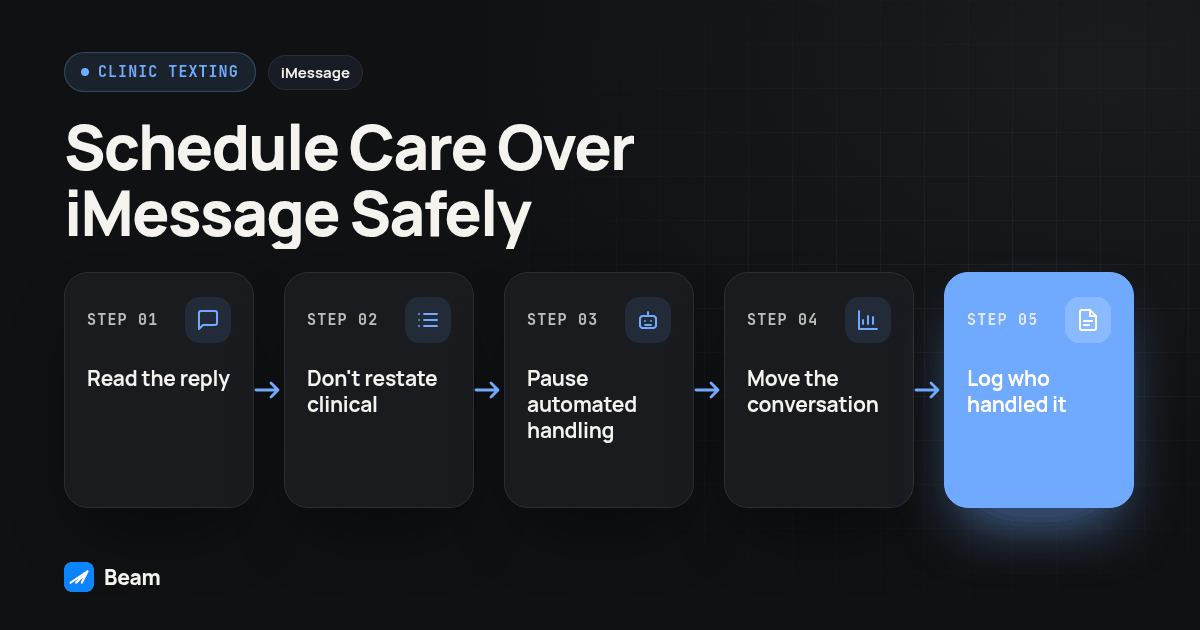
A short, repeatable handoff for front-desk staff:
- Read the reply before responding. A diagnosis, result, symptom, or anything beyond logistics is a clinical message, not a scheduling question.
- Don’t restate clinical content in the thread. “We’ll have someone call you about that” closes the loop without repeating what the patient wrote.
- Pause automated handling on that thread if an assistant is in use, so no scheduled follow-up lands on top of an unresolved clinical question.
- Move the conversation to the approved channel. A phone call from clinical staff, or a note to check the patient portal, not a continued back-and-forth over text.
- Log who handled it and when, the same way any other patient contact outside standard templates gets logged.
How should a clinic handle consent and opt-outs for patient texting?
Capture appointment and scheduling consent separately from any marketing consent the practice collects elsewhere. A patient agreeing at intake to receive confirmations and reminders at a mobile number is a different record from a general newsletter signup, and treating them as the same thing is the kind of mix-up that creates problems later. Log the exact wording the patient saw and the date they agreed to it.
Opt-outs need to work regardless of how the patient phrases the request. STOP and its common variants work automatically, and so does plain language: a reply like “please stop texting me” has to be honored the same way a keyword reply is, since a request to stop made through any reasonable method now has to be treated as valid rather than requiring an exact word (Beam’s consent and opt-outs guide). Once a contact opts out, sending to them returns an error, including scheduled follow-ups or assistant replies.
Frequency matters too, separate from opt-outs. A narrow federal exemption lets a healthcare provider send certain treatment-related calls and texts without the consent otherwise required for autodialed messages, but only under specific conditions: the number must come from the patient, the message must identify the provider, no marketing or financial content, and a cap of one message per day and three per week combined with calls, generally within 160 characters, with opt-out instructions and HIPAA compliance named as conditions of the exemption itself (47 CFR 64.1200(a)(9)(iv)). That’s a narrow exemption, not a general cap on every patient program; have counsel confirm which basis applies before relying on it.
What changes for patients on Android, with RCS or SMS fallback?
Nothing about the content rules changes, but the channel mechanics are worth knowing. An eligible iPhone on a capable line gets iMessage. A supported Android phone paired with a carrier that supports RCS gets RCS. Everything else falls back to plain SMS. The first number a patient’s phone pairs with stays theirs permanently, so a reminder sent weeks later still lands in the same thread regardless of which channel carried it (Beam’s routing reference).
Delivery confidence differs by channel too. An uncertain blue-bubble delivery is not automatically resent as a text; a staff member decides from the inbox whether a stuck message needs a different follow-up. Don’t assume a queued or sent status means the patient actually saw a time-sensitive reminder; check the recorded delivery state first.
Who should be able to see these threads, and what about shared phones?
Limit sending and reply access to staff who already handle scheduling and patient calls, not the entire front desk roster. Every teammate gets an individual login rather than a shared one, owners set configuration while reps work the inbox without changing it, and any thread can be assigned to a specific person so replies aren’t answered twice or missed (Beam’s team and seats guide). Deactivating a seat when someone leaves should be immediate. The same thread shows delivery state, ownership, and whether an assistant or a person sent the last reply, so a privacy lead reviewing access isn’t relying on staff memory (Beam’s inbox).
Separately, think about the patient’s side of the screen. A text preview can appear on a lock screen, and a shared family phone means someone other than the patient might read the first line. Keeping clinical detail out of routine templates protects against this too: “your appointment is confirmed” reveals far less than a line naming a procedure would.
What should an agency or practice check before a patient texting program goes live?
Run this sequence against a test phone the team controls before a single template reaches a live list:
- Review every template against the minimum necessary filter. Each line should be something the patient needs to act on, not something the office is used to including.
- Confirm consent wording separately from marketing opt-in. Check that the intake language names the sender, message types, and opt-out method, logged with a timestamp.
- Test the STOP path and a plain-language stop request. Opt out on the test phone with an exact keyword, then with ordinary language on a second contact, and confirm both suppress every template.
- Send an unexpected clinical reply from the test phone. Confirm a named staff member receives it, no automated workflow answers with clinical detail, and any assistant pauses on that thread.
- Check actual delivery, not just a queued status. Watch the message land on the device and confirm the recorded status moves to delivered.
- Confirm access matches the role list. Only intended staff can send and reply, and a deactivated login stops working immediately.
- Get sign-off from the practice’s privacy officer or counsel on the approved templates, consent basis, and access list, with the date and reviewer recorded alongside them.
A successful test of the confirmation template doesn’t carry over to a recall campaign or a different message type; each needs its own review.
Some practices pair this thread with outbound calling for patients who never respond to a reminder. Agencies running a clinic’s messaging inside GoHighLevel often add a calling layer on the same contact record rather than treating text and voice as separate projects; RizzDial’s GoHighLevel integration covers that side of the stack. For the registration and compliance mechanics behind the texting itself, start with Beam’s texting compliance hub, and for dental-specific wording, see Beam’s dental texting page.
What do clinics ask about texting patients with iMessage?
Is iMessage HIPAA compliant for texting patients?
No messaging channel is HIPAA compliant by itself, and no vendor’s encryption makes a practice compliant on its own. HIPAA compliance comes from the practice’s administrative, technical and physical safeguards, not from the channel carrying the message. Confirm in writing with every vendor in the chain whether a business associate agreement is available before any protected health information goes through it, and keep PHI out of messages until that question is settled. This is not legal advice; have the practice’s privacy officer or counsel review the actual setup.
Can a confirmation or reminder text name the diagnosis or procedure?
Leave it out of routine scheduling templates even though HIPAA’s minimum necessary standard does not technically apply to disclosures made to the patient who is the subject of the information. The reason to keep clinical detail out is practical: a text can sit on a lock screen or a shared phone where someone other than the patient reads it first. Treat the omission as an operational safeguard the practice chooses, not a claim that the law bars sending it.
What should staff do when a patient texts back clinical details on their own?
Don’t answer with clinical detail inside the same automated flow. Route the reply to a staff member, pause any assistant activity on that thread, and move the actual clinical conversation to the practice’s approved channel, a phone call or the patient portal. The text thread can still confirm that someone will follow up without repeating what the patient wrote back.
Does a clinic need separate consent for appointment texts versus marketing texts?
Yes. Appointment and scheduling consent, captured at intake with its own wording, is a different record from marketing opt-in captured through a general signup. Keep them separate, log what the patient actually agreed to, and honor STOP or plain language stop requests the same way for both.
For the front-desk wording itself, see the patient text messaging front desk checklist. For the registration and consent mechanics underneath any clinic’s texting setup, review Beam’s texting compliance hub.