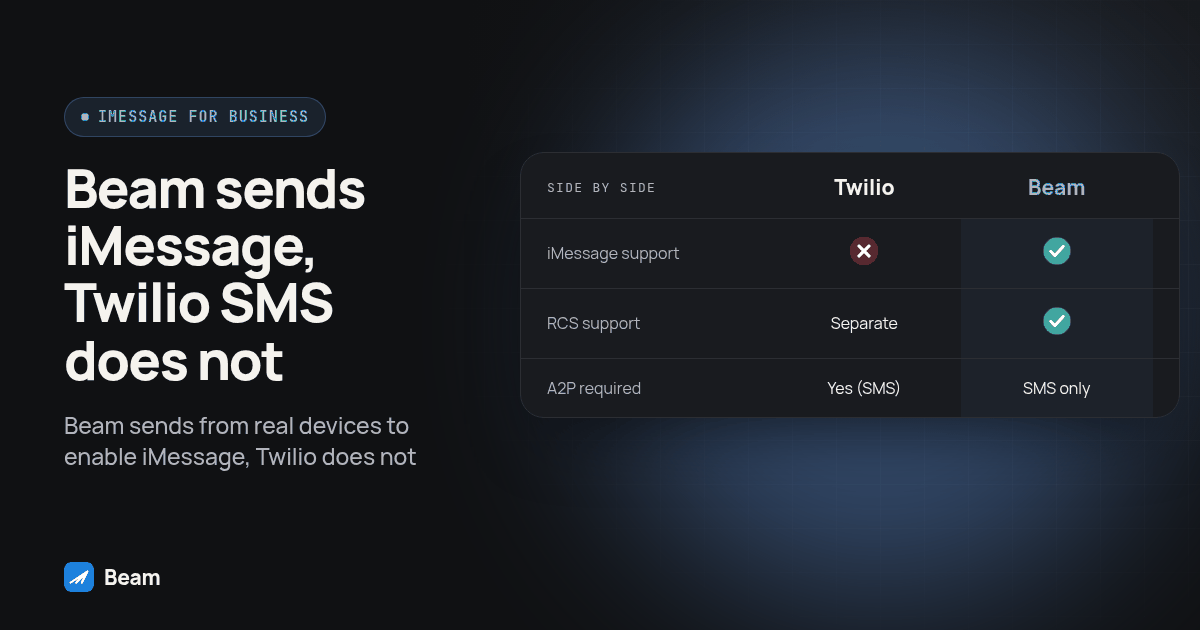
Why can’t Twilio send a blue bubble iMessage text?
Twilio’s messaging channel documentation lists SMS/MMS, WhatsApp, Facebook Messenger and RCS. It does not list ordinary iMessage as a Programmable Messaging channel. Apple’s channel guide explains that iMessage uses Wi-Fi or cellular data between Apple devices, while SMS and RCS are separate channels. Registering a Twilio SMS campaign does not change that channel into iMessage. Start by identifying the actual send action in your GoHighLevel workflow rather than assuming every message in the Messages app uses the same network.
That Apple Messages for Business product on Twilio’s list causes real confusion, so look twice at it. It is not a path to blue bubbles for a typical GoHighLevel client. It is a separate, customer-initiated channel: a person starts the conversation from Apple Maps, Safari, Siri, or iOS Search, not from a phone number you text outbound (Twilio: Apple Messages for Business). It is also currently in a private beta that requires its own application and Twilio approval, separate from a standard SMS number. If a rep says Twilio “does Apple messaging too,” ask whether that means outbound iMessage to an eligible iPhone contact from your existing number, or Apple’s discovery channel that a customer opens through an entry point such as Maps or your website. Conflating those two is how agencies end up promising a client something Twilio was never going to deliver.
RCS deserves the same precision. Twilio’s RCS documentation describes a branded sender profile and RCS onboarding, separate from SMS campaign registration. It is not the same thing as the default SMS number most GoHighLevel agencies provision, and it does not retroactively turn a plain Twilio-based GHL number into an iMessage sender. Know which product you are actually asking for before you promise a client a color of bubble.
What does A2P 10DLC registration actually cost an agency in time and rejection risk?
For US application-to-person SMS over local ten-digit numbers, Twilio’s A2P 10DLC documentation describes business registration and campaign registration. Prepare the client’s business details, intended messages and consent flow before submission. Ask the provider for the current review status and any missing information rather than promising a fixed approval date. Registration is a dependency to plan around, not a channel conversion tool.
A useful onboarding checklist records who owns the application, which business the number represents, and where the consent evidence lives. If a submission is rejected, request the specific reason before changing it. Reusing another client’s description without checking the actual use case can leave the application inconsistent with the messages you intend to send. Review reminders and promotions separately, and keep sample messages aligned with the registered purpose. Can you text clients without A2P 10DLC registration? explains the channel distinction; this article focuses on choosing and testing a replacement.
None of that process touches iMessage. A2P 10DLC exists to regulate SMS traffic over local numbers. iMessage runs outside that system entirely, so a campaign rejection, a slow carrier review, or a client stuck mid-registration does not have to mean a client goes silent. It means the SMS leg is stuck, and the iMessage leg is a separate decision with a separate timeline.
Does switching to iMessage mean an agency skips A2P 10DLC entirely?
An agency should separate iMessage eligibility from SMS registration when explaining the switch to a client. A2P 10DLC is specifically an SMS rule for local numbers. It has nothing to do with voice calls on that same number, and it does not retroactively cover every channel a number happens to carry. iMessage changes what applies to the texting side for messages that actually route as iMessage. SMS fallback on that same line still carries applicable carrier A2P requirements, the same as any other SMS sender, and voice calling rules are a separate conversation entirely. If your team is explaining this to a client, separate the three questions (iMessage registration, SMS fallback registration, voice rules) instead of answering as if one rule covers the whole number.
How does Beam send iMessage, RCS and SMS fallback without that registration step?
Beam sends from real Apple and Android devices connected to dedicated business lines, with channel capability determined by the assigned line and recipient. For each message, Beam checks whether the recipient supports blue bubbles, then routes to iMessage for an eligible iPhone on a capable line, RCS where the Android recipient’s phone and carrier support it, or SMS fallback for other reachable recipients. Registration for the iMessage leg does not run through carrier A2P 10DLC, because iMessage is not an SMS channel in the first place; SMS fallback on an assigned number still carries applicable carrier A2P requirements, same as it would on any other platform.
Beam is independent of Apple and does not provide an official Apple iMessage API. Ask the team to confirm the capabilities of your assigned line before planning the rollout.
Three behaviors worth knowing before you build a client workflow around this, covered in the Beam iMessage API overview and channel routing documentation:
- Queued is not delivered. A successful send call means Beam accepted the message into a paced sending queue, not that the phone received it. Check the message status endpoint or subscribe to signed webhooks for the real delivery state.
- Uncertain stays uncertain. Beam does not silently retry a blue bubble message or switch it to SMS after an ambiguous delivery update. SMS fallback after a confirmed failed iMessage send is a workspace setting you choose, not an automatic behavior.
- Opt-outs are enforced at the send layer. A send attempt to a contact who has opted out returns an error and nothing goes out, regardless of which workflow triggered it.
On the GoHighLevel side, Beam connects through a Custom Webhook step that reads the destination straight from the connected location’s contact record, carrying a request key so a repeated workflow enrollment returns the same message instead of sending a client a duplicate text (Beam: GoHighLevel workflows). If your agency is weighing more than one replacement provider, the full provider-switch checklist walks through what to verify before you move a number between any two platforms, not just Twilio to Beam specifically.
Which provider actually supports which channel?
| Capability | Twilio / default carrier SMS number | Twilio RCS Business Messaging | Beam |
|---|---|---|---|
| Sends iMessage (blue bubble) to an eligible iPhone contact | No | No | Yes, with an eligible recipient and capable assigned line |
| Sends RCS to supported Android phones | No | Yes, after RCS sender onboarding | Yes, when the recipient’s phone and carrier support it |
| SMS path for other recipients | SMS is the original channel | Confirm fallback configuration and SMS sender eligibility | Where available and configured |
| A2P 10DLC registration required for the texting leg | Yes, for the SMS/MMS leg | Separate RCS agent registration, independent of A2P 10DLC | Not for the iMessage leg; SMS fallback still carries applicable carrier A2P requirements |
| Customer-initiated-only business channel (Apple Messages for Business) | Available as a separate private-beta product | Not applicable | Not applicable; Beam sends business-initiated iMessage from your own number |
Use this table to check a sales claim against the actual product, not against a general category like “texting platform.” A rep who says their platform “does iMessage” because it integrates Apple Messages for Business is describing a different, customer-initiated product, not the outbound business texting your clients expect.
What are the exact steps to migrate a Twilio-based GoHighLevel number?
Run these in order. Skipping the test steps to save a day is exactly how an agency ends up explaining a dropped conversation to a client mid-switch.
- Export your current SMS history for every active client line. Do not assume the new provider imports old Twilio messages automatically. Verify what remains visible in GoHighLevel and preserve a readable export before cutover.
- Confirm with your current provider whether the number itself can port, and get a written answer on what happens to messages sent during the port window.
- Check blue bubble eligibility on a handful of real client contacts before committing, using a phone-check endpoint rather than guessing from the device type alone. A number that shows as eligible today can change if the contact switches phones.
- Set up one test contact you control and run a full send-and-reply cycle on the new provider: send a message, confirm the status moves from queued to delivered, reply from the test phone, and confirm the reply lands correctly in your CRM.
- Rebuild one GoHighLevel workflow’s send step, not all of them, and test it end to end before touching every automation at once. Trigger the workflow, confirm the dry-run response if your provider offers one, then flip it live for the single test contact.
- Trigger a STOP from your test phone and confirm opt-out enforcement actually blocks a later send, not just that it logs the keyword. Record the blocked result and confirm other workflows cannot bypass the suppression.
- Run the same test on an Android test phone to confirm which channel it actually lands on (RCS or SMS fallback) for that specific device and carrier, rather than assuming every Android recipient behaves the same way.
- Plan an overlap only if you are using separate numbers. A port of the same number needs an agreed cutover and recovery plan; do not assume it can remain active with both providers. Confirm responsibility for replies during the transition.
- Document the new webhook URL and the owner of the integration. Store credentials in an access-controlled secret manager and document how authorized staff retrieve them. A migration that only one person understands is a liability the next time something breaks.
- Confirm consent and opt-out records transferred or were re-established on the new platform before resuming any marketing-adjacent sends. A port does not automatically carry consent history between systems.
What should you test before you flip a client’s live number?
Before any client conversation touches the new provider, confirm these four things on your own test contact, not a client’s:
- The message actually lands as the channel you expect (iMessage, RCS, or SMS), verified on the receiving phone, not inferred from an API response alone.
- A reply from that test phone reaches your CRM and is attributed to the correct contact record.
- An opt-out keyword is enforced at the send layer on a follow-up attempt, not just logged.
- A repeated workflow trigger does not produce a duplicate outbound message.
If any test fails, pause the rollout and investigate before exposing a client conversation to the same unverified path. Save the send identifier, timestamps, receiving-phone observation and CRM record together so another team member can reproduce the test.
What about the sales calling side of the same GoHighLevel stack?
If your agency also runs AI voice or sales calling through GoHighLevel, review that workflow separately from texting. If your team is comparing how a GoHighLevel add-on actually extends the native dialer and calling tools, RizzDial’s GoHighLevel page lays out what the native GHL dialer handles versus what an add-on adds, which is the same kind of feature-by-feature comparison worth running before you commit a client’s whole stack to one vendor’s word.
For the full SMS registration picture, see A2P 10DLC registration and agency texting. Bring your current setup to the team so the proposed migration can be checked against your actual sub-accounts.
What do agencies ask before switching off Twilio?
What does it cost to switch a Twilio-based GoHighLevel number to an iMessage provider like Beam?
Text our team with your sub-account count and current texting setup for a Beam quote and an assigned-line timeline. Existing GoHighLevel triggers and delays can remain part of the workflow, but you must configure the sending action and verify reply handling. Test the complete workflow before assuming the switch only requires one change.
How long does it take to move a Twilio-based GoHighLevel number without losing conversation history?
There is no universal migration timeline. Confirm number eligibility and the cutover plan with both providers, then export or preserve existing SMS history before switching. Do not assume the new messaging provider imports old conversations automatically. Run a one-contact send, reply, webhook and CRM test before touching a live client thread.
Does Beam require A2P 10DLC registration the way our Twilio number does?
iMessage runs outside carrier A2P 10DLC, so that registration step does not apply to the iMessage leg. SMS fallback on a local number still carries applicable carrier A2P requirements, the same as any SMS sender. Beam does not exempt SMS from carrier rules; it gives you a channel that does not depend on that rule for the iMessage leg.
Will our existing GoHighLevel workflows and triggers still work after we switch providers?
Existing GoHighLevel triggers, delays and branches can remain, but the send action and reply routing need review. Configure Beam's Custom Webhook step and test the workflow from trigger to reply to CRM note. Check that the old SMS action cannot also send a duplicate message.
Do we have to give up our current business number to make the switch?
Not necessarily. Confirm with both providers whether your specific number can move and support the required channel. A port and iMessage eligibility are separate checks. If you use a new number, an overlap may help testing; if you port the same number, agree on a cutover plan instead of assuming both providers can use it simultaneously.